
Redi-Remote RT147915011
Redi-Remote Replacement Remote Control User Manual
Model: RT147915011
Introduction
This manual provides comprehensive instructions for the Redi-Remote Replacement Remote Control, model RT147915011. This remote is a custom-built replacement designed to be compatible with specific Sony audio/video units, including STRK9900P, 147915011, STRK5900P, HTDDW870, STRDE698, STRDE698B, HT6900DP, STRK760P, STRK870P, HT5950DP, STRK9900, and RMAAP001. It is designed to perform all functions for the specific unit it controls without requiring additional programming.
Product Overview
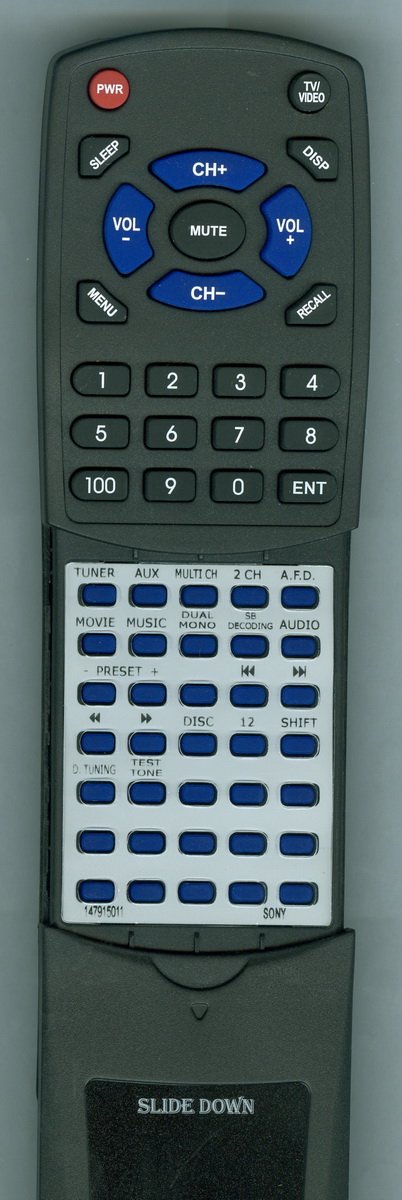
Figure 1: Redi-Remote Replacement Remote Control (Model RT147915011)
This image displays the entire remote control. The upper part features primary controls like power, volume, and channel selection. Below this, a silver panel contains additional function buttons, some of which are concealed by a sliding cover. The bottom portion of the remote indicates the "SLIDE DOWN" mechanism for accessing these hidden buttons.
Setup
1. Battery Installation
The remote control requires four (4) AAA batteries for operation. These batteries are typically included with your purchase.
- Locate the battery compartment on the back of the remote control.
- Slide open the battery compartment cover.
- Insert four AAA batteries, ensuring the positive (+) and negative (-) terminals align correctly with the indicators inside the compartment.
- Close the battery compartment cover securely.
2. Initial Use
This Redi-Remote is pre-programmed and requires no additional setup or programming. Once batteries are installed, it is ready for immediate use with your compatible Sony unit.
Operating Instructions
Familiarize yourself with the various buttons and their functions:
Top Section Buttons
- PWR (Power): Turns the connected Sony unit on or off.
- SLEEP: Activates the sleep timer function on the unit.
- TV/VIDEO: Switches between TV and video input sources.
- DISP (Display): Toggles on-screen display information.
- CH+ / CH- (Channel Up/Down): Changes channels or navigates menus.
- VOL+ / VOL- (Volume Up/Down): Adjusts the audio volume.
- MUTE: Mutes or unmutes the audio output.
- MENU: Accesses the main menu of the connected unit.
- RECALL: Recalls the previously viewed channel or input.
- Numeric Keypad (0-9, 100, ENT): Used for direct channel entry, numerical input, and confirming selections.
Lower Section Buttons (Under Sliding Cover)
To access these buttons, slide the lower cover of the remote downwards. The cover is designed to slide down to reveal the lower half buttons.
- TUNER: Selects the tuner input.
- AUX: Selects the auxiliary input.
- MULTI CH (Multi Channel): Activates multi-channel audio modes.
- 2 CH (2 Channel): Selects 2-channel stereo audio.
- A.F.D. (Auto Format Direct): Engages Auto Format Direct sound mode.
- MOVIE: Optimizes audio settings for movie playback.
- MUSIC: Optimizes audio settings for music playback.
- DUAL MONO: Toggles between dual mono audio streams.
- SB DECODING (Sound Blaster Decoding): Activates Sound Blaster decoding.
- AUDIO: Cycles through audio modes or settings.
- PRESET - / +: Navigates through radio presets.
- Playback Controls (◀◀ Rewind, ▶ Play, ▶▶ Fast Forward, ■ Stop, ▌▌ Pause): Standard controls for media playback.
- DISC: Selects disc input or navigates disc functions.
- 12: Specific function button, possibly for direct track selection or a specific mode.
- SHIFT: Used in combination with other buttons for secondary functions.
- D. TUNING (Direct Tuning): Allows direct frequency input for radio tuning.
- TEST TONE: Activates a test tone for speaker setup.
- Other Unlabeled Buttons: These buttons are typically for specific functions related to the connected Sony unit and may vary in use. Refer to your Sony unit's manual for detailed information on these specific controls.
Maintenance
Cleaning the Remote
To maintain the remote control's appearance and functionality:
- Wipe the remote with a soft, dry cloth.
- For stubborn dirt, lightly dampen the cloth with water or a mild, non-abrasive cleaner. Do not spray cleaner directly onto the remote.
- Avoid using harsh chemicals, solvents, or abrasive cleaning pads, as these can damage the remote's surface or internal components.
Battery Care
- Replace batteries when the remote's performance degrades or it stops responding.
- If the remote will not be used for an extended period, remove the batteries to prevent leakage and potential damage.
- Dispose of used batteries according to local regulations.
Troubleshooting
| Problem | Possible Cause | Solution |
|---|---|---|
| Remote not responding. | Dead or incorrectly inserted batteries. | Replace batteries with new ones, ensuring correct polarity (+/-). |
| Remote not responding. | Obstruction between remote and unit. | Ensure a clear line of sight between the remote's IR emitter and the unit's IR receiver. |
| Certain buttons not working. | Dust or debris under buttons. | Clean the remote as described in the Maintenance section. |
| Remote does not control other devices. | Remote is designed for specific Sony units only. | This remote cannot be programmed to control auxiliary devices. It is designed to control only the specific Sony unit it replaces. |
Specifications
- Model: RT147915011
- Brand: Redi-Remote
- Dimensions: Approximately 7.5 inches (L) x 2.25 inches (W) x 0.75 inches (D)
- Weight: Approximately 5 ounces
- Batteries: 4 x AAA (included)
- Connectivity: Infrared (IR)
- Supported Devices: 1 (Specific Sony audio/video units)
- Special Features: No programming required
Warranty and Support
Warranty Information
Specific warranty details are not provided in this manual. Please refer to your purchase documentation or contact the seller for information regarding warranty coverage.
Customer Support
If you have any concerns with the remote control after purchase, or require assistance, please contact the seller directly for support.
Ask a question about this manual
Ask about setup, troubleshooting, compatibility, parts, safety, or missing instructions. Manuals+ will review the question and use this page’s manual context to help answer it.