
1. Introduction
This manual provides instructions for the Redi-Remote replacement remote control, model RTLSSQ0343. This remote is designed to function as a direct replacement for specific PANASONIC VCR remote controls, including models LSSQ0388, PVV4521, LSSQ0343, PVV4612S, and PVV4603S. It is not an original PANASONIC remote but is custom-built to provide full functionality for the listed units without requiring any programming.
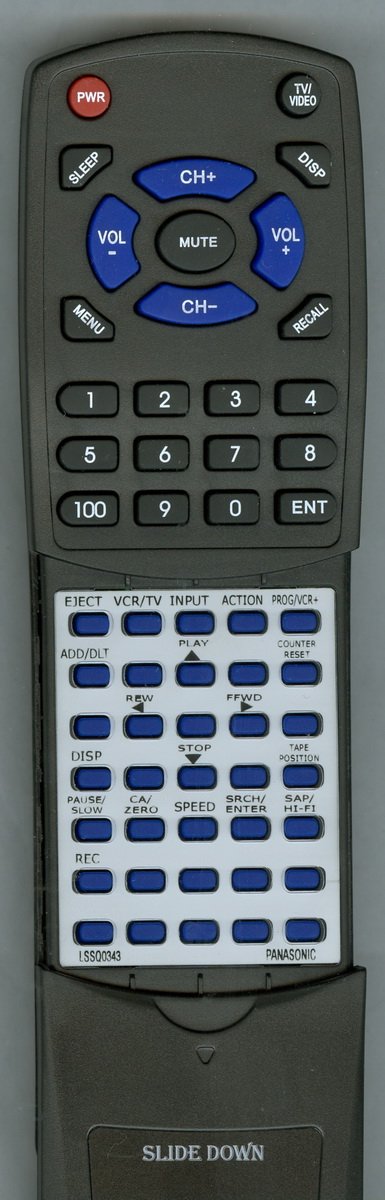
Image 1.1: Redi-Remote Replacement Remote Control. This image displays the front view of the remote control, showing its buttons and general layout.
2. Setup
2.1 Battery Installation
The remote control requires four (4) AAA batteries for operation. These batteries are included with your purchase.
- Locate the battery compartment cover on the back of the remote control.
- Slide the cover downwards or press the latch (if present) to open the compartment.
- Insert four AAA batteries, ensuring the positive (+) and negative (-) terminals align correctly with the markings inside the compartment.
- Replace the battery compartment cover by sliding it back into place until it clicks securely.
Note: Always use fresh batteries. If the remote control is not used for an extended period, remove the batteries to prevent leakage.
3. Operating the Remote Control
This Redi-Remote replacement control is pre-programmed and requires no additional setup. It is designed to perform all functions of the original remote for your compatible PANASONIC VCR unit.
3.1 Basic Operation
- Power: Press the POWER button to turn your VCR unit on or off.
- Playback Controls: Use buttons such as PLAY, STOP, PAUSE, REW (Rewind), and FF (Fast Forward) for media playback.
- Channel/Volume: Use the CHANNEL +/- and VOLUME +/- buttons to adjust settings.
- Number Pad: The numeric buttons (0-9) are used for direct channel input or other numerical selections.
3.2 Accessing Lower Half Buttons
The lower half of the remote control features a sliding cover. This cover conceals additional buttons for advanced functions. To access these buttons:
- Locate the sliding cover on the front, lower section of the remote.
- Gently slide the cover downwards to reveal the hidden buttons.
- After use, slide the cover back upwards to protect the buttons.
Important: This remote control is designed exclusively for the specified PANASONIC VCR units. It cannot be programmed to control auxiliary devices such as televisions, DVD players, or sound systems.
4. Maintenance
- Cleaning: Wipe the remote control with a soft, dry cloth. Do not use liquid cleaners or abrasive materials.
- Storage: Store the remote in a cool, dry place away from direct sunlight and extreme temperatures.
- Battery Replacement: Replace batteries when the remote's range decreases or it becomes unresponsive.
5. Troubleshooting
| Problem | Possible Cause | Solution |
|---|---|---|
| Remote is unresponsive. | Dead or incorrectly inserted batteries. | Check battery polarity (+/-). Replace with new AAA batteries. |
| Remote does not control the VCR. | Obstruction between remote and VCR; VCR not powered on; remote not compatible. | Ensure a clear line of sight to the VCR's infrared sensor. Verify the VCR is powered on. Confirm your VCR model is listed as compatible. |
| Some buttons do not work. | Dust or debris under buttons; remote damage. | Clean the remote surface. If the issue persists, contact support. |
6. Specifications
- Model: RTLSSQ0343
- Brand: Redi-Remote
- Compatible PANASONIC Models: LSSQ0388, PVV4521, LSSQ0343, PVV4612S, PVV4603S
- Dimensions: 7 1/2" (L) x 2 1/4" (W) x 3/4" (H) (approximately 7 x 2.5 x 1 inches)
- Item Weight: 4.5 ounces
- Batteries Required: 4 x AAA (included)
- Connectivity Technology: Infrared (IR)
- Max Number of Supported Devices: 1 (VCR)
- Special Feature: No Programming Required
7. Support and Warranty
For any concerns or issues with your Redi-Remote replacement control after purchase, please contact the seller directly. This ensures you receive prompt and accurate assistance for your specific product.
Redi-Remote products are designed for reliability. While specific warranty details are not provided in this manual, direct seller contact is the recommended first step for support.