
Introduction
This manual provides instructions for the Redi-Remote replacement remote control, model RT147758212. This remote is designed to operate specific Sony audio/video units. Please read this manual thoroughly before use to ensure proper operation and to familiarize yourself with its features.
This remote control is a custom-built replacement and is not an original Sony product. It is pre-programmed and requires no additional setup for compatible devices.
Compatibility
The Redi-Remote model RT147758212 is specifically designed to be compatible with the following Sony unit models:
- Sony RMTV501
- Sony 147758211
- Sony SLVD100
- Sony SLVD3009
- Sony 147758212
This remote control is designed to perform all functions of the original remote for these specific models. It cannot be programmed to control auxiliary devices.
Setup
1. Battery Installation
The remote control requires 4 AAA batteries (included). Follow these steps to install them:
- Locate the battery compartment cover on the back of the remote control.
- Slide the cover downwards to open the compartment.
- Insert 4 AAA batteries, ensuring the positive (+) and negative (-) terminals align with the markings inside the compartment.
- Slide the battery compartment cover back into place until it clicks securely.
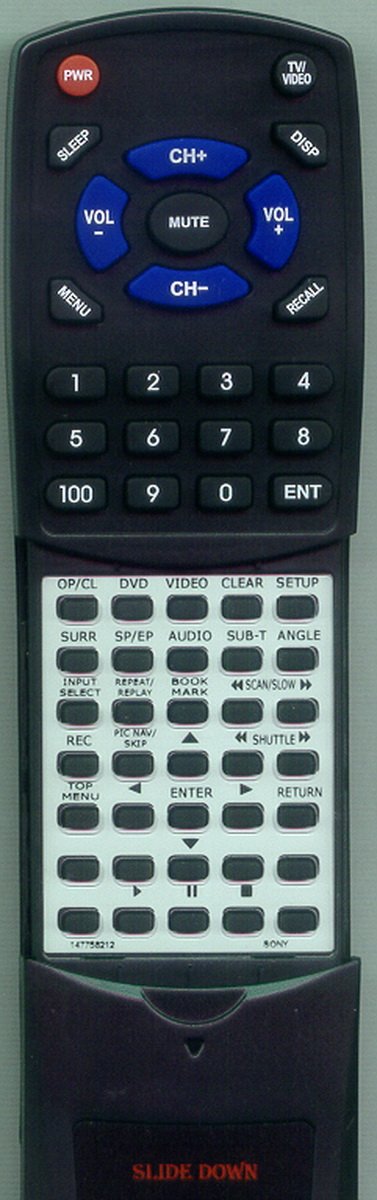
Image: The Redi-Remote replacement remote control. The back of the remote shows the battery compartment, which slides open for battery insertion. The remote has a sleek, black design with clearly labeled buttons.
2. Initial Use
This Redi-Remote control is pre-programmed for the compatible Sony models listed above. No additional programming or setup is required. Once batteries are installed, the remote is ready for immediate use with your compatible device.
Operating Instructions
The remote control features standard buttons for operating your Sony unit. A sliding cover on the lower half of the remote reveals additional buttons for advanced functions.
Basic Functions:
- Power: Turns the unit on or off.
- Volume Up/Down: Adjusts the audio volume.
- Channel Up/Down: Changes channels (if applicable to your unit).
- Play/Pause/Stop/Rewind/Fast Forward: Controls media playback.
- Number Pad: For direct channel or track selection.
Advanced Functions (Under Sliding Cover):
Slide the lower cover downwards to access additional buttons. These typically include menu navigation, input selection, and other specific functions depending on your Sony unit model.
Refer to your Sony unit's original manual for specific functions of each button, as this remote replicates those controls.
Maintenance
- Cleaning: Use a soft, dry cloth to clean the remote control. Do not use liquid cleaners or abrasive materials.
- Battery Replacement: Replace all 4 AAA batteries when the remote's performance diminishes. Do not mix old and new batteries, or different types of batteries.
- Storage: If the remote will not be used for an extended period, remove the batteries to prevent leakage.
- Avoid Damage: Do not drop the remote, expose it to extreme temperatures, or immerse it in water.
Troubleshooting
| Problem | Possible Cause | Solution |
|---|---|---|
| Remote not responding. | Dead or incorrectly installed batteries. | Replace batteries with new AAA batteries, ensuring correct polarity. |
| Remote only works intermittently. | Weak batteries; Obstruction between remote and unit. | Replace batteries. Ensure a clear line of sight to the unit's infrared receiver. |
| Certain buttons do not work. | Remote not compatible with specific function; Button malfunction. | Verify your Sony unit model is listed in the compatibility section. If the unit is compatible and other buttons work, contact support. |
| Sliding cover is stuck. | Debris or physical damage. | Gently clean the tracks of the sliding cover. Do not force it. |
Specifications
- Model: RT147758212
- Brand: Redi-Remote
- Compatibility: Sony RMTV501, 147758211, SLVD100, SLVD3009, 147758212
- Dimensions: 7 x 2.5 x 1 inches (approximately 17.8 cm x 6.4 cm x 2.5 cm)
- Weight: 4.5 ounces (approximately 127.6 grams)
- Power Source: 4 x AAA batteries (included)
- Connectivity Technology: Infrared (IR)
- Special Feature: No programming required
- Max Number of Supported Devices: 1 (specific Sony unit)
Warranty and Support
For any concerns with the remote after purchase, please contact the seller directly. Redi-Remote products are designed for specific compatibility and functionality as described.
This product is a replacement remote and is not covered by the original manufacturer's warranty for the Sony units. Any warranty or support is provided by the seller or Redi-Remote as per their terms.
For further assistance, refer to the contact information provided with your purchase or on the seller's platform.