
1. Introduction
This manual provides comprehensive instructions for the Redi-Remote replacement remote control. This remote is specifically designed to operate various SANYO units, including models MCDZ65, 6142405161, RBZ65, and 114955801. It is a custom-built replacement and not an original SANYO remote. Please read this manual carefully to ensure proper setup and operation of your new remote control.
2. Product Overview
The Redi-Remote replacement remote control is designed for ease of use and direct compatibility with specified SANYO models. It features a durable construction and a sliding cover that conceals the lower half buttons when not in use, protecting them from accidental presses and dust.
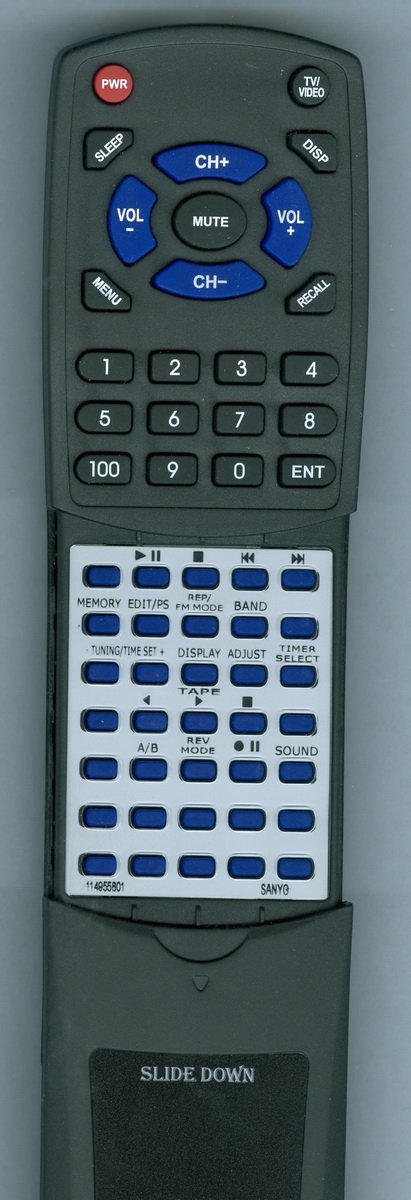
Image 1: Front view of the Redi-Remote Replacement Remote Control. Note the ergonomic design and button layout.
- Approximate Dimensions: The remote measures approximately 7 1/2 inches (19.05 cm) in length, 2 1/4 inches (5.72 cm) in width, and 3/4 inches (1.91 cm) in thickness.
- Sliding Cover: A protective cover slides down to reveal or conceal the lower half of the remote's buttons.
- Functionality: This remote is specifically designed to perform all functions for the designated SANYO unit. It cannot be programmed to control auxiliary devices.
- Features: The remote does not include laser pointers or LED lights.
3. Setup
3.1 Battery Installation
- Locate the battery compartment on the back of the remote control.
- Slide open the battery compartment cover.
- Insert four (4) AAA batteries, ensuring the positive (+) and negative (-) terminals align correctly with the markings inside the compartment. Four AAA batteries are included with the remote.
- Close the battery compartment cover securely.
3.2 Initial Use
No programming is required for this Redi-Remote. Once batteries are installed, the remote is ready for immediate use with your compatible SANYO unit.
4. Operating Instructions
The Redi-Remote operates using infrared (IR) technology. Ensure a clear line of sight between the remote control and the SANYO unit's IR receiver for optimal performance.
- Point and Press: Aim the remote control directly at your SANYO unit.
- Button Functions: Each button on the remote corresponds to a specific function on your SANYO unit. Refer to your SANYO unit's original manual for detailed descriptions of each function if needed.
- Sliding Cover: Slide the cover down to access additional buttons for advanced functions. Slide it up to protect these buttons.
5. Maintenance
- Cleaning: Wipe the remote control with a soft, dry cloth. Do not use liquid cleaners or abrasive materials.
- Battery Replacement: If the remote's performance degrades or it stops responding, replace all four AAA batteries with new ones. Do not mix old and new batteries.
- Storage: Store the remote in a dry place away from extreme temperatures and direct sunlight.
6. Troubleshooting
- Remote not responding:
- Ensure batteries are correctly installed with proper polarity.
- Replace old batteries with new ones.
- Check for any obstructions between the remote and the SANYO unit's IR receiver.
- Ensure you are within the effective range of the SANYO unit.
- Some buttons not working:
- Verify that the sliding cover is fully open if you are trying to access lower-half buttons.
- Confirm the remote is compatible with your specific SANYO model.
If you continue to experience issues after following these troubleshooting steps, please contact the seller directly for assistance.
7. Specifications
| Feature | Detail |
|---|---|
| Brand | Redi-Remote |
| Model Number | RT114955801 |
| Compatible Devices | SANYO MCDZ65, 6142405161, RBZ65, 114955801 (Stereo System) |
| Connectivity Technology | Infrared (IR) |
| Max Number of Supported Devices | 1 (Specific SANYO unit) |
| Special Feature | No Programming Required |
| Product Dimensions | 7 x 2.5 x 1 inches (17.78 x 6.35 x 2.54 cm) |
| Item Weight | 4.5 ounces (127.57 grams) |
| Batteries | 4 AAA batteries (included) |
8. Support
For any concerns or issues with your Redi-Remote replacement remote control after purchase, please contact the seller directly for assistance. Provide your purchase details and a description of the issue to facilitate a quicker resolution.