
1. Introduction
This manual provides instructions for the Redi-Remote replacement remote control, designed to operate specific AIWA audio/video units. This remote is a custom-built replacement and is not an original AIWA product. It is engineered to provide full functionality for the compatible models listed below.
2. Product Overview
The Redi-Remote replacement remote control is specifically designed for seamless operation with the following AIWA models:
- AIWA S7660DB0100
- AIWA VXS207U
- AIWA 3XS205
- AIWA VXS137
- AIWA VXS137U
- AIWA RCAVC02
- AIWA VXF205
- AIWA U0034599U
- AIWA VXS207
This remote measures approximately 7 1/2 inches in length, 2 1/4 inches in width, and 3/4 inches in thickness. It features a sliding cover that conceals additional buttons on the lower half of the remote, providing access to a full range of functions.
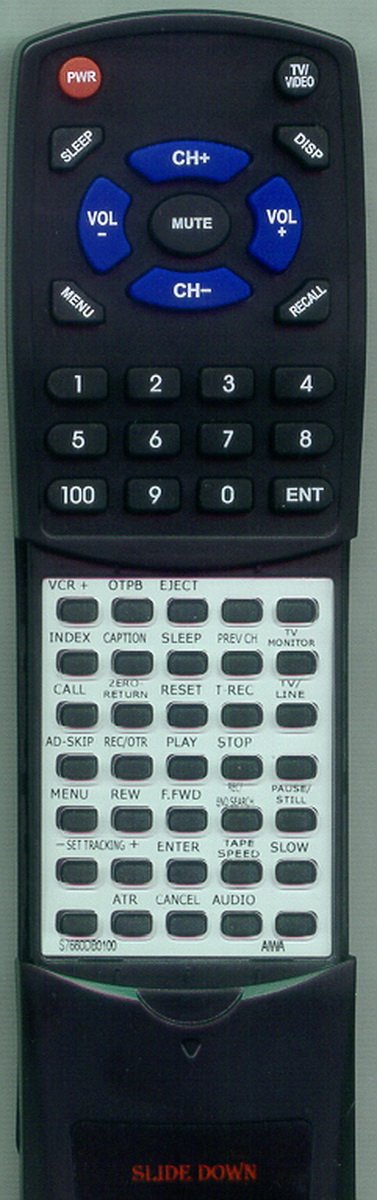
Image 1: The Redi-Remote replacement remote control. Note the sliding cover on the lower section, which can be moved down to reveal additional control buttons.
3. Setup
3.1 Battery Installation
The remote control requires four (4) AAA batteries for operation. These batteries are typically included with your purchase.
- Locate the battery compartment cover on the back of the remote control.
- Slide or press the latch to open the battery compartment.
- Insert four (4) AAA batteries, ensuring the positive (+) and negative (-) terminals align correctly with the markings inside the compartment.
- Replace the battery compartment cover, ensuring it clicks securely into place.
Note: Always replace all batteries at the same time with new ones. Do not mix old and new batteries, or different types of batteries.
4. Operating Instructions
4.1 Basic Operation
To operate your AIWA unit with this remote control, point the remote directly at the infrared sensor on your AIWA device. Ensure there are no obstructions between the remote and the device.
4.2 Accessing Additional Functions (Sliding Cover)
The lower half of the remote control features a sliding cover. To access additional control buttons for advanced functions:
- Gently slide the cover downwards to reveal the hidden buttons.
- After use, you may slide the cover back upwards to protect the buttons.
Important: This Redi-Remote is designed to control only the specific AIWA unit it was purchased for. It cannot be programmed to control auxiliary devices such as televisions, DVD players, or other audio equipment.
5. Troubleshooting
If your remote control is not functioning as expected, please refer to the following common issues and solutions:
- Remote not responding:
- Check if the batteries are inserted correctly with the correct polarity (+/-).
- Replace old batteries with a fresh set of four (4) AAA batteries.
- Ensure there is a clear line of sight between the remote control and the AIWA unit's infrared sensor.
- Verify that the AIWA unit is powered on.
- Limited functionality:
- Ensure the sliding cover is fully open to access all buttons.
- Remember that this remote is designed for a single AIWA unit and cannot control other devices.
If problems persist after attempting these solutions, please refer to the "Warranty and Support" section for further assistance.
6. Specifications
| Model Number | RTS7660DB0100 |
| Brand | Redi-Remote |
| Compatible AIWA Models | S7660DB0100, VXS207U, 3XS205, VXS137, VXS137U, RCAVC02, VXF205, U0034599U, VXS207 |
| Connectivity Technology | Infrared (IR) |
| Power Source | 4 x AAA Batteries (included) |
| Product Dimensions | 7 x 2.5 x 1 inches (approx. 17.8 x 6.4 x 2.5 cm) |
| Item Weight | 4.5 ounces (approx. 127.6 grams) |
| Special Feature | Ergonomic design, Sliding button cover |
| Max Number of Supported Devices | 1 (Specific AIWA unit) |
7. Care and Maintenance
- Cleaning: Use a soft, dry cloth to clean the remote control. Do not use liquid cleaners or abrasive materials, as these may damage the surface or internal components.
- Battery Replacement: When the remote's performance diminishes, replace all four AAA batteries simultaneously. Remove batteries if the remote will not be used for an extended period to prevent leakage.
- Storage: Store the remote control in a cool, dry place, away from direct sunlight, extreme temperatures, and high humidity.
- Avoid Drops: Protect the remote from physical impact, as drops can damage internal circuitry.
8. Warranty and Support
For any concerns or issues with your Redi-Remote replacement remote control after purchase, please contact the seller directly. They can provide assistance with troubleshooting, replacements, or any other product-related inquiries.
Please retain your proof of purchase for warranty purposes, if applicable.