
Redi-Remote RTEUR644376
Redi-Remote Replacement Remote Control User Manual
Model: RTEUR644376
Introduction
This manual provides comprehensive instructions for the Redi-Remote Replacement Remote Control, designed as a direct replacement for various PANASONIC audio and video units. This remote is specifically compatible with models such as EUR644853, SAAK25, SAAK90, SCAK45, EUR644344, SAAK91, SCAK20, EUR644376, SCAK25, SAAK20, SCAK91, and SKAK27. It is a custom-built replacement and does not require programming.
The remote features a sliding cover that conceals additional buttons for advanced functions. Please read this manual thoroughly to ensure proper use and care of your new remote control.
Product Overview
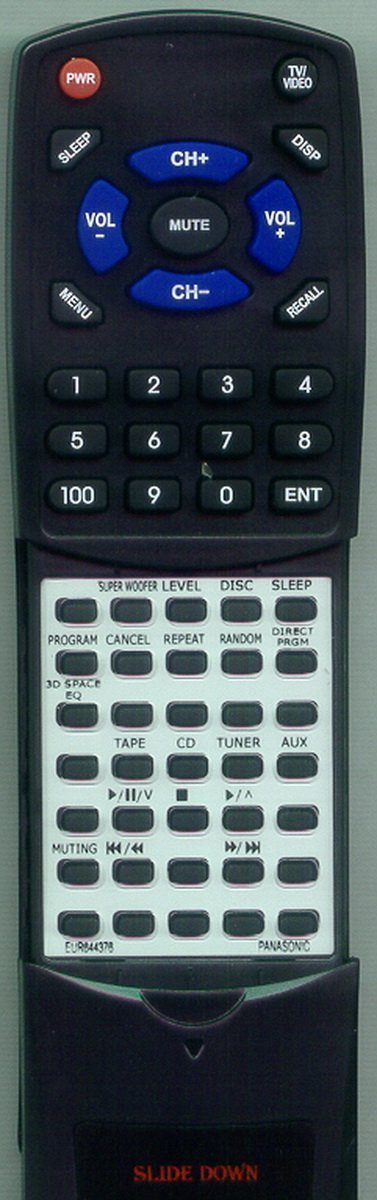
Figure 1: Front view of the Redi-Remote Replacement Remote Control. The image shows the remote with its upper section featuring power, volume, channel, and numeric buttons, and the lower section, which is revealed by sliding down a cover, containing additional function buttons for various audio and video modes.
Setup
Battery Installation
Your Redi-Remote requires 4 AAA batteries (included). Follow these steps to install them:
- Locate the battery compartment on the back of the remote control.
- Slide open the battery compartment cover.
- Insert 4 AAA batteries, ensuring the positive (+) and negative (-) terminals align correctly with the markings inside the compartment.
- Close the battery compartment cover until it clicks securely into place.
Note: This remote control does not require any programming. It is ready to use with compatible PANASONIC units immediately after battery installation.
Operating Instructions
The remote control is divided into two main sections: the upper fixed section and the lower section accessible by sliding down the cover.
Upper Section Buttons
- PWR (Power): Turns the connected PANASONIC unit on or off.
- TV/VIDEO: Switches between TV and video input modes.
- SLEEP: Activates or adjusts the sleep timer function.
- DISP (Display): Shows on-screen display information.
- VOL +/- (Volume): Increases or decreases the audio volume.
- MUTE: Mutes or unmutes the audio output.
- CH +/- (Channel): Changes the channel up or down.
- MENU: Accesses the unit's main menu.
- RECALL: Recalls the previously viewed channel or input.
- Numeric Keypad (0-9, 100, ENT): Used for direct channel entry, track selection, or other numerical inputs. "100" may be used for channels 100 and above, and "ENT" (Enter) to confirm numerical inputs.
Lower Section Buttons (Slide Down)
To access these buttons, gently slide down the lower cover of the remote control.
- SUPER WOOFER LEVEL: Adjusts the level of the super woofer.
- DISC: Selects the disc function or switches between discs.
- SLEEP: (Duplicate function, may offer different sleep timer options or be a redundant button for convenience).
- PROGRAM: Initiates program mode for setting up channels or playback sequences.
- CANCEL: Cancels the current operation or menu selection.
- REPEAT: Repeats the current track, disc, or program.
- RANDOM: Activates random playback (shuffle).
- DIRECT PRGM (Direct Program): Allows direct entry for programming functions.
- 3D SPACE EQ (Equalizer): Adjusts the 3D space equalizer settings.
- TAPE: Selects the tape deck input.
- CD: Selects the CD player input.
- TUNER: Selects the radio tuner input.
- AUX (Auxiliary): Selects the auxiliary input.
- Playback Controls (▶/⏸/V, ■, ▶/▶, ◀◀/▶▶):
- ▶/⏸/V (Play/Pause/Stop): Controls playback (Play, Pause, Stop).
- ■ (Stop): Stops playback.
- ▶/▶ (Fast Forward): Fast forwards through content.
- ◀◀/▶▶ (Rewind/Fast Forward): Rewinds or fast forwards through content.
- MUTING: Mutes or unmutes the audio (redundant with MUTE button in upper section, but common on some remotes).
- ◀◀/▶▶ (Skip Back/Skip Forward): Skips to the previous or next track/chapter.
Maintenance
- Cleaning: Use a soft, dry cloth to clean the remote control. Do not use liquid cleaners or aerosols.
- Battery Replacement: Replace batteries when the remote's response becomes sluggish or inconsistent. Always replace all batteries at the same time with new ones of the same type.
- Storage: If the remote will not be used for an extended period, remove the batteries to prevent leakage and damage.
- Avoid Exposure: Keep the remote away from direct sunlight, heat sources, and excessive moisture.
Troubleshooting
| Problem | Possible Cause | Solution |
|---|---|---|
| Remote not responding. | Dead or incorrectly installed batteries. Obstruction between remote and unit. Remote is out of range. | Replace batteries, ensuring correct polarity. Remove any obstructions. Move closer to the unit. |
| Some buttons not working. | Dirty contacts under buttons. Unit not in correct mode (e.g., trying to control TV functions on a stereo). | Clean the remote surface. Ensure the PANASONIC unit is powered on and in the correct input mode. |
| Remote works intermittently. | Low battery power. Infrared sensor on unit is dirty or obstructed. | Replace batteries. Clean the infrared sensor on your PANASONIC unit. |
Specifications
- Model Number: RTEUR644376
- Product Dimensions: 7 x 2.5 x 1 inches
- Item Weight: 2.39 ounces
- Batteries: 4 AAA batteries (included)
- Connectivity Technology: Infrared
- Max Number of Supported Devices: 1
- Compatible Devices: Stereo System (and other specified PANASONIC units)
- Special Feature: No Programming Needed
Warranty and Support
This Redi-Remote replacement remote control is designed for direct compatibility and ease of use. As a custom-built replacement, it does not require programming.
For any concerns regarding the remote after purchase, or for technical support, please contact the seller directly. Refer to your purchase documentation for seller contact information.
Protection plans may be available for extended coverage. Please check your purchase options for details on 2-Year or 3-Year Protection Plans, or the Complete Protect plan.
Ask a question about this manual
Ask about setup, troubleshooting, compatibility, parts, safety, or missing instructions. Manuals+ will review the question and use this page’s manual context to help answer it.