
Introduction
This manual provides comprehensive instructions for the Redi-Remote replacement remote control, designed for use with NAKAMICHI RE10 and RE35D1 audio/video units. This remote is a custom-built replacement and is not an original NAKAMICHI product. It is engineered to perform all functions of the original remote for the specified models without requiring any programming.
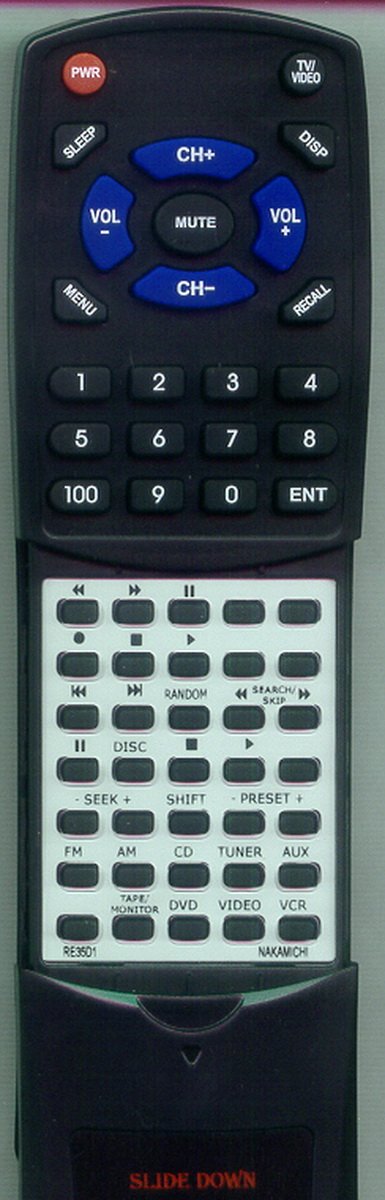
Image: Redi-Remote replacement remote control. This image displays the front view of the remote, highlighting its button layout and compact design. The remote is black with clearly labeled buttons.
Setup
1. Battery Installation
The remote control requires four (4) AAA batteries for operation. These batteries are included with your purchase.
- Locate the battery compartment cover on the back of the remote control.
- Slide or lift the cover to open the compartment.
- Insert four AAA batteries, ensuring the positive (+) and negative (-) terminals align correctly with the markings inside the compartment.
- Replace the battery compartment cover until it clicks securely into place.
2. Initial Use
This Redi-Remote replacement remote control is pre-programmed and requires no additional setup or programming. Once batteries are installed, it is ready for immediate use with your NAKAMICHI RE10 or RE35D1 unit.
Operating Instructions
The Redi-Remote is designed to replicate the functionality of your original NAKAMICHI remote. Point the remote directly at your NAKAMICHI RE10 or RE35D1 unit when pressing buttons.
Key Features:
- Direct Compatibility: Functions immediately with NAKAMICHI RE10 and RE35D1 models.
- No Programming Required: Ready to use out of the box.
- Sliding Cover: A cover over the lower half of the remote can be slid down to reveal additional buttons for advanced functions.
- Operating Range: Effective up to 20 feet (approximately 6 meters) from the unit.
Basic Functions:
While specific button layouts may vary slightly from the original, the remote includes standard controls for:
- Power On/Off
- Volume Up/Down
- Input/Source Selection
- Playback Controls (Play, Pause, Stop, Skip)
- Navigation and Menu Access
- Numeric Keypad (if applicable to the original model)
Refer to your NAKAMICHI RE10 or RE35D1 unit's original manual for detailed descriptions of specific functions if needed.
Maintenance
Cleaning the Remote:
To clean the remote control, use a soft, dry cloth. For stubborn dirt, slightly dampen the cloth with water or a mild, non-abrasive cleaner. Avoid using harsh chemicals, solvents, or abrasive materials, as these can damage the remote's surface or internal components.
Battery Replacement:
Replace batteries when the remote's responsiveness decreases or it stops functioning. Always replace all four AAA batteries at the same time with new ones. Do not mix old and new batteries, or different types of batteries. Dispose of used batteries according to local regulations.
Troubleshooting
| Problem | Possible Cause | Solution |
|---|---|---|
| Remote not responding. | Dead or incorrectly installed batteries. | Check battery orientation. Replace all four AAA batteries with new ones. |
| Remote has limited range or intermittent response. | Weak batteries; Obstruction between remote and unit; Remote too far from unit. | Replace batteries. Ensure a clear line of sight to the NAKAMICHI unit. Operate within the 20-foot range. |
| Remote does not control other devices (TV, DVD player, etc.). | This remote is designed only for NAKAMICHI RE10/RE35D1. | Redi-Remotes cannot be programmed to control auxiliary devices. Use the original remote for other equipment. |
| Some buttons do not work. | Dirt or debris under buttons; Remote malfunction. | Clean the remote. If the issue persists after battery replacement and cleaning, contact support. |
Specifications
- Brand: Redi-Remote
- Model Name: RTRE35D1
- Compatible NAKAMICHI Models: RE10, RE35D1
- Connectivity Technology: Infrared
- Special Feature: No Programming Required
- Maximum Number of Supported Devices: 1
- Button Quantity: 58
- Maximum Range: 20 Feet (approx. 6 meters)
- Power Source: 4 x AAA batteries (included)
- Battery Type: Lithium
- Item Dimensions (L x W x H): 7.5" x 2.25" x 0.75" (19.05 cm x 5.72 cm x 1.91 cm)
- Item Weight: 4.5 Ounces (approx. 127.57 grams)
- Color: Black
Warranty and Support
Warranty Information:
Specific warranty details for this Redi-Remote product are not provided in the available product data. Please refer to your purchase documentation or contact the seller for warranty information.
Customer Support:
If you encounter any issues or have questions regarding your Redi-Remote replacement remote control after purchase, please contact the seller directly for assistance. They can provide support and guidance specific to your product.