
Introduction
This manual provides comprehensive instructions for the Redi-Remote replacement remote control, designed specifically for use with LUXMAN R115, RR115, and 01E04303S01 audio receiver models. Please read this manual thoroughly to ensure proper setup and operation.
Product Overview
The Redi-Remote replacement remote control is engineered to replicate the functions of the original LUXMAN 01E04303S01 remote. It is a dedicated replacement unit and does not require programming for the specified LUXMAN models.
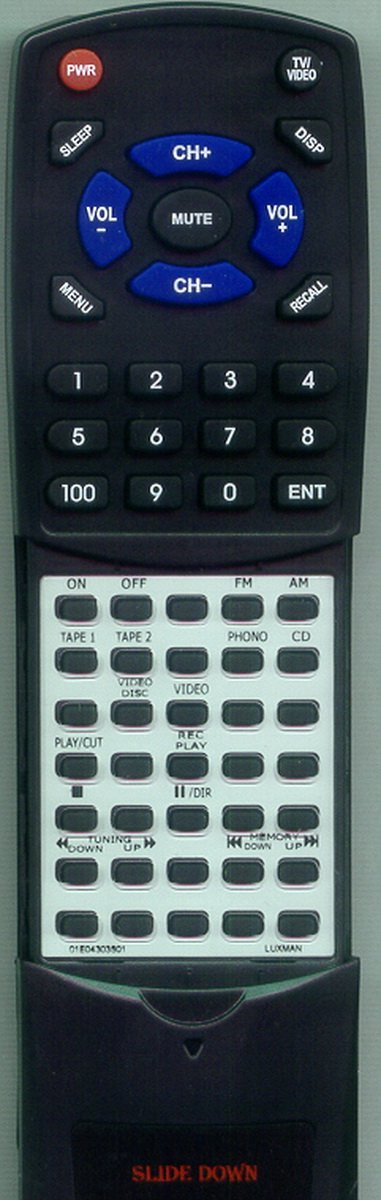
Image Description: A full view of the Redi-Remote replacement remote control. The upper section features primary controls like power, volume, channel, and number keys. The lower section, initially covered by a sliding panel, reveals additional function buttons for audio sources and playback controls.
Setup
Battery Installation
The remote control requires four (4) AAA batteries, which are included with the unit.
- Locate the battery compartment on the back of the remote control.
- Gently slide the battery compartment cover downwards to open. Note: The cover may be snug; apply firm, even pressure. Avoid using sharp objects to pry it open to prevent damage.
- Insert four AAA batteries, ensuring the correct polarity (+ and -) as indicated inside the compartment.
- Slide the battery compartment cover back into place until it clicks securely.
Initial Use
Once batteries are installed, the remote is ready for immediate use with compatible LUXMAN R115, RR115, or 01E04303S01 units. No additional programming is required.
Operating Instructions
Upper Section Controls
The upper section of the remote control provides access to frequently used functions:
- PWR: Powers the LUXMAN unit on or off.
- SLEEP: Activates the sleep timer function.
- TV/VIDEO: Switches between TV and Video input sources.
- DISP: Changes the display mode or information shown on the unit.
- VOL +/-: Adjusts the volume level.
- MUTE: Mutes or unmutes the audio output.
- CH +/-: Changes channels or navigates through menus.
- MENU: Accesses the unit's main menu.
- RECALL: Recalls the previously selected channel or input.
- Number Pad (0-9, 100): Directly selects channels or enters numerical values.
- ENT: Confirms selections or entries.
Lower Section Controls (Sliding Cover)
The lower section of the remote control contains additional functions, accessible by sliding down the cover located at the bottom of the remote.

Image Description: A close-up view of the lower section of the remote control with the sliding cover moved down, revealing a grid of buttons for various audio and video source selections and playback controls.
- ON/OFF: Separate power controls for specific components.
- FM/AM: Selects FM or AM radio bands.
- TAPE 1/TAPE 2: Selects Tape Deck 1 or Tape Deck 2 input.
- PHONO: Selects Phono input.
- CD: Selects CD player input.
- VIDEO DISC: Selects Video Disc player input.
- VIDEO: Selects general Video input.
- PLAY/CUT: Initiates playback or performs a cut function.
- REC/PLAY: Initiates recording or playback.
- ||/DIR: Pause/Play or Directory function.
- TUNING DOWN/UP: Adjusts radio tuning frequency.
- MEMORY DOWN/UP: Navigates through stored memory presets.
Specifications
| Feature | Detail |
|---|---|
| Model Number | RT01E04303S01 |
| Brand | Redi-Remote |
| Compatible LUXMAN Models | R115, RR115, 01E04303S01 |
| Product Dimensions | 7 x 2.5 x 1 inches (approximately) |
| Item Weight | 4.5 ounces (approximately) |
| Batteries Required | 4 AAA (included) |
| Connectivity Technology | Infrared |
| Special Feature | No Programming Required |
| Max Number of Supported Devices | 1 (Dedicated to the specified LUXMAN unit) |
Troubleshooting
Remote Not Responding
- Check Batteries: Ensure batteries are inserted correctly with proper polarity. Replace old batteries with new ones if necessary.
- Line of Sight: Ensure there is a clear line of sight between the remote control and the LUXMAN unit's infrared receiver. Obstructions can block the signal.
- Remote Sensor: Verify that the LUXMAN unit's remote sensor is not obstructed or dirty.
Difficulty with Battery Compartment
- The battery cover is designed to fit snugly. Apply firm, even pressure when sliding it open or closed. Avoid using excessive force or sharp tools, which could damage the plastic.
Maintenance
- Cleaning: Wipe the remote control with a soft, dry cloth. For stubborn dirt, a slightly damp cloth can be used, followed by immediate drying. Avoid abrasive cleaners or solvents.
- Battery Replacement: Replace batteries when the remote's performance diminishes. Remove batteries if the remote will not be used for an extended period to prevent leakage.
- Storage: Store the remote in a dry place, away from extreme temperatures and direct sunlight.
Warranty and Support
This Redi-Remote replacement remote control is designed for specific LUXMAN models. For any concerns regarding the remote control's functionality or compatibility after purchase, please contact the seller directly for assistance.
Redi-Remotes are not designed to be programmed for auxiliary devices; they are dedicated to the specific unit they are intended to control.