
PAC LP7-2
PAC LP72 L.O.C. Pro 2-Channel Line-Out Converter Instruction Manual
Model: LP7-2
Introduction
The PAC LP72 L.O.C. Pro 2-Channel Line-Out Converter is designed to integrate aftermarket amplifiers into vehicle audio systems. It facilitates the connection of an amplifier to either an OEM (Original Equipment Manufacturer) radio, retaining the factory amplified system, or to an aftermarket system that lacks RCA outputs. The LP72 also features an automatic remote turn-on circuit for amplifiers, eliminating the need for a separate remote wire connection from the head unit.
This manual provides detailed instructions for the proper installation and operation of your LP72 unit.
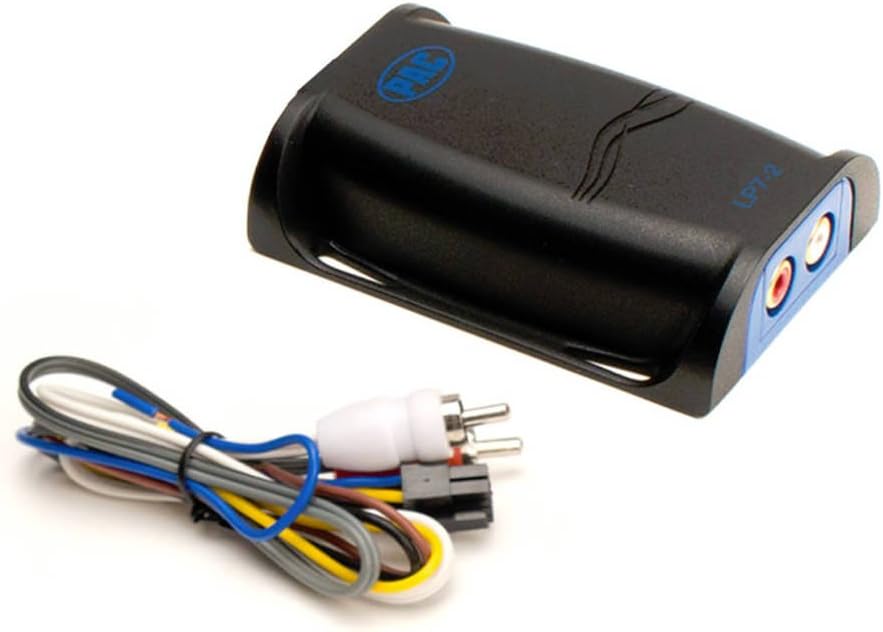
Image: The PAC LP72 Line-Out Converter unit shown with its included wiring harness, illustrating the compact design and connection points.
Key Features
- Built-in Remote Turn-On Circuit: Automatically generates an amplifier remote turn-on signal.
- High and Low-Level Input Acceptance: Compatible with both speaker-level (high-level) and RCA (low-level) audio signals.
- Single Stereo Gain Controls: Precision dials for independent left and right channel level matching, ensuring optimal audio output.
- Ultra-Compact Housing: Designed for easy installation in confined spaces, achieved by recessing transformers into the circuit board.
- High Power Handling: Conservatively rated at 55 watts per channel.
- Wide Frequency Response: Full 20Hz to 20kHz frequency response (+/- 1.5 dB).
- Differential Inputs: Allows for integration into OEM premium audio systems, such as BOSE.
- Single Harness Design: Simplifies wiring connections.
- Versatile Mounting: Includes provisions for wire-tie or screw mounting.
Setup and Installation
Proper installation is crucial for optimal performance. It is recommended that installation be performed by a qualified professional.
Wiring Connections
- Power Connection: Connect the red wire to a switched 12V power source.
- Ground Connection: Connect the black wire to a solid chassis ground point.
- Remote Output: The blue wire provides the remote turn-on signal for your aftermarket amplifier. Connect this to the amplifier's remote input terminal.
- High-Level Input (Speaker Wires): If connecting to speaker outputs from an OEM radio or amplifier, connect the vehicle's speaker wires to the corresponding input wires on the LP72 harness (e.g., Left Front +, Left Front -, Right Front +, Right Front -). Ensure correct polarity.
- Low-Level Output (RCA): Connect the RCA outputs from the LP72 to the RCA inputs of your aftermarket amplifier.
The LP72's differential inputs are designed to work effectively with various OEM systems, including those with premium audio setups like BOSE, minimizing noise and ensuring signal integrity.
Mounting
The compact design of the LP72 allows for flexible mounting options. Secure the unit using wire-ties or screws in a location that is dry, free from excessive heat, and away from potential interference sources. Ensure adequate ventilation.

Image: A view of the PAC LP72 unit highlighting its compact dimensions, demonstrating its suitability for installation in tight spaces.

Image: The PAC LP72 unit being held in a hand, providing a visual reference for its small and portable size.
Operating Instructions
Gain Adjustment
The LP72 features precision stereo gain dials to match the output level of the converter to the input sensitivity of your aftermarket amplifier. This ensures optimal system performance and prevents distortion.
- Start with the gain controls on the LP72 set to their minimum position.
- Turn your vehicle's head unit volume to about 75% of its maximum level.
- Slowly increase the gain controls on the LP72 until you hear a slight distortion, then back off slightly until the sound is clear.
- Adjust the gain controls on your aftermarket amplifier according to its manufacturer's instructions, ensuring no distortion at desired listening levels.
Proper gain staging is essential for achieving clear, powerful audio without introducing unwanted noise or clipping.
Troubleshooting
- No Sound Output:
- Verify all power and ground connections are secure.
- Check that the remote turn-on wire is properly connected to the amplifier and that the amplifier is powering on.
- Ensure speaker input wires are correctly connected to the LP72 and RCA outputs are connected to the amplifier.
- Confirm head unit volume is up and not muted.
- Distorted Sound:
- Reduce the gain settings on the LP72 and/or the amplifier.
- Ensure the head unit volume is not excessively high, causing distortion before the signal reaches the LP72.
- Engine Whine or Noise:
- Ensure the ground connection for the LP72 and amplifier is solid and free from paint or corrosion.
- Route power cables away from audio signal cables to prevent interference.
- Check for loose connections in the audio path.
- The LP72's differential inputs are designed to minimize noise; however, external factors can still introduce interference.
- Amplifier Not Turning On:
- Verify the blue remote wire from the LP72 is connected to the amplifier's remote input.
- Ensure the LP72 is receiving power and ground.
- Confirm the head unit is on and producing an audio signal for the LP72 to detect and generate the remote signal.
Specifications
| Feature | Specification |
|---|---|
| Model Number | LP7-2 |
| Brand | PAC |
| Number of Channels | 2 |
| Power Handling | 55 watts per channel (conservatively rated) |
| Frequency Response | 20Hz to 20kHz (+/- 1.5 dB) |
| Input Type | High-level (speaker) and Low-level (RCA) |
| Output Type | RCA |
| Remote Output | Built-in automatic turn-on |
| Mounting Type | Wire-tie or screw mounting provisions |
| Material | Plastic |
| Item Weight | 4.6 ounces |
| Package Dimensions | 7.8 x 4.13 x 1.26 inches |
Warranty and Support
For specific warranty details and technical support, please refer to the documentation included with your purchase or visit the official PAC website. PAC provides customer support and resources for their products.
For further assistance, please contact PAC customer service directly.
Related documentsLP7-2


Ask a question about this manual
Ask about setup, troubleshooting, compatibility, parts, safety, or missing instructions. Manuals+ will review the question and use this page’s manual context to help answer it.