
1. Introduction
This manual provides essential instructions for the proper installation, operation, and maintenance of your FUJITSU CL106 recycled toner cartridge set. This set includes Black, Cyan, Magenta, and Yellow cartridges designed for use with compatible FUJITSU laser printers. Please read this manual thoroughly before use to ensure optimal performance and longevity of your product.
2. Safety Information
- Keep toner cartridges out of reach of children.
- Do not ingest toner powder. If ingested, seek medical attention immediately.
- Avoid direct contact of toner powder with eyes or skin. If contact occurs, rinse thoroughly with water.
- Do not incinerate used toner cartridges. Toner powder is flammable.
- Store cartridges in a cool, dry place, away from direct sunlight and extreme temperatures.
3. Package Contents
Your FUJITSU CL106 recycled toner cartridge set includes:
- 1 x FUJITSU CL106 Black Recycled Toner Cartridge
- 1 x FUJITSU CL106 Cyan Recycled Toner Cartridge
- 1 x FUJITSU CL106 Magenta Recycled Toner Cartridge
- 1 x FUJITSU CL106 Yellow Recycled Toner Cartridge
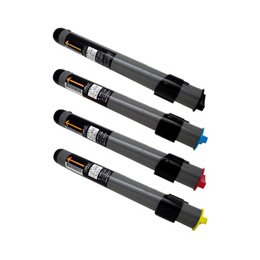
Figure 1: The FUJITSU CL106 recycled toner cartridge set, typically including black, cyan, magenta, and yellow cartridges.
4. Setup and Installation
Follow these steps to install the toner cartridges into your compatible FUJITSU printer:
- Power Off Printer: Ensure your printer is powered off and unplugged from the electrical outlet for safety.
- Open Access Door: Open the front cover or toner access door of your printer. Refer to your printer's manual for specific instructions on accessing the toner compartment.
- Remove Old Cartridge: Carefully remove the used toner cartridge by pulling it straight out. Place it in a protective bag for recycling.
- Unpack New Cartridge: Remove the new FUJITSU CL106 toner cartridge from its packaging.
- Gently Shake: Gently rock the new cartridge horizontally 5-6 times to distribute the toner evenly inside.
- Remove Protective Seals: Carefully remove any protective tape, seals, or covers from the cartridge. Do not touch the green drum surface.
- Insert New Cartridge: Align the new cartridge with the corresponding slot in the printer and slide it in until it clicks firmly into place. Ensure it is fully seated.
- Close Access Door: Close the printer's front cover or toner access door.
- Power On Printer: Plug in and power on your printer. The printer will typically perform a self-test and recognize the new cartridge.
5. Operating Instructions
Once installed, the FUJITSU CL106 toner cartridges operate automatically with your compatible printer. The printer's software will monitor toner levels and alert you when a cartridge is low or empty. Continue printing as usual, and replace cartridges as needed following the installation steps above.
6. Maintenance
6.1 Storage
- Store unused cartridges in their original sealed packaging.
- Keep in a cool, dry environment, away from direct sunlight, heat sources, and humidity.
- Avoid storing cartridges in areas with significant temperature or humidity fluctuations.
6.2 Handling
- Always handle cartridges by their plastic casing, avoiding contact with the drum or electrical contacts.
- Do not force cartridges into the printer. If a cartridge does not fit easily, recheck its orientation and the correct slot.
7. Troubleshooting
If you encounter issues with your toner cartridges, refer to the following common problems and solutions:
- Printer Not Recognizing Cartridge:
- Ensure the cartridge is fully seated in its slot. Remove and reinsert it firmly.
- Check if all protective seals and tapes have been removed from the cartridge.
- Restart the printer.
- Poor Print Quality (Faded, Streaky, or Incomplete Prints):
- Check the toner level indicator on your printer's display or software. Replace the cartridge if it is low.
- Gently remove the cartridge and rock it horizontally to redistribute any remaining toner.
- Perform a printer cleaning cycle or print head alignment through your printer's utility software.
- Ensure the drum unit (if separate) is clean and not damaged.
- Toner Leaks:
- Carefully remove the cartridge and inspect it for any visible damage.
- Clean any spilled toner inside the printer with a dry, lint-free cloth. Do not use a vacuum cleaner not designed for toner.
8. Specifications
| Product Model | CL106 |
| Brand | FUJITSU |
| Colors Included | Black, Cyan, Magenta, Yellow |
| Print Yield (Black) | Approximately 5,500 pages (A4, 5% coverage) |
| Print Yield (CMY) | Approximately 6,000 pages each (A4, 5% coverage) |
| Compatible Printer Models | FUJITSU XL-C3100, FUJITSU XL-C3200 |
| Recycle Count | Up to 2 times per cartridge |
9. Warranty and Support
This FUJITSU CL106 recycled toner cartridge set comes with an 18-month warranty period from the date of purchase. This warranty covers manufacturing defects and performance issues under normal use conditions.
For technical support, warranty claims, or further assistance, please refer to the contact information provided by your retailer or the original manufacturer's support channels. Keep your proof of purchase for warranty validation.
