
1. Introduction
The TOA P-60F is a high-performance multi-channel power amplifier designed for professional audio applications. This unit provides reliable amplification for various sound systems, including retail environments, educational facilities, and fixed installations. It features four independent channels, each capable of delivering significant power output to connected loudspeakers.
This manual provides essential information for the safe and efficient installation, operation, and maintenance of your P-60F amplifier. Please read it thoroughly before use and retain it for future reference.
2. Safety Instructions
To ensure safe operation and prevent damage to the unit or injury to users, always observe the following safety precautions:
- Power Source: Connect the unit only to an AC power source of the specified voltage. Ensure the power cord is securely plugged into both the unit and the wall outlet.
- Ventilation: Do not block ventilation openings. Ensure adequate airflow around the unit to prevent overheating. Avoid installing the unit in enclosed spaces or near heat sources.
- Moisture: Do not expose the unit to rain, moisture, or splashing liquids. Do not place objects filled with liquids, such as vases, on the unit.
- Foreign Objects: Do not insert any metallic objects or flammable materials into the ventilation openings.
- Grounding: Ensure the unit is properly grounded to prevent electric shock.
- Servicing: Do not attempt to service this unit yourself. Refer all servicing to qualified service personnel.
- Placement: Place the unit on a stable, level surface. Avoid locations subject to excessive vibration, dust, or direct sunlight.
3. Package Contents
Verify that all items are present in the package:
- TOA P-60F Multi-Channel Power Amplifier Unit
- AC Power Cord
- User Manual (this document)
If any items are missing or damaged, contact your dealer immediately.
4. Setup
4.1 Physical Placement
Install the P-60F in a location that allows for proper ventilation. Maintain at least 10 cm (4 inches) of clear space around the top, sides, and rear of the unit. Avoid placing it directly on carpeted surfaces or in enclosed cabinets without adequate airflow.
4.2 Connecting Speakers
The P-60F features four independent amplifier channels. Connect your loudspeakers to the corresponding output terminals on the rear panel. Ensure correct polarity (+ to + and - to -) for all connections. Verify that the impedance of your speakers matches the amplifier's output impedance (4Ω or 8Ω) to prevent damage.
Use high-quality speaker cables of appropriate gauge for the distance and power requirements.
4.3 Connecting Input Sources
Connect your audio source devices (e.g., mixer, pre-amplifier) to the input terminals on the rear panel. The P-60F typically uses balanced XLR or unbalanced RCA inputs. Ensure that the input levels from your source devices are appropriate for the amplifier's input sensitivity.
4.4 Power Connection
After all audio connections are made, connect the supplied AC power cord to the power inlet on the rear of the unit, then plug the other end into a suitable AC power outlet. Ensure the power switch on the front panel is in the "OFF" position before connecting to power.
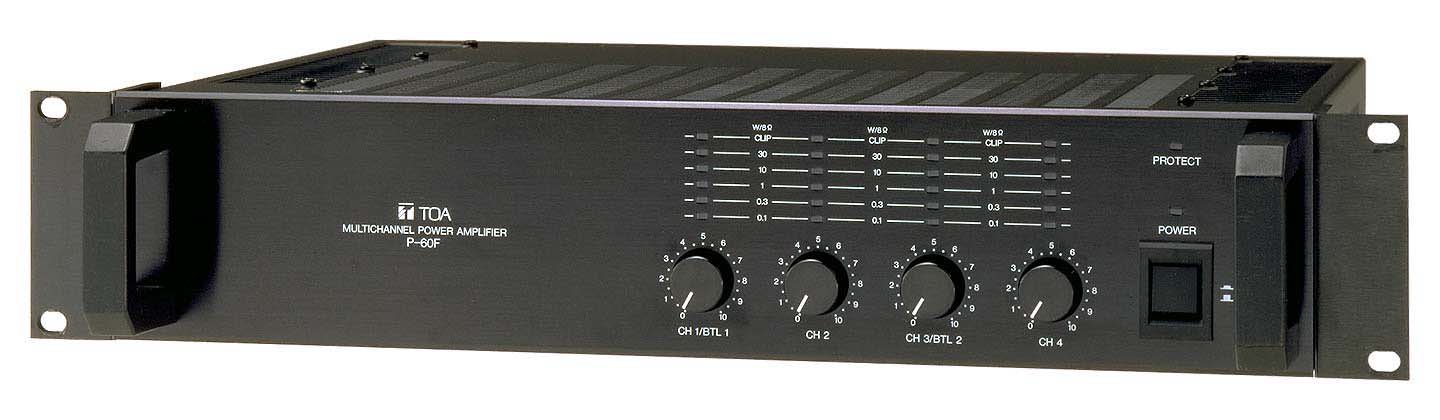
Figure 1: Front view of the TOA P-60F amplifier, showing input level controls and indicator lights.
5. Operating Instructions
5.1 Powering On/Off
- To Power On: Ensure all input levels are set to minimum. Press the power switch on the front panel to the "ON" position. The power indicator light will illuminate.
- To Power Off: Reduce all input levels to minimum. Press the power switch to the "OFF" position. The power indicator light will turn off.
5.2 Adjusting Input Levels
Each channel on the P-60F has an independent input level control knob on the front panel. Slowly increase the level controls for each channel to achieve the desired output volume. Monitor the signal indicator lights to avoid clipping (distortion).
5.3 Indicator Lights
- POWER: Illuminates when the unit is powered on.
- SIGNAL: Illuminates when an audio signal is present on the corresponding channel.
- PEAK/CLIP: Illuminates when the signal level is too high, indicating potential distortion. Reduce the input level if this light frequently illuminates.
- PROTECT: Illuminates if the amplifier enters protection mode due to overheating, short circuit, or other fault conditions. If this light illuminates, power off the unit, check connections, and allow it to cool before restarting.
6. Maintenance
6.1 Cleaning
Wipe the exterior of the unit with a soft, dry cloth. Do not use abrasive cleaners, waxes, or solvents. Ensure the unit is powered off and disconnected from the AC outlet before cleaning.
6.2 Ventilation
Periodically check the ventilation openings for dust accumulation. Use a soft brush or a vacuum cleaner with a brush attachment to gently remove any dust, ensuring proper airflow.
6.3 Storage
If storing the unit for an extended period, disconnect it from power, clean it, and store it in a cool, dry place away from direct sunlight and extreme temperatures.
7. Troubleshooting
| Problem | Possible Cause | Solution |
|---|---|---|
| No power | Power cord disconnected; Power switch off; Blown fuse; Power outlet fault. | Check power cord connection; Ensure power switch is ON; Check fuse (if accessible and safe); Test power outlet with another device. |
| No sound from a channel | Input cable disconnected; Speaker cable disconnected; Input level too low; Speaker fault. | Check input cable connection; Check speaker cable connection and polarity; Increase input level; Test speaker with another amplifier if possible. |
| Distorted sound | Input level too high (clipping); Speaker impedance mismatch; Damaged speaker. | Reduce input level until PEAK/CLIP light stops flashing; Verify speaker impedance; Inspect speakers for damage. |
| PROTECT light illuminated | Overheating; Short circuit in speaker wiring; Overload. | Power off, allow to cool, ensure ventilation; Check speaker wiring for shorts; Reduce load. If problem persists, contact service. |
If the problem persists after attempting these solutions, please contact TOA customer support or your authorized dealer for assistance.
8. Specifications
| Model | P-60F |
| Brand | TOA |
| Output Power (4 channels driven simultaneously) | 60 W x 4 (8 Ω) / 80 W x 4 (4 Ω) |
| Dimensions (W x D x H) | 48.5 x 40 x 9.5 cm (approx. 19.1 x 15.7 x 3.7 inches) |
| Weight | 10.28 kg (approx. 22.66 lbs) |
| ASIN | B009DBIXCY |
Note: Specifications are subject to change without notice for product improvement.
9. Warranty and Support
TOA Corporation warrants its products against defects in materials and workmanship for a specified period from the date of purchase. The exact warranty terms and conditions may vary by region and product. Please refer to the warranty card included with your product or visit the official TOA website for detailed information.
For technical support, service, or warranty claims, please contact your authorized TOA dealer or the TOA customer service center in your region. Be prepared to provide your product model number (P-60F) and proof of purchase.
TOA Official Website: www.toa-global.com


