
1. Introduction and Overview
This manual provides essential instructions for the Redi-Remote replacement remote control, model RTTD13669L0. This remote is designed to operate the entertainment system in Mazda CX9 vehicles from model years 2007 through 2015. It is a custom-built replacement and is not an original Mazda product. The remote requires no programming and is ready for use once batteries are installed.
The remote measures approximately 7.5 inches in length, 2.25 inches in width, and 0.75 inches in height, and weighs about 5 ounces.
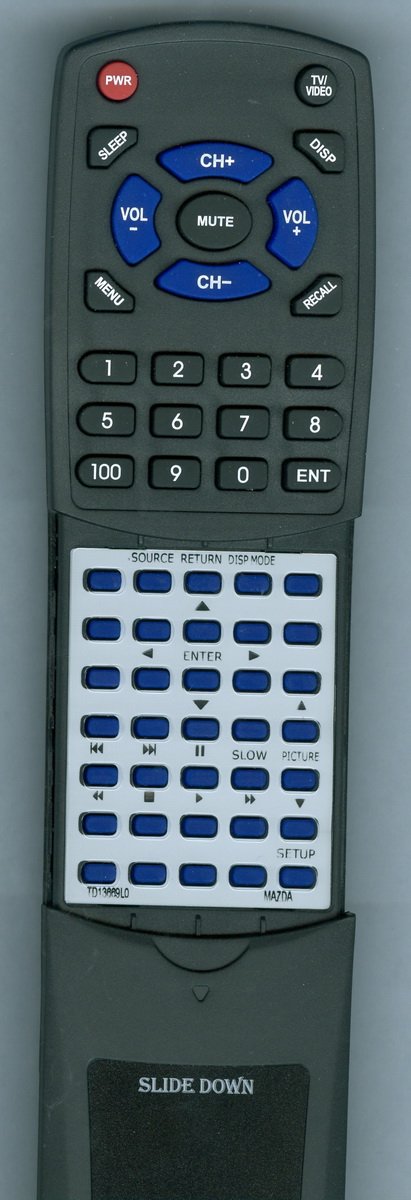
Figure 1: Redi-Remote Replacement Remote Control (Model RTTD13669L0)
2. Setup
2.1 Battery Installation
The remote control requires four (4) AAA alkaline batteries for operation. To install or replace batteries:
- Locate the battery compartment cover on the back of the remote control.
- Slide the cover off in the direction indicated by the arrow (if present).
- Insert four new AAA alkaline batteries, ensuring the positive (+) and negative (-) terminals align correctly with the markings inside the compartment.
- Replace the battery compartment cover by sliding it back into place until it clicks securely.
The remote is now ready for use with your Mazda CX9 entertainment system.
3. Operating Instructions
This Redi-Remote is designed for immediate use without any programming. It functions via infrared (IR) technology, requiring a clear line of sight to the entertainment system's IR receiver. The maximum effective range is approximately 20 feet.
3.1 Basic Operation
- Power: Press the POWER button to turn the entertainment system on or off.
- Volume Control: Use the VOL+ and VOL- buttons to adjust the audio volume.
- Channel/Track Selection: Use the CH+ and CH- buttons or directional arrows to navigate menus or select tracks/channels.
- Playback Controls: Buttons such as PLAY, PAUSE, STOP, REWIND, and FAST FORWARD control media playback.
3.2 Sliding Cover for Additional Buttons
The remote features a sliding cover over its lower half. To access additional functions and buttons, gently slide this cover downwards. Once revealed, these buttons provide extended control over the entertainment system's features.
3.3 Device Compatibility
This remote is specifically designed to control the DVD/Blu-ray player component of your Mazda CX9 entertainment system. It cannot be programmed to control auxiliary devices such as televisions, soundbars, or other external media players.
4. Maintenance
4.1 Cleaning
To clean the remote control, use a soft, dry cloth. For stubborn dirt, lightly dampen the cloth with water or a mild, non-abrasive cleaner. Avoid using harsh chemicals, solvents, or abrasive materials, as these can damage the remote's surface or internal components.
4.2 Battery Care
- Replace all four AAA batteries simultaneously. Do not mix old and new batteries, or different types of batteries.
- If the remote will not be used for an extended period, remove the batteries to prevent leakage and potential damage.
- Dispose of used batteries according to local regulations.
5. Troubleshooting
5.1 Remote Not Responding
- Check Batteries: Ensure batteries are correctly installed and have sufficient charge. Replace with new AAA alkaline batteries if necessary.
- Line of Sight: Verify there is a clear path between the remote control and the entertainment system's IR receiver. Obstructions can block the signal.
- Distance: Ensure you are within the maximum operating range of 20 feet.
5.2 Some Buttons Not Functioning
- Sliding Cover: Confirm that the sliding cover is fully open to reveal all buttons. Some functions may be located under this cover.
- System Compatibility: Remember that this remote is designed for the entertainment system's DVD/Blu-ray player. It will not control other vehicle functions or auxiliary devices.
If issues persist, refer to your Mazda CX9 vehicle's entertainment system manual for specific operational details or contact customer support.
6. Specifications
| Brand | Redi-Remote |
| Model Name | RTTD13669L0 |
| Model Number | RTTD13669L0 |
| Compatible Devices | DVD/Blu-ray Player (Mazda CX9 Entertainment Center 2007-2015) |
| Connectivity Technology | Infrared (IR) |
| Max Number of Supported Devices | 1 |
| Special Feature | No Programming Required |
| Color | Black |
| Button Quantity | 58 |
| Maximum Range | 20 Feet |
| Battery Type | 4 x AAA Alkaline |
| Item Dimensions (L x W x H) | 7.5" x 2.25" x 0.75" |
| Item Weight | 5 Ounces |
7. Support
For any concerns or questions regarding the operation or functionality of your Redi-Remote replacement remote control, please contact the seller directly. Provide your purchase details and the model number (RTTD13669L0) for efficient assistance.