
Introduction
This manual provides instructions for the Redi-Remote replacement remote control, model RTRC00104P. This remote is designed to function as a direct replacement for NIKO remote control models RC00104P and SV3706. It is a custom-built replacement and not an original NIKO product. This remote control is pre-programmed and requires no additional setup for the specified NIKO units.
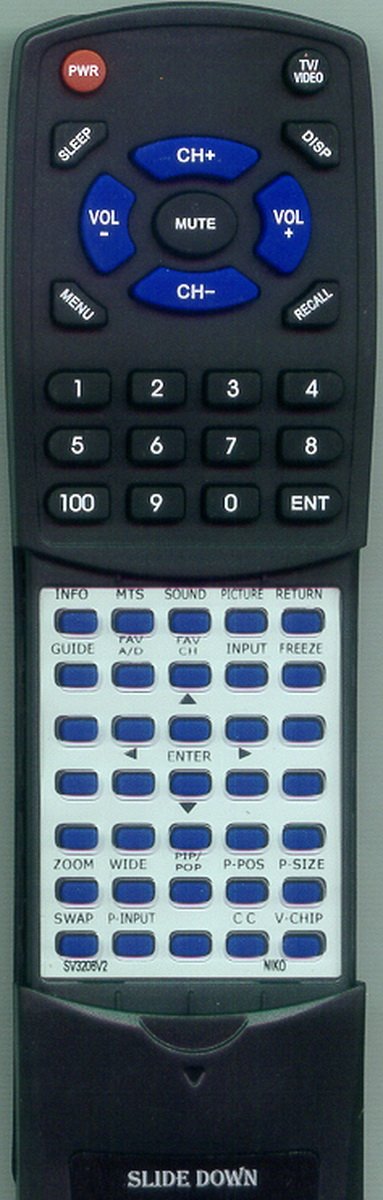
Image: The Redi-Remote replacement remote control, featuring a standard rectangular shape with various buttons for television operation. The lower half of the remote has a sliding cover.
Setup
1. Battery Installation
The remote control requires 4 AAA batteries, which are included. To install the batteries:
- Locate the battery compartment cover on the back of the remote control.
- Slide the cover downwards or press the latch and lift to open.
- Insert the 4 AAA batteries, ensuring the positive (+) and negative (-) terminals align correctly with the markings inside the compartment.
- Replace the battery compartment cover by sliding it back into place until it clicks securely.
2. Initial Use
This Redi-Remote is pre-programmed for NIKO RC00104P and SV3706 units. No additional programming is required. Once batteries are installed, the remote is ready for use with your compatible NIKO television.
Operating Instructions
The remote control provides standard functions for operating your NIKO television. Point the remote directly at the television's infrared receiver.
Basic Functions
- Power Button: Turns the television on or off.
- Channel Up/Down: Changes the television channel.
- Volume Up/Down: Adjusts the sound volume.
- Mute Button: Silences the television audio.
- Number Buttons (0-9): Directly input channel numbers.
Sliding Cover Feature
The remote features a sliding cover over its lower half. To access additional buttons, gently slide this cover downwards. Slide it back up to conceal the buttons when not in use.
Maintenance
Cleaning
To clean the remote control, use a soft, dry cloth. Do not use liquid cleaners or abrasive materials, as these can damage the remote's surface or internal components.
Battery Replacement
If the remote control's performance degrades or it stops responding, replace all 4 AAA batteries with new ones. Always replace all batteries at the same time and ensure correct polarity.
Troubleshooting
- Remote not responding:
- Check if the batteries are installed correctly with the correct polarity.
- Replace old batteries with new ones.
- Ensure there are no obstructions between the remote and the television's infrared receiver.
- Make sure you are pointing the remote directly at the television.
- Limited functionality:
- This remote is designed to control only the specific NIKO units (RC00104P, SV3706) and cannot be programmed for auxiliary devices.
- Ensure the sliding cover is positioned correctly to access all buttons if needed.
Specifications
| Feature | Detail |
|---|---|
| Model Number | RTRC00104P |
| Compatible Devices | NIKO RC00104P, SV3706 Televisions |
| Connectivity Technology | Infrared |
| Power Source | 4 x AAA Batteries (included) |
| Product Dimensions | 7 x 2.5 x 1 inches (approximately) |
| Item Weight | 4.5 ounces |
| Special Feature | No Programming Required |
Support
For any concerns or issues with your Redi-Remote replacement remote control after purchase, please contact the seller directly for assistance. This remote is manufactured by Redi-Remote.