
1. Introduction
This manual provides instructions for the Redi-Remote Replacement Remote Control, model RT483521917582. This remote is designed as a direct replacement for specific MAGNAVOX television units, offering immediate functionality without the need for programming.
Important Note: This remote control is specifically designed to operate the designated MAGNAVOX unit only. It cannot be programmed to control auxiliary devices such as DVD players, VCRs, or sound systems. It does not feature laser pointers or LED lights.
Compatible MAGNAVOX Models:
- EM5019C121
- PR1356B
- PR1916C125
- PS2086
- 25TR12C
- 00T225AG
- TR2512C
- TS2542C
- T225AGMA02
- T225EGMA01
- TS2552C101
- 19PS52C121
- 483521917611
- PS1952C121
- 25TS52C
- TS2752C201
- FS2752
- 483521917582
- PR1914C
- TR2512C102
- TR2712C101
- TR2516C103
- 13PR12E121
- PR1916C
- TS2552C104
- 19PS52C221
- 25TS52C321
- 00T225AGMA02
- 19PR14
- 25TR12C221
- TS2542C102
- PS2086B121
- 13PR12C121
- TR2516C121
- PR1312C
- PR1357C
- TS2552C205
- T22AGMA02
- 00T225EGMA01
- PS1952C122
- 19PR14C121
- TR2516C
- TS2752C
- 13PR12C
- HD2516C123
- TS2552C198
- PR1916C121
- TS2752
- TS2752C205
- 25TS52C408
- TR2512C121
- 25TR12C101
- FS2752A101
2. Setup
2.1 Battery Installation
The remote control requires 4 AAA batteries (included). Follow these steps to install them:
- Locate the battery compartment cover on the back of the remote control.
- Slide the cover downwards or press the latch (if present) and lift to open.
- Insert four AAA batteries, ensuring the positive (+) and negative (-) terminals align correctly with the markings inside the compartment.
- Replace the battery compartment cover by sliding it back into place until it clicks securely.
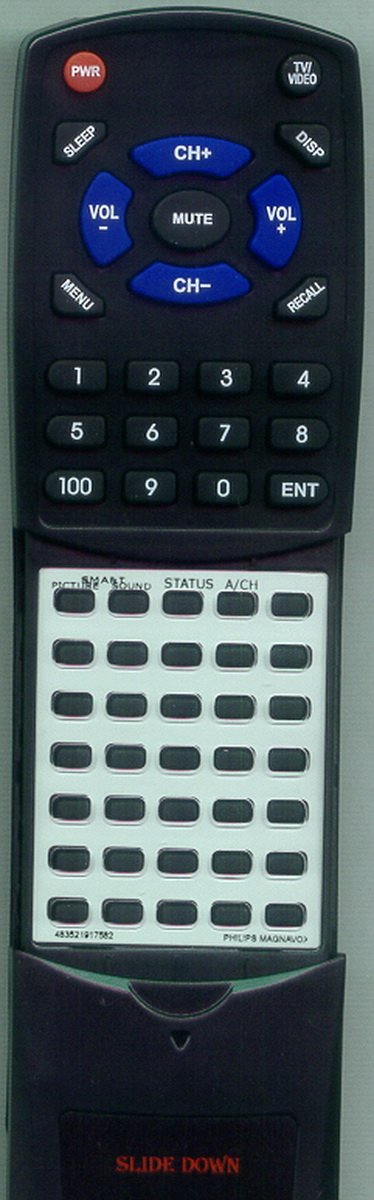
Image: Front view of the Redi-Remote Replacement Remote Control. This image shows the layout of the buttons and the overall design of the remote.
3. Operating Instructions
Once batteries are installed, the remote is ready for immediate use with your compatible MAGNAVOX television. Point the remote control directly at the television's infrared receiver.
3.1 Basic Functions
- Power: Press the POWER button to turn the television on or off.
- Channel Up/Down: Use the CH+ and CH- buttons to change channels.
- Volume Up/Down: Use the VOL+ and VOL- buttons to adjust the volume.
- Mute: Press the MUTE button to silence the television audio.
- Number Buttons (0-9): Use these buttons to directly enter channel numbers.
3.2 Accessing Lower Half Buttons
The remote features a sliding cover over the lower half of the buttons. To access these additional functions:
- Locate the cover on the lower front section of the remote.
- Gently slide the cover downwards to reveal the additional buttons.
- After use, slide the cover upwards to protect the buttons.
4. Maintenance
To ensure the longevity and proper functioning of your remote control, follow these maintenance guidelines:
- Cleaning: Wipe the remote with a soft, dry cloth. Do not use liquid cleaners, aerosols, or abrasive materials.
- Battery Replacement: Replace all batteries simultaneously when the remote's performance diminishes. Do not mix old and new batteries, or different types of batteries.
- Storage: Store the remote in a cool, dry place away from direct sunlight and extreme temperatures.
- Avoid Drops: Protect the remote from impacts and drops, which can damage internal components.
5. Troubleshooting
If you experience issues with your remote control, try the following troubleshooting steps:
- Remote Not Responding:
- Ensure batteries are installed correctly with correct polarity (+/-).
- Replace old batteries with fresh ones.
- Check for any obstructions between the remote and the television's infrared sensor.
- Ensure you are within the effective range and pointing the remote directly at the TV.
- Specific Buttons Not Working:
- Clean the remote's surface, especially around the unresponsive buttons, to remove any dirt or debris.
- If the issue persists, it may indicate a fault with the remote.
- Remote Controls Other Devices:
- This remote is designed only for specific MAGNAVOX TVs and cannot be programmed for other devices. If it appears to control another device, it is likely a coincidence due to similar IR frequencies.
6. Specifications
| Brand | Redi-Remote |
| Model Number | RT483521917582 |
| Compatible Devices | MAGNAVOX Televisions (specific models listed in Introduction) |
| Connectivity Technology | Infrared (IR) |
| Power Source | 4 x AAA Batteries (included) |
| Dimensions (L x W x H) | 7.5 x 2.25 x 0.75 inches (approx. 19.05 x 5.72 x 1.91 cm) |
| Item Weight | 4.5 ounces (approx. 127.57 grams) |
| Special Features | No Programming Required, Sliding Button Cover |
7. Support
For any concerns or issues with your Redi-Remote Replacement Remote Control after purchase, please contact the seller directly for assistance. Refer to your purchase documentation for seller contact information.