
Introduction
This manual provides instructions for the Redi-Remote replacement remote control, designed specifically for use with Panasonic units PVV4611 and LSSQ0286. This is a custom-built replacement remote and is not an original Panasonic product. It is engineered to perform all functions of the original remote for the specified models without requiring any programming.
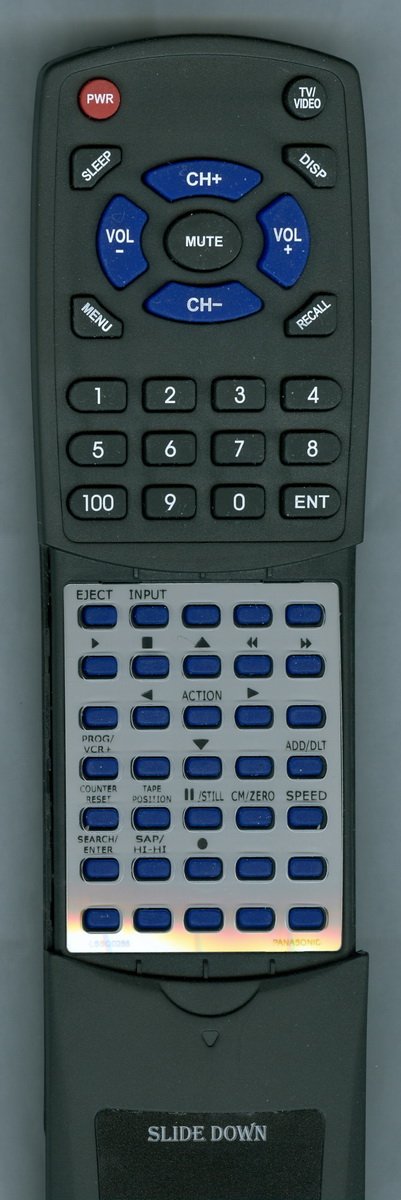
Image: Redi-Remote Replacement Remote Control. This image displays the black remote control with various buttons, including a sliding cover at the bottom.
Setup
Battery Installation
- Locate the battery compartment on the back of the remote control.
- Slide open the battery compartment cover.
- Insert four (4) AAA batteries, ensuring correct polarity (+ and -) as indicated inside the compartment. Batteries are included with the remote.
- Close the battery compartment cover securely.
No Programming Required
This Redi-Remote is pre-programmed to work with your Panasonic PVV4611 or LSSQ0286 unit. No additional programming steps are necessary. Simply install the batteries, and the remote is ready for use.
Operating Instructions
Basic Operation
- Point the remote control directly at your Panasonic unit.
- Press the desired function button (e.g., Power, Play, Stop, Volume).
- The remote has a maximum operating range of approximately 20 feet. Ensure there are no obstructions between the remote and the unit for optimal performance.
Accessing Lower Buttons
The remote features a sliding cover over the lower half of the buttons. To access these additional functions, gently slide the cover downwards.
Device Control Limitations
This Redi-Remote is designed to control only the specific Panasonic unit (PVV4611 or LSSQ0286) it is intended for. It cannot be programmed to control any auxiliary devices such as televisions, sound systems, or other components.
Maintenance
Cleaning
To clean the remote control, wipe it with a soft, dry cloth. Do not use liquid cleaners, abrasive pads, or chemical solvents, as these may damage the remote's surface or internal components.
Battery Replacement
If the remote control's performance degrades or stops working, replace all four AAA batteries with new ones. Always replace all batteries at the same time and ensure they are inserted with the correct polarity.
Troubleshooting
- Remote Not Responding:
Check if the batteries are inserted correctly and are not depleted. Replace batteries if necessary. Ensure there is a clear line of sight between the remote and the Panasonic unit. - Limited Range:
Ensure the batteries are fresh. Remove any obstructions between the remote and the unit. The maximum effective range is approximately 20 feet. - Specific Buttons Not Working:
Ensure the sliding cover is fully open if you are trying to access lower-half buttons. Clean the remote's surface to ensure no debris is interfering with button presses. - Remote Not Controlling Other Devices:
This remote is designed exclusively for Panasonic PVV4611 and LSSQ0286 units and cannot be programmed to control other electronic devices.
Specifications
| Feature | Detail |
|---|---|
| Brand | Redi-Remote |
| Model Name | RTLSSQ0286 |
| Compatible Devices | Panasonic PVV4611, LSSQ0286 |
| Connectivity Technology | Infrared |
| Controller Type | Button Control |
| Button Quantity | 58 |
| Maximum Range | 20 Feet |
| Battery Type | AAA |
| Number of Batteries | 4 (included) |
| Dimensions (L x W x H) | 7.5" x 2.25" x 0.75" |
| Item Weight | 4.5 Ounces |
Warranty and Support
Return Policy
This product is subject to a 30-day refund or replacement return policy from the date of purchase. Please retain your proof of purchase for any return claims.
Customer Support
For any concerns or issues with your Redi-Remote replacement control after purchase, please contact the seller, RemotesPro, directly. They can assist with troubleshooting or return inquiries.
Please note that this is a replacement remote control and not an original equipment manufacturer (OEM) product from Panasonic.