
Introduction
This manual provides instructions for the Redi-Remote replacement remote control, designed to operate specific RCA audio/video units. This remote is a direct replacement and does not require programming for the listed compatible models. It offers full functionality for your RCA device.
Compatible RCA Models: RS2044, RS2656, 271131, 269010, RS2044B
Remote Control Overview
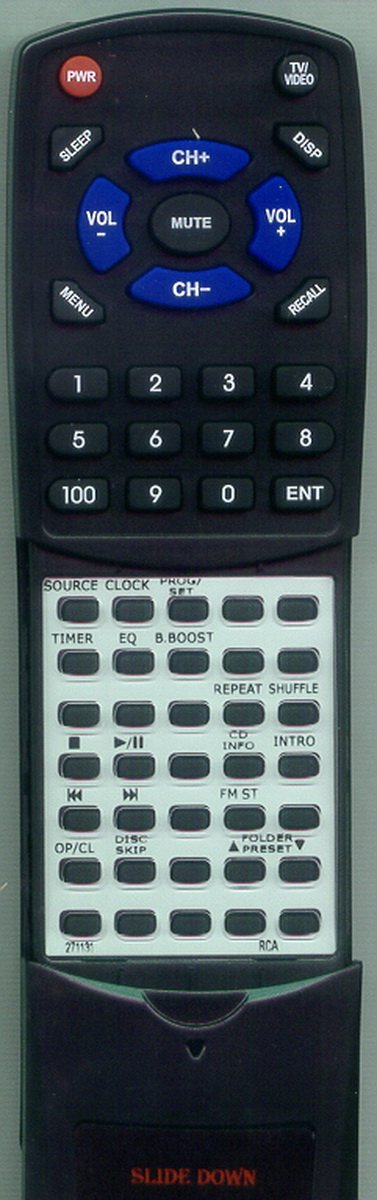
This image displays the Redi-Remote replacement remote control. The upper section features power, volume, channel, mute, menu, display, and recall buttons, along with a numeric keypad (0-9, 100, ENT). The lower section, revealed by sliding down a cover, includes buttons for source, clock, program/set, timer, equalizer, bass boost, repeat, shuffle, play/pause, stop, fast forward, rewind, CD info, intro, FM stereo, open/close, disc skip, and folder/preset controls.
Setup
1. Battery Installation
- Locate the battery compartment on the back of the remote control.
- Slide open the battery compartment cover.
- Insert four (4) AAA batteries, ensuring correct polarity (+ and -) as indicated inside the compartment.
- Close the battery compartment cover securely.
Note: This Redi-Remote is designed for immediate use with compatible RCA units and does not require any programming steps.
Operating Instructions
Basic Functions (Upper Section)
- PWR (Power): Turns the RCA unit on or off.
- TV/VIDEO: Selects the input source (e.g., TV, Video 1, Video 2).
- DISP (Display): Shows on-screen information about the current status or program.
- VOL +/- (Volume): Increases or decreases the audio volume.
- MUTE: Silences the audio output.
- CH +/- (Channel): Changes the channel up or down.
- MENU: Accesses the main menu of the RCA unit.
- RECALL: Switches to the previously viewed channel.
- Numeric Keypad (0-9, 100, ENT): Directly enters channel numbers or other numerical inputs. Use 'ENT' to confirm entries.
- SLEEP: Activates the sleep timer function.
Advanced Functions (Lower Section)
To access these functions, slide down the cover located on the lower half of the remote control.
- SOURCE: Selects the audio/video input source.
- CLOCK: Accesses clock settings.
- PROG/SET: Used for programming or setting various features.
- TIMER: Sets timer functions.
- EQ (Equalizer): Adjusts audio equalization settings.
- B.BOOST (Bass Boost): Enhances bass audio output.
- REPEAT: Repeats the current track or disc.
- SHUFFLE: Plays tracks in a random order.
- Play/Pause (▶/II): Starts or pauses playback.
- Stop (■): Stops playback.
- Fast Forward (▶▶): Skips forward through content.
- Rewind (◀◀): Skips backward through content.
- CD INFO: Displays information about the current CD track.
- INTRO: Plays the introductory part of each track.
- FM ST (FM Stereo): Toggles FM stereo reception.
- OP/CL (Open/Close): Opens or closes the disc tray.
- DISC SKIP: Skips to the next disc in a multi-disc player.
- FOLDER/▲PRESET/▼: Navigates through folders or radio presets.
Maintenance
Cleaning the Remote
To clean the remote control, use a soft, dry cloth. For stubborn dirt, slightly dampen the cloth with water or a mild cleaning solution. Avoid using harsh chemicals or abrasive materials, as these can damage the remote's surface or internal components.
Battery Replacement
Replace batteries when the remote's response becomes sluggish or it stops functioning. Always replace all batteries at the same time with new ones of the same type (AAA). Do not mix old and new batteries, or different types of batteries.
Troubleshooting
- Remote not responding:
- Check if the batteries are inserted correctly with the proper polarity.
- Replace old batteries with new ones.
- Ensure there are no obstructions between the remote and the RCA unit's infrared sensor.
- Confirm the remote is pointed directly at the RCA unit.
- Limited range:
- Ensure batteries are fresh.
- Reduce the distance between the remote and the RCA unit.
- Remove any potential sources of infrared interference (e.g., strong lights).
Specifications
| Feature | Detail |
|---|---|
| Product Dimensions | 7 x 2.5 x 1 inches |
| Item Weight | 4.5 ounces |
| Batteries Required | 4 AAA batteries (included) |
| Connectivity Technology | Infrared |
| Max Number of Supported Devices | 1 |
| Special Feature | No Programming Required |
| Manufacturer | Redi-Remote |
Warranty and Support
This Redi-Remote replacement remote control is designed for reliable performance. If you encounter any issues or have concerns after purchase, please contact the seller directly for assistance. Specific warranty details may vary; refer to your purchase documentation or contact the seller for more information.