
Introduction
This manual provides instructions for the Redi-Remote replacement remote control, model RTHA06497. This remote is specifically designed to operate NAKAMICHI RE3 and RECEIVER 3 audio units. It offers direct functionality without the need for programming.
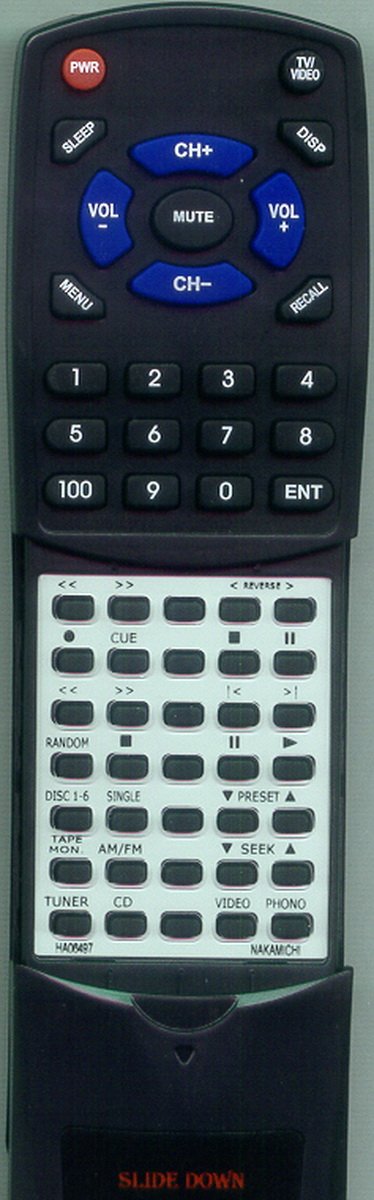
Image: Redi-Remote Replacement Remote Control. This image displays the front view of the remote control, featuring various buttons for operation.
Setup
1. Battery Installation
- Locate the battery compartment on the back of the remote control.
- Slide open the battery compartment cover.
- Insert four (4) AAA batteries, ensuring correct polarity (+ and -) as indicated inside the compartment.
- Close the battery compartment cover securely.
Note: Four AAA batteries are included with the remote control.
2. Initial Use
This Redi-Remote control requires no programming. Once batteries are installed, it is ready for immediate use with compatible NAKAMICHI RE3 and RECEIVER 3 units.
Operating Instructions
Point the remote control directly at the NAKAMICHI receiver unit. Ensure there are no obstructions between the remote and the receiver's infrared sensor.
Basic Functions
- Power Button: Turns the receiver on or off.
- Volume Up/Down: Adjusts the audio output level.
- Input/Source Selection: Cycles through available audio inputs (e.g., CD, Tuner, Aux).
- Mute Button: Silences the audio output.
Accessing Additional Buttons
The remote control features a sliding cover on its lower half. Slide this cover downwards to reveal additional control buttons for advanced functions specific to your NAKAMICHI receiver.
Maintenance
Battery Replacement
Replace batteries when the remote's performance diminishes or it stops responding. Always replace all four AAA batteries simultaneously with new ones. Do not mix old and new batteries, or different types of batteries.
Cleaning
To clean the remote control, use a soft, dry cloth. Do not use liquid cleaners, aerosols, or abrasive materials, as these may damage the remote's surface or internal components.
Troubleshooting
- Remote is not responding:
- Ensure the batteries are correctly installed with the proper polarity.
- Replace old batteries with new ones.
- Check for any obstructions between the remote control and the receiver's infrared sensor.
- Ensure you are within the effective operating range and pointing the remote directly at the receiver.
- Certain buttons are not working:
- Verify that the sliding cover is fully open if you are trying to access lower-half buttons.
- Ensure the remote is compatible with your specific NAKAMICHI RE3 or RECEIVER 3 model.
Specifications
| Model Number | RTHA06497 |
| Compatible Units | NAKAMICHI RE3, RECEIVER 3, HA06497, RE3RC |
| Dimensions | 7 x 2.5 x 1 inches (17.78 x 6.35 x 2.54 cm) |
| Item Weight | 4.5 ounces (127.57 grams) |
| Batteries Required | 4 x AAA (included) |
| Special Feature | No Programming Required |
| Color | Black |
Customer Support
For any concerns or questions regarding the Redi-Remote replacement control after purchase, please contact the seller directly for assistance.