
Introduction
This manual provides instructions for the Redi-Remote replacement remote control, designed for use with various Technics audio/video components. This remote is a direct replacement and requires no programming for the specified models.
Please read this manual thoroughly before using your new remote control to ensure proper operation and longevity.
Package Contents
- Redi-Remote Replacement Remote Control
- 4 AAA batteries (pre-installed)
Setup
The Redi-Remote replacement remote control is designed for immediate use with compatible Technics units. No programming is required.
- Battery Installation/Verification: The remote control comes with 4 AAA batteries pre-installed. Verify that the batteries are correctly seated in the battery compartment. If the remote does not respond, check battery orientation or replace with fresh AAA batteries.
- Point and Use: Point the remote control directly at your Technics component (e.g., receiver, amplifier) and press the desired function button.
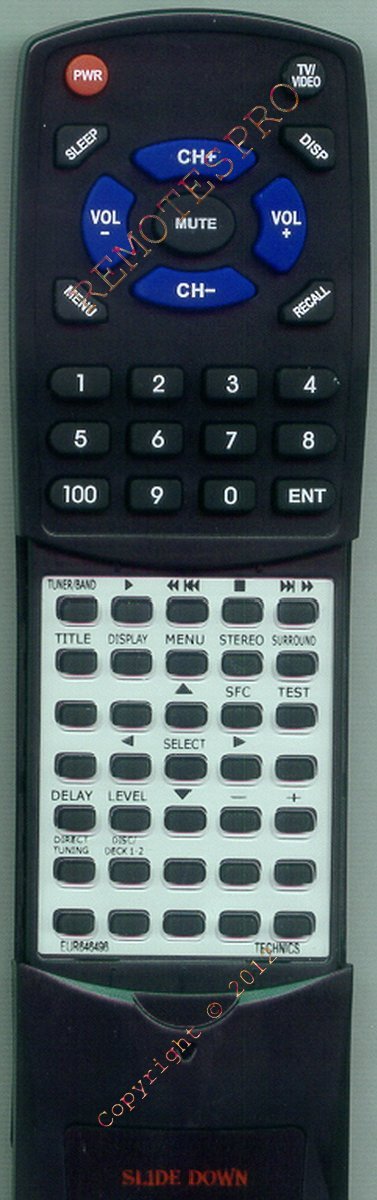
Image: Front view of the Redi-Remote replacement remote control. This image displays the various control buttons, including power, volume, channel, and input selection, which are ready for immediate use with compatible Technics devices.
Operating Instructions
This remote control provides full functionality for your compatible Technics unit. The buttons are laid out intuitively for ease of use.
Key Functions:
- Power Button: Turns the Technics unit on or off.
- Volume Up/Down: Adjusts the audio output level.
- Mute Button: Silences the audio output.
- Input/Source Selection: Cycles through available audio/video inputs.
- Numeric Keypad: For direct input of track numbers or other numerical selections.
- Playback Controls: Play, Pause, Stop, Fast Forward, Rewind, Skip Track (if applicable to your Technics unit).
Note: Some advanced functions specific to your original Technics remote may be located under a sliding cover on the lower half of this replacement remote. Slide the cover down to access these additional buttons.
Maintenance
- Cleaning: Use a soft, dry cloth to clean the remote control. Do not use liquid cleaners or abrasive materials.
- Battery Replacement: If the remote control's response becomes sluggish or stops working, replace all 4 AAA batteries with new ones. Ensure correct polarity (+/-) when inserting new batteries.
- Storage: Store the remote control in a cool, dry place away from direct sunlight and extreme temperatures.
- Avoid Drops: Protect the remote from physical impact, as drops can damage internal components.
Troubleshooting
| Problem | Possible Cause | Solution |
|---|---|---|
| Remote not responding | Dead or incorrectly installed batteries. Obstruction between remote and unit. Remote out of range. | Replace batteries, ensuring correct polarity. Remove any obstructions. Move closer to the Technics unit. |
| Some buttons not working | Button stuck or dirty. Unit not compatible with specific function. | Clean around the button. Ensure the Technics unit supports the function. Check if the button is under the sliding cover. |
| Slow response | Weak batteries. | Replace batteries. |
If troubleshooting steps do not resolve the issue, please contact customer support.
Specifications
- Brand: Redi-Remote
- Model Number: RTEUR646496
- Compatible Technics Models: EUR646496, EUR646498, SAAX7, SAAX730, SADX930, SCS2250, SDS9225, SUG88
- Connectivity Technology: Infrared
- Power Source: 4 x AAA batteries (included)
- Product Dimensions: 7.5 inches (L) x 2.25 inches (W) x 0.75 inches (H)
- Item Weight: 4.5 ounces
- Special Feature: No Programming Required
- Max Number of Supported Devices: 1
- Compatible Devices: Receiver
Warranty and Support
Warranty Information:
Redi-Remote products are designed for reliability. For specific warranty details, please refer to the documentation provided at the time of purchase or contact the seller directly. The manufacturer typically offers a limited warranty against defects in materials and workmanship.
Customer Support:
If you encounter any issues or have questions regarding your Redi-Remote replacement remote control, please contact the seller or Redi-Remote customer service. Provide your product model number (RTEUR646496) and a detailed description of the issue for efficient assistance.
Contact information for the seller (RemotesPro) can typically be found on your purchase receipt or order details page on Amazon.