
1. Introduction
This manual provides instructions for the Redi-Remote Replacement Remote Control, model RTBDP110. This remote is specifically designed to function as a direct replacement for the original OLEVIA BDP110 and RCBD1 remote controls, offering full functionality for your OLEVIA DVD/Blu-ray player without requiring any programming.
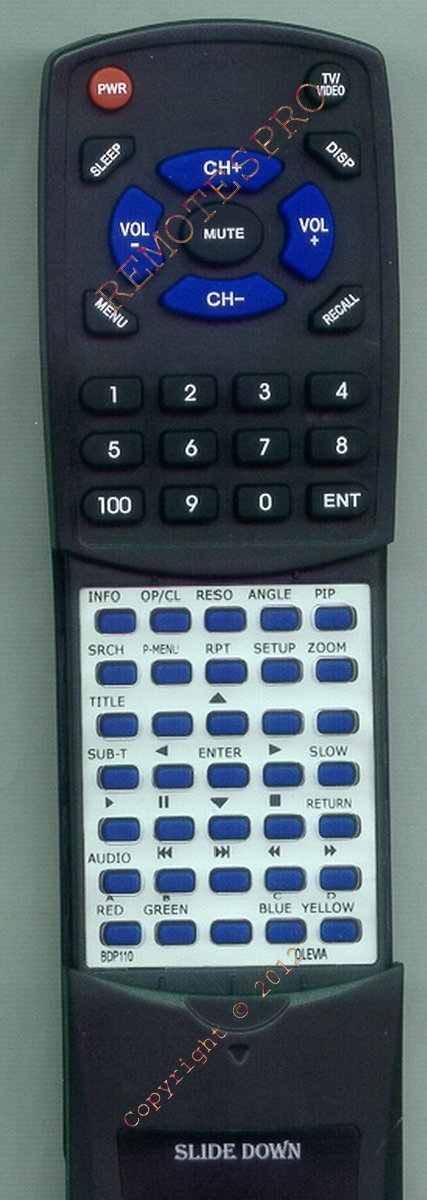
Image 1: Redi-Remote Replacement Remote Control. This image displays the front view of the remote control, showing its ergonomic design and button layout.
2. Setup
2.1 Battery Installation
The Redi-Remote requires four (4) AAA batteries for operation. These batteries are typically included with your purchase.
- Locate the battery compartment cover on the back of the remote control.
- Slide the cover downwards or press the latch and lift to open the compartment.
- Insert four (4) AAA batteries, ensuring the positive (+) and negative (-) terminals align correctly with the markings inside the compartment.
- Replace the battery compartment cover by sliding it back into place until it clicks securely.
Note: Always use new batteries and replace all four batteries at the same time. Do not mix old and new batteries, or different types of batteries.
2.2 Initial Use (No Programming Required)
This Redi-Remote is a pre-programmed replacement remote control. It is designed to work immediately with your OLEVIA BDP110 or RCBD1 DVD/Blu-ray player without any additional setup or programming steps. Simply install the batteries, and the remote is ready for use.
Redi-Remotes are not designed to be programmed for auxiliary devices. They are dedicated to controlling the specific unit they are designed for.
3. Operating Instructions
The Redi-Remote provides comprehensive control over your OLEVIA BDP110 or RCBD1 DVD/Blu-ray player. Familiarize yourself with the button layout for optimal use.
3.1 Basic Functions
- POWER: Turns the OLEVIA player on or off.
- PLAY/PAUSE: Starts or pauses playback of media.
- STOP: Stops media playback.
- REW/FF (Rewind/Fast Forward): Skips backward or forward through media.
- SKIP (Previous/Next): Jumps to the previous or next track/chapter.
- MENU: Accesses the player's main menu or disc menu.
- NAVIGATION (Arrow Buttons): Moves cursor within menus.
- ENTER/OK: Confirms selections in menus.
- RETURN/BACK: Returns to the previous menu or screen.
- VOLUME +/-: Adjusts the volume (if supported by the player and connected audio system).
- MUTE: Mutes the audio output.
- NUMBER PAD (0-9): Direct input for track numbers or other numerical selections.
For specific advanced functions or button mappings, refer to the original user manual of your OLEVIA BDP110 or RCBD1 DVD/Blu-ray player.
3.2 Operating Range
The remote control operates effectively within a maximum range of approximately 20 feet (6 meters) from the OLEVIA player. Ensure a clear line of sight between the remote's infrared emitter and the player's IR receiver for optimal performance.
4. Maintenance
4.1 Cleaning
To clean the remote control, gently wipe its surface with a soft, dry cloth. For stubborn dirt, slightly dampen the cloth with water or a mild, non-abrasive cleaner. Avoid using harsh chemicals, solvents, or abrasive materials, as these can damage the remote's finish or internal components.
4.2 Battery Replacement
Replace the batteries when the remote's response becomes sluggish or stops functioning. Follow the battery installation steps outlined in Section 2.1. Remove batteries if the remote will not be used for an extended period to prevent leakage.
5. Troubleshooting
| Problem | Possible Cause | Solution |
|---|---|---|
| Remote not responding. |
|
|
| Buttons are unresponsive or sticky. |
|
|
| Remote controls some functions but not others. |
|
|
6. Specifications
- Brand: Redi-Remote
- Model Number: RTBDP110
- Compatible Devices: OLEVIA BDP110, OLEVIA RCBD1 (DVD/Blu-ray Player)
- Connectivity Technology: Infrared (IR)
- Max Number of Supported Devices: 1 (Dedicated to OLEVIA BDP110/RCBD1)
- Button Quantity: 58
- Power Source: 4 x AAA batteries (included)
- Maximum Range: Approximately 20 feet (6 meters)
- Item Dimensions (L x W x H): 7.5" x 2.25" x 0.75" (19.05 cm x 5.72 cm x 1.91 cm)
- Item Weight: 4.5 ounces (127.57 grams)
- Special Feature: Ergonomic design
7. Warranty and Support
7.1 Product Support
For further assistance or inquiries regarding your Redi-Remote Replacement Remote Control, please contact the seller or manufacturer directly. Refer to your purchase documentation for contact information.
7.2 Warranty Information
Specific warranty details for this replacement remote control are typically provided by the seller at the time of purchase. Please consult your purchase receipt or contact the seller for information regarding warranty coverage and return policies.
Note: This manual does not constitute a warranty. Any warranty offered is provided by the seller or manufacturer.