
1. Introduction
This manual provides detailed instructions for the Logitech G710+ Mechanical Gaming Keyboard. Designed for high-performance gaming, this keyboard features tactile, low-noise mechanical keys, adjustable backlighting, and programmable G-keys to enhance your gaming and computing experience.

Figure 1: Logitech G710+ Mechanical Gaming Keyboard. This image displays the full keyboard with its black keys, orange accents on the G-keys, and integrated palm rest.
2. Setup
2.1 What's in the Box
- Logitech G710+ Mechanical Gaming Keyboard
- Removable Palm Rest
- User Documentation
2.2 System Requirements
- Windows 8, Windows 7, or Windows Vista operating systems
- Two available Hi-Speed USB (2.0) ports
- 70 MB of available hard disk space
- Internet connection for optional software download (Logitech Gaming Software)
- Mac OS X 10.6.8 - 10.9.x
2.3 Connecting the Keyboard
- Connect the keyboard's USB cable to an available USB 2.0 port on your computer.
- For the integrated USB pass-through port to function, connect the second USB cable from the keyboard to another available USB 2.0 port on your computer.
- Optionally, attach the removable palm rest to the front of the keyboard for enhanced comfort.
3. Operating Instructions
3.1 Tactile High-Speed, Low-Noise Mechanical Keys
The Logitech G710+ features quiet mechanical keys with superior tactile feedback, designed for faster response rates with less force. Non-clicking key switches and dampening rings under keycaps reduce distracting noise while providing gaming-grade responsiveness.

Figure 2: Close-up view of a mechanical key switch on the G710+ keyboard, highlighting the tactile mechanism.
3.2 High-Performance Gaming Keys
- 110 Anti-Ghosting Keys: Ensures that every keypress is registered accurately, even during intense gaming sessions with multiple simultaneous inputs.
- 26-Key Rollover: Allows you to press almost any number of keys plus modifier keys (Control, Alt, Shift) in any order and get exactly what you entered.
- Durable Performance: Keys are tested for a long-life performance of up to 50 million keypresses.
3.3 Adjustable Dual-Zone Backlighting
The keyboard features adjustable white LED backlighting with four brightness levels (plus 'Off'). You can adjust the brightness of the WASD and arrow keys independently from the rest of the keyboard, allowing for easy key identification in low-light conditions.

Figure 3: The G710+ keyboard illuminated with its dual-zone white backlighting, showing WASD and arrow keys with potentially different brightness settings.
3.4 Programmable G-keys
Six programmable G-keys are located on the left side of the keyboard. These keys can be configured with up to 18 unique functions per game (three macros per G-key) using the Logitech Gaming Software. This allows for single keypresses, complex macros, or intricate LUA scripts to be triggered precisely.
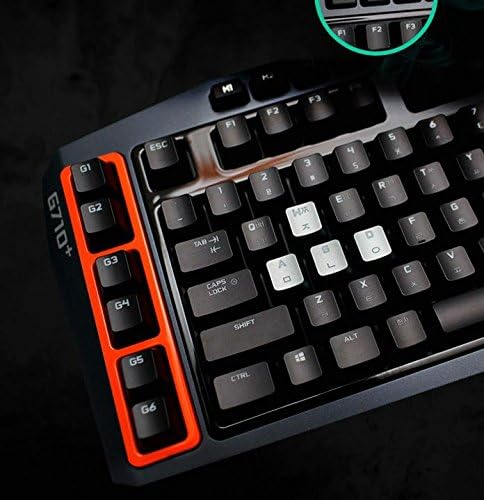
Figure 4: Close-up of the six programmable G-keys on the left side of the G710+ keyboard, highlighted with orange borders.
3.5 Instant Media Access and Game Mode
- Dedicated Media Keys: Convenient one-touch keys provide immediate control over volume, mute, and media playback.
- Game/Desktop Mode: A dedicated button allows you to quickly disable the Windows/Context Menu keys, preventing accidental interruptions during gameplay.
3.6 USB Pass-Through
The keyboard includes a built-in high-speed USB pass-through port. This allows you to quickly plug in a mouse, headset, or other USB device directly into the keyboard without needing to reach for your computer's USB ports.
4. Maintenance
To ensure optimal performance and longevity of your Logitech G710+ keyboard, regular maintenance is recommended:
- Cleaning: Use a soft, lint-free cloth to wipe down the keyboard surface. For deeper cleaning, you may carefully remove keycaps using a keycap puller (not included) and clean underneath with compressed air.
- Cable Management: Ensure the USB cables are not kinked or under excessive strain.
- Palm Rest: Clean the removable palm rest with a damp cloth as needed.
5. Troubleshooting
If you encounter issues with your keyboard, consider the following basic troubleshooting steps:
- No Power/Keys Not Responding: Ensure both USB connectors are securely plugged into your computer. Try different USB ports.
- Backlighting Issues: Check the backlighting brightness levels using the dedicated buttons on the keyboard. Ensure the Logitech Gaming Software is installed and updated for full control.
- G-keys Not Working: Verify that the Logitech Gaming Software is installed and that macros are correctly configured and assigned to the G-keys.
- Software Issues: Reinstall the Logitech Gaming Software from the official Logitech website.
6. Specifications
| Feature | Detail |
|---|---|
| Product Dimensions | 20.7 x 9 x 2.4 inches |
| Item Weight | 4.8 pounds |
| Manufacturer | Logitech |
| ASIN | B009C98NPY |
| Item Model Number | 920-003887 |
| Date First Available | October 9, 2012 |
| Connectivity Technology | Micro USB |
| Keyboard Description | Gaming |
| Special Feature | Backlit |
| Color | Black (Single Color Backlighting) |
7. Official Product Videos
Logitech Mechanical Gaming Keyboard Overview
This video provides a general overview of the Logitech Mechanical Gaming Keyboard, showcasing its design and key features.
Logitech G710+ Mechanical Gaming Keyboard with Tactile High-Speed Keys - Black
This video highlights the specific features of the Logitech G710+ Mechanical Gaming Keyboard, including its tactile keys and overall design.
8. Warranty and Support
8.1 Legal Disclaimer
The manufacturer makes no claims concerning the warranty on this product. Since it was a warranty replacement, the warranty may no longer be valid for a second owner.
8.2 Further Support
For additional support, software downloads (such as Logitech Gaming Software for G-key programming), and detailed warranty information, please visit the official Logitech G website: logitechg.com/downloads.


