
Princeton Tec CP-3-BK
Princeton Tec Charge PRO Tactical Light User Manual
Model: CP-3-BK
Brand: Princeton Tec
Introduction
The Princeton Tec Charge PRO is a versatile, low-profile task light designed for tactical and outdoor use. It features a flexible neck for precise illumination and multiple light modes, including a powerful Maxbright LED white flood light and lower lumen administrative lighting. Powered by a single CR123 Lithium battery, it offers extended burn time and reliable performance in various conditions.
Product Overview
The Charge PRO is engineered for demanding environments, offering a blend of durability, functionality, and user-friendly design. Key features include:
- Exclusive Flexi-Neck Design: Allows for simple and accurate spot illumination right where you need it, adapting to various tasks.
- Low-Profile: Designed to be the lowest-profile helmet light on the market, ideal for close-at-hand administrative tasks in the field.
- Intuitive Operation: Features an easy-to-find and simply reached button for quick activation and dimming.
- Maxbright LED: Equipped with a single white Maxbright LED providing 55 lumens in a focused flood beam, suitable for both distance spotting and close-range work.
- Extended Burn Time: Offers up to 40 hours of runtime on a single battery.
- CR123 Powered: Operates via a single CR123 battery (included) for optimal cold weather performance and lighter weight.

Figure 1: The Princeton Tec Charge PRO Tactical Light, showcasing its compact design and flexible neck.

Figure 2: The Charge PRO highlighting its flexible neck design, allowing for precise light positioning.

Figure 3: The Charge PRO mounted on a tactical vest, demonstrating its low-profile and versatile attachment capabilities.
Setup
Battery Installation
- Locate the battery compartment cap, typically at the rear of the light unit.
- Unscrew or unlatch the cap to open the compartment.
- Insert one CR123 Lithium battery, ensuring the correct polarity as indicated inside the compartment.
- Securely close the battery compartment cap to ensure water resistance.
Mounting Options
The Charge PRO comes with various tactical mounts for versatile attachment:
- Standard Nylon Headstrap
- Helmet Side Mount
- ARCs (Accessory Rail Connectors)
- EXFIL Rail
- MOLLE/PALS
- Picatinny
- Above the Rail
Attach the appropriate mount to your gear (helmet, vest, etc.) according to the mount's specific instructions. Then, slide or clip the Charge PRO light unit onto the mounted base until it securely locks into place.

Figure 4: The Charge PRO mounted on a helmet, demonstrating its use in a tactical scenario with red light activated.

Figure 5: A user adjusting the flexible neck of the Charge PRO while mounted on a helmet, highlighting ease of use.
Operating Instructions
Turning On/Off and Mode Selection
- White Maxbright LED Mode: To activate the main white flood light, press and hold the power button for a full two seconds. This prevents accidental activation.
- Dimming White Mode: While the white Maxbright LED is on, press and hold the button to dim the light. Release the button at the desired intensity.
- Administrative Lighting (Color LEDs): For lower lumen administrative lighting (e.g., red, blue, IR depending on model), quick press the power button. Subsequent quick presses will cycle through available color modes.
- Turning Off: Press and hold the power button until the light turns off.
Flexible Neck Adjustment
The flexible neck allows you to direct the light precisely where needed. Gently bend and position the neck to illuminate your task area. The neck is designed to hold its position once adjusted.
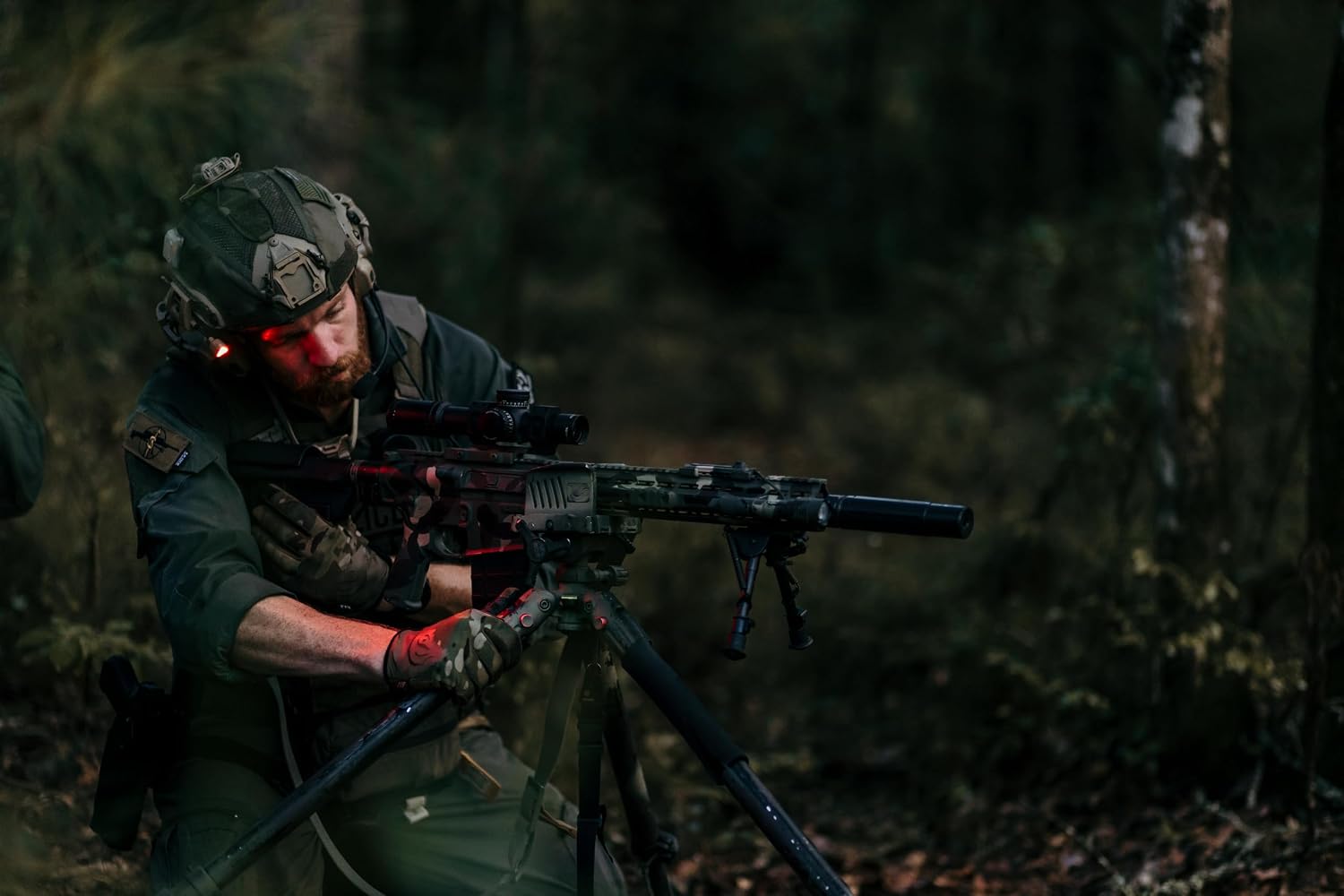
Figure 6: The Charge PRO in use during an outdoor operation, demonstrating its effectiveness in various environments.
Maintenance
- Cleaning: Wipe the light with a damp cloth to remove dirt and debris. Do not use harsh chemicals or abrasive cleaners.
- Battery Replacement: Replace the CR123 battery when the light output diminishes. Always use fresh, high-quality batteries.
- Storage: If storing the light for an extended period, remove the battery to prevent leakage and potential damage to the unit. Store in a cool, dry place.
- Water Resistance: The Charge PRO is water-resistant. Ensure the battery compartment cap is securely closed before exposure to moisture. Do not submerge the light.
Troubleshooting
| Problem | Possible Cause | Solution |
|---|---|---|
| Light does not turn on. | Dead or incorrectly installed battery. | Replace battery with a fresh one, ensuring correct polarity. |
| Light output is dim. | Low battery power. | Replace battery. |
| Light flickers or turns off unexpectedly. | Loose battery connection or faulty battery. | Check battery connection. Replace battery if issue persists. |
| Button unresponsive. | Debris around button or internal issue. | Clean around the button. If issue persists, contact customer support. |
Specifications
| Attribute | Value |
|---|---|
| Brand Name | Princeton Tec |
| Model Name | Charge Pro |
| Part Number | CP-3-BK |
| Item Weight | 3.2 ounces |
| Item Dimensions (LxWxH) | 1 x 1 x 1 inches |
| Package Weight | 0.22 Kilograms |
| Color | Black |
| Material | Plastic |
| Power Source | 1 x CR123 Battery (Included) |
| Light Output | 55 Lumens (Maxbright LED) |
| Burn Time | Up to 40 hours |
| Water Resistance | IPX7 (Water-Resistant) |
| Included Components | Charge Pro Task Light, CR123 Battery, Tactical Mounts (Standard Nylon Headstrap, Helmet Side Mount, ARCs, EXFIL Rail, MOLLE/PALS, Picatinny, Above the Rail) |
Warranty and Support
The Princeton Tec Charge PRO is covered by a Manufacturer's Warranty. For detailed information regarding warranty terms, conditions, and to register your product, please visit the official Princeton Tec website or contact their customer support.
For further assistance, technical support, or to inquire about replacement parts, please refer to the contact information provided on the Princeton Tec website or the product packaging.
You can also visit the Princeton Tec Store on Amazon for more product information and support resources.
Related documentsCP-3-BK


Ask a question about this manual
Ask about setup, troubleshooting, compatibility, parts, safety, or missing instructions. Manuals+ will review the question and use this page’s manual context to help answer it.