
ProTech 42-25101-03
ProTech Contactor 42-25101-03 User Manual
Model: 42-25101-03
Product Overview
The ProTech Contactor 42-25101-03 is a robust 40 Amp, 1-Pole contactor designed for various HVAC and industrial applications. It features a 24V coil and is compatible with a range of Rheem and Ruud systems. This component is crucial for controlling electrical loads in heating, ventilation, and air conditioning units.
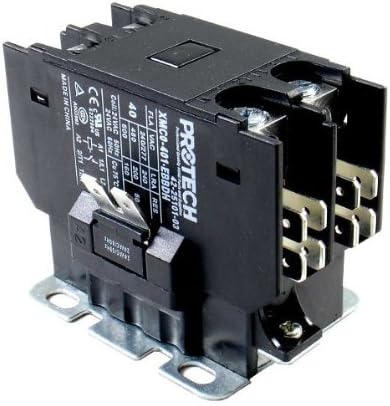
Image: The ProTech Contactor 42-25101-03, showing its terminals, coil, and technical specifications label. The label indicates it is a 40 Amp contactor with a 24V AC coil, rated for various FLA, LRA, and Resistive loads, and is manufactured in China.
Safety Information
Always disconnect power before installing or servicing this device. Installation should be performed by a qualified technician. Failure to follow these instructions may result in electrical shock, fire, or property damage.
- Ensure the power supply matches the contactor's voltage and current ratings.
- Do not operate the contactor if it appears damaged.
- Wear appropriate personal protective equipment (PPE) during installation and maintenance.
Setup and Installation
This contactor is designed for direct replacement in compatible HVAC systems. Refer to your equipment's service manual for specific wiring diagrams.
- Power Disconnection: Turn off all power to the HVAC unit at the circuit breaker or disconnect switch. Verify power is off using a voltage tester.
- Locate Existing Contactor: Identify the old contactor within the unit. Note the wiring connections to each terminal. It is recommended to take a photograph for reference.
- Disconnect Wiring: Carefully disconnect all wires from the old contactor. Label wires if necessary to ensure correct re-connection.
- Remove Old Contactor: Unmount the old contactor from its mounting bracket.
- Mount New Contactor: Securely mount the ProTech 42-25101-03 contactor in the same location.
- Connect Wiring: Reconnect the wires to the corresponding terminals on the new contactor. Ensure all connections are tight and secure. The coil terminals are typically labeled A1 and A2, and power terminals L1, L2, T1, T2.
- Verify Installation: Double-check all wiring connections against your reference photo or wiring diagram. Ensure no loose wires or exposed conductors.
- Restore Power: Once installation is complete and verified, restore power to the HVAC unit.
Operating Principles
The ProTech 42-25101-03 contactor operates as an electrically controlled switch. When 24V AC power is applied to its coil terminals (A1 and A2), an electromagnetic field is generated, pulling the movable contacts to close the main power circuit. This allows high-voltage power to flow to the connected load, such as a compressor or fan motor. When power to the coil is removed, the electromagnetic field collapses, and springs return the contacts to their open position, interrupting the power flow.
This single-pole contactor controls one phase of the electrical supply to the connected equipment.
Maintenance
Regular inspection of the contactor can help ensure reliable operation and extend its lifespan. Perform maintenance only after disconnecting all power.
- Visual Inspection: Periodically inspect the contactor for signs of overheating, such as discoloration or melted plastic. Check for loose connections, corrosion, or excessive arcing marks on the contacts.
- Cleanliness: Keep the contactor free from dust, dirt, and debris, which can impede proper operation or cause overheating. Use a soft, dry brush or compressed air for cleaning.
- Contact Wear: While direct inspection of internal contacts may require disassembly, severe contact wear can sometimes be indicated by erratic operation or humming noises. If significant wear is suspected, replacement is recommended.
Troubleshooting
| Problem | Possible Cause | Solution |
|---|---|---|
| Contactor does not pull in (no click) | No power to coil, faulty coil, incorrect coil voltage, loose wiring. | Check 24V supply to coil terminals. Verify coil voltage matches specifications. Inspect wiring for loose connections. Replace contactor if coil is faulty. |
| Contactor hums loudly | Loose laminations, dirt/debris in magnet assembly, incorrect voltage. | Clean magnet assembly. Verify correct coil voltage. If humming persists, replace contactor. |
| Contactor contacts are pitted or burnt | Overload, frequent cycling, short circuit, age. | Identify and correct overload conditions. Replace contactor. Consider a contactor with higher ratings if frequent failure occurs. |
| Contactor remains closed (stuck) | Welded contacts, mechanical binding. | Immediately disconnect power. Replace contactor. Investigate cause of welding (e.g., short circuit). |
Specifications
- Model Number: 42-25101-03
- Brand: ProTech
- Number of Poles: 1
- Coil Voltage: 24V AC
- Motor FLA Rating (230V): 40 Amps
- Motor LRA Rating (230V): 240 Amps
- Resistive Rating (230V): 50 Amps
- Motor FLA Rating (460V): 40 Amps
- Motor LRA Rating (460V): 200 Amps
- Resistive Rating (460V): 50 Amps
- Motor FLA Rating (575V): 40 Amps
- Motor LRA Rating (575V): 160 Amps
- Resistive Rating (575V): 50 Amps
- Dimensions (L x W x H): 3.46 x 2.64 x 2.32 inches
- Item Weight: 1.32 pounds
Warranty Information
ProTech products are manufactured to high-quality standards. For specific warranty details, please refer to the warranty statement provided with your original purchase or contact ProTech customer support. Keep your proof of purchase for warranty claims.
Customer Support
For technical assistance, troubleshooting, or parts inquiries, please contact ProTech customer support. When contacting support, please have your product model number (42-25101-03) and purchase information ready.
You can visit the ProTech Store on Amazon for more information.
Ask a question about this manual
Ask about setup, troubleshooting, compatibility, parts, safety, or missing instructions. Manuals+ will review the question and use this page’s manual context to help answer it.