
Introduction
Thank you for choosing the Severin KV 8021 S2 One Touch Automatic Coffee Machine. This appliance is designed to provide high-quality coffee and milk-based beverages with ease. To ensure safe operation and optimal performance, please read this instruction manual thoroughly before first use and keep it for future reference.
Safety Instructions
Always observe the following safety precautions to prevent injury or damage to the appliance:
- Ensure the voltage specified on the rating plate matches your mains supply.
- Do not immerse the appliance, power cord, or plug in water or any other liquids.
- Keep the appliance out of reach of children.
- Do not operate the appliance if it shows any signs of damage.
- Exercise caution when handling hot water and steam to avoid burns.
- Only use original Severin spare parts and accessories.
Product Overview
The Severin KV 8021 S2 features a compact design with intuitive controls for various coffee specialties. Key components include the water tank, bean container, ground coffee chute, control panel with display, rotary knob, and integrated milk frothing system.

The Severin KV 8021 S2 automatic coffee machine, featuring a sleek silver design, preparing a layered latte macchiato.
Key Features:
- One Touch Technology: Prepare espresso, cappuccino, and latte macchiato with a single touch.
- Unique Hygiene System: Ensures cleanliness and longevity of the milk system.
- Customization Options: Adjust coffee strength, volume, and grind settings.
- Ceramic Disc Grinder: For consistent and quiet grinding of coffee beans.

An open view of the top of the Severin KV 8021 S2, showing the coffee bean hopper filled with whole beans and a separate compartment for pre-ground coffee.

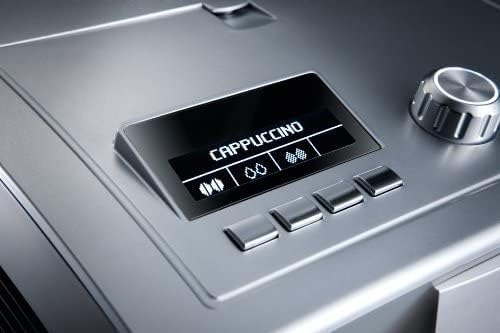
A close-up of the digital display on the Severin KV 8021 S2, indicating 'CAPPUCCINO' as the selected beverage, with control buttons below.
Detail of the rotary control knob on the Severin KV 8021 S2, used for navigating menus and adjusting settings.

A close-up of the external milk frother tube connection on the side of the Severin KV 8021 S2, ready to draw milk from a container.
Setup
- Unpacking: Carefully remove all packaging materials and ensure all components are present.
- Placement: Place the machine on a stable, level, and heat-resistant surface, away from water sources and direct sunlight.
- Fill Water Tank: Remove the water tank, rinse it, and fill it with fresh, cold tap water up to the MAX mark. Reinsert the tank securely.
- Fill Bean Container: Open the lid of the bean container and fill it with whole coffee beans. Close the lid.
- First Use Rinse Cycle: Plug in the machine and switch it on. The machine will prompt you to perform an initial rinse cycle. Follow the on-screen instructions, placing a container under the coffee spout.
Operating Instructions
The Severin KV 8021 S2 offers various beverage options and customization.
Making Espresso or Coffee:
- Place a cup under the coffee spout.
- Select your desired coffee strength and volume using the rotary knob and display.
- Press the corresponding button for Espresso or Coffee. The machine will grind the beans and brew your beverage.
Making Cappuccino or Latte Macchiato (One Touch):
- Connect the milk tube to a container of cold milk.
- Place a suitable glass under the coffee spout.
- Select Cappuccino or Latte Macchiato from the menu.
- Press the One Touch button. The machine will automatically froth the milk, brew the coffee, and dispense the beverage.
Adjusting Grind Settings:
The grind setting can be adjusted using the dial inside the bean container. Only adjust the grind setting while the grinder is operating to prevent damage.
Maintenance and Cleaning
Regular cleaning is essential for optimal performance and hygiene.
Daily Cleaning:
- Drip Tray and Coffee Grounds Container: Empty and rinse daily.
- Milk System: After each milk-based beverage, perform the automatic milk system cleaning cycle as prompted by the machine.
Weekly/Monthly Cleaning:
- Brew Unit: The brew unit is removable. Switch off the machine, remove the brew unit, rinse it thoroughly under running water, and allow it to air dry before reinserting.
- Descaling: The machine will indicate when descaling is required. Use a suitable descaling solution and follow the instructions on the display.
Troubleshooting
If you encounter issues, refer to the following common problems and solutions:
| Problem | Possible Cause | Solution |
|---|---|---|
| No coffee is dispensed. | Water tank empty, beans empty, brew unit clogged. | Refill water/beans, clean brew unit. |
| No milk foam or poor foam quality. | Milk system dirty, milk tube blocked, milk too warm. | Perform milk system cleaning, check milk tube, use cold milk. |
| Machine not turning on. | Power cord not connected, power outlet faulty. | Check power connection, try another outlet. |
For further assistance, please contact Severin customer support.
Specifications
| Feature | Detail |
|---|---|
| Model Number | KV 8021 |
| Color | Silver |
| Product Dimensions | 33 x 24 x 35 cm |
| Item Weight | 10.9 kg (24.03 lbs) |
| Water Tank Capacity | 1.5 Liters |
| Power/Wattage | 1500 watts |
| Voltage | 240 Volts |
| Material | Stainless Steel |
| Special Features | Automatic shut-off, Dishwasher-safe parts, Display, Height-adjustable spout, Removable brew unit, One Touch, Cleaning program |
Warranty and Support
This Severin KV 8021 S2 Automatic Coffee Machine comes with a manufacturer's warranty. Please refer to the warranty card included in the original packaging for specific terms and conditions. For technical support, spare parts, or service inquiries, please visit the official Severin website or contact their authorized customer service center.
