
1. Product Overview
The LogiLink LPS204 is a practical power strip designed to provide multiple power outlets with convenient control. It features six Schuko-type outlets and an external foot switch for easy power management of connected devices. This manual provides essential information for the safe and effective use of your power strip.
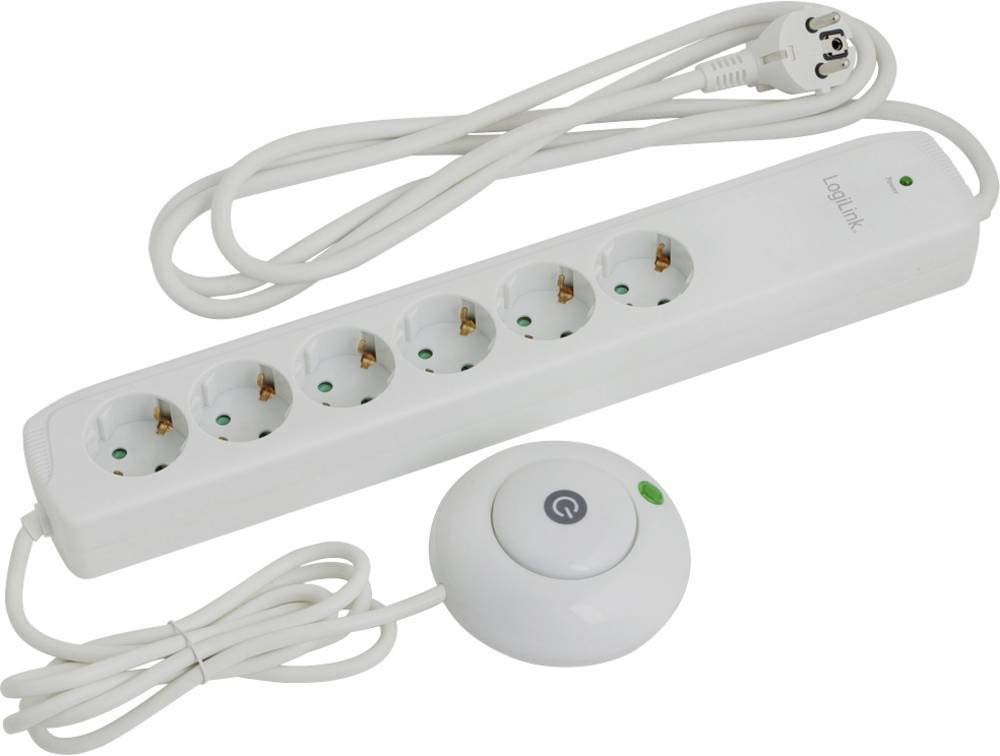
Figure 1: LogiLink LPS204 Power Strip with Foot Switch. This image displays the LogiLink LPS204 power strip. It features a white rectangular strip with six Schuko-type power outlets. A white power cable extends from one end, terminating in an angled Schuko plug. A separate round foot switch, also white, is connected to the power strip by a shorter cable. The foot switch has a central power button with an illuminated indicator.
Key Features:
- 6 Schuko-type power outlets (German style)
- Integrated ON/OFF illuminated foot switch for convenient control
- 1.4-meter power cable with an angled Schuko plug
- White finish
2. Safety Information
Please read and understand all safety instructions before using this product. Failure to follow these instructions may result in electric shock, fire, or serious injury.
- Do not exceed the maximum load: Ensure the total power consumption of all connected devices does not exceed 3500 Watts. Overloading can cause overheating and fire.
- Indoor use only: This power strip is designed for indoor use in dry environments. Do not use it outdoors or in damp/wet conditions.
- Avoid liquid contact: Keep the power strip away from water, liquids, and excessive humidity.
- Proper grounding: Always plug the power strip into a properly grounded wall outlet.
- Do not daisy-chain: Do not connect multiple power strips together.
- Children and pets: Keep the power strip and its cables out of reach of children and pets.
- Inspection: Regularly inspect the power strip and its cables for any signs of damage. Do not use if damaged.
- Ventilation: Do not cover the power strip, as this can lead to overheating.
- Disconnection: To completely disconnect power, unplug the power strip from the wall outlet.
3. Setup Instructions
- Unpack: Carefully remove the LogiLink LPS204 power strip from its packaging.
- Placement: Place the power strip on a stable, dry surface, away from heat sources and direct sunlight. Ensure adequate ventilation. Position the foot switch in an easily accessible location on the floor.
- Connect to Wall Outlet: Plug the angled Schuko plug of the power strip's main cable into a properly grounded wall outlet.
- Connect Devices: Plug your electronic devices into the six available Schuko outlets on the power strip. Ensure all devices are switched off before connecting them.
- Verify Connection: Once all devices are connected, the power strip is ready for operation.
4. Operating Instructions
The LogiLink LPS204 power strip is designed for simple operation using its integrated foot switch.
- Powering On: Press the central button on the foot switch. The illuminated indicator on the foot switch and on the power strip itself will light up, indicating that power is supplied to all six outlets.
- Powering Off: Press the central button on the foot switch again. The illuminated indicators will turn off, cutting power to all six outlets.
- Individual Device Control: Use the individual power switches on your connected devices (if available) to control them independently while the power strip is on.
Note: The foot switch controls power to all six outlets simultaneously. Individual outlets cannot be controlled independently via the foot switch.
5. Maintenance and Care
To ensure the longevity and safe operation of your LogiLink LPS204 power strip, follow these simple maintenance guidelines:
- Cleaning: Disconnect the power strip from the wall outlet before cleaning. Use a soft, dry cloth to wipe the exterior. Do not use liquid cleaners, aerosols, or abrasive materials.
- Inspection: Periodically check the power strip, cable, and plug for any signs of damage, such as cuts, fraying, or discoloration. If any damage is found, discontinue use immediately and replace the unit.
- Storage: When not in use for extended periods, store the power strip in a cool, dry place, away from direct sunlight and extreme temperatures.
- No User Serviceable Parts: Do not attempt to open or repair the power strip. There are no user-serviceable parts inside. Opening the unit will void any warranty and may pose a safety hazard.
6. Troubleshooting
If you encounter issues with your LogiLink LPS204 power strip, refer to the following common problems and solutions:
| Problem | Possible Cause | Solution |
|---|---|---|
| No power to connected devices. |
|
|
| Foot switch indicator light does not turn on/off. |
|
|
| Power strip feels hot. |
|
|
If the problem cannot be resolved using the troubleshooting guide, do not attempt to repair the device yourself. Contact LogiLink customer support or a qualified electrician.
7. Specifications
| Feature | Detail |
|---|---|
| Brand | LogiLink |
| Model Number | LPS204 |
| Manufacturer Product ID | LPS204 |
| Product Dimensions | 24 x 15 x 2 cm |
| Product Weight | 300 g |
| Color | White |
| Voltage | 230 Volts |
| Electrical Power (Max) | 3500 Watts |
| Number of Outlets | 6 |
| Plug Type | Schuko |
| Cable Length | 1.4 m |
| Batteries Included | No |
| Batteries Required | No |
| Global Trade Item Number (GTIN) | 04014619683147 |
8. Warranty and Support
Warranty information and details regarding customer support are typically provided with your purchase documentation or can be found on the official LogiLink website. Please retain your proof of purchase for warranty claims.
For technical assistance or further inquiries, please refer to the contact information provided by LogiLink or your retailer.


