
1. Introduction
The Olympus E-PL5 is a compact mirrorless digital camera designed for both photography enthusiasts and casual users. It features a 16MP Live MOS sensor, a TruePic VI image processor, and a versatile 14-42mm lens, offering high-quality imaging in a portable form factor. This manual provides essential information for setting up, operating, and maintaining your camera.
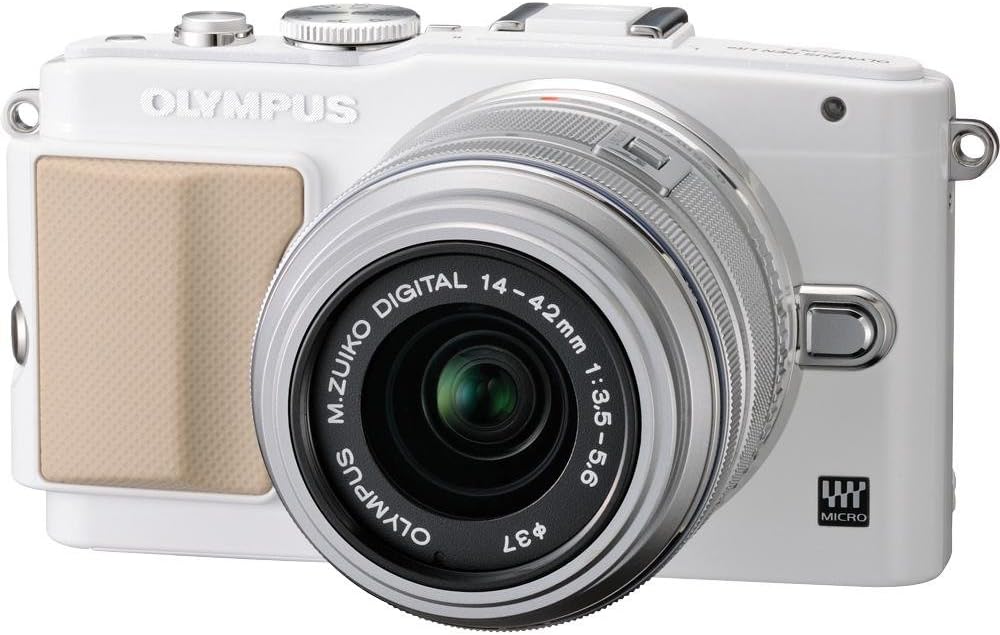
Figure 1: Front view of the Olympus E-PL5 Mirrorless Digital Camera with the 14-42mm lens attached.
2. Setup
2.1 Battery and Memory Card Installation
- Open the battery/memory card cover located on the bottom of the camera.
- Insert the battery with the correct orientation until it clicks into place.
- Insert an SD/SDHC/SDXC memory card into the slot until it clicks. Ensure the card is facing the correct direction.
- Close the cover securely.
2.2 Attaching the Lens
- Remove the body cap from the camera and the rear lens cap from the lens.
- Align the white dot on the lens with the white dot on the camera body.
- Mount the lens by turning it clockwise until it clicks into place.
- Remove the front lens cap.

Figure 2: Front view of the camera, illustrating the lens attachment point.
3. Operation
3.1 Basic Shooting Modes
Turn the mode dial to select your desired shooting mode:
- i-Auto: Intelligent Auto mode for automatic scene detection.
- P (Program Auto): Camera sets aperture and shutter speed for optimal exposure.
- A (Aperture Priority): You control the aperture, camera sets shutter speed.
- S (Shutter Priority): You control the shutter speed, camera sets aperture.
- M (Manual): Full manual control over aperture and shutter speed.
- SCN (Scene Modes): Pre-set modes for specific situations (e.g., Portrait, Landscape).
- ART (Art Filters): Apply creative effects to your photos.
3.2 Using the Touch LCD Screen
The 3.0-inch flip self-portrait touch LCD screen allows for intuitive control:
- Touch Shutter: Tap the screen to focus and take a picture.
- Touch AF: Tap to set the autofocus point.
- Live Guide System: Adjust settings like brightness, color, and background blur by touching on-screen sliders and previewing effects.
- The screen can be tilted for various shooting angles, including self-portraits.

Figure 3: Rear view of the Olympus E-PL5, showing the LCD screen in use.

Figure 4: Side view of the Olympus E-PL5 with its tilting LCD screen extended.
3.3 Recording Video
The E-PL5 supports Full 1080i HD video recording with Art Filter Movie and Effects. To record a video:
- Set the mode dial to the movie recording mode (usually indicated by a film camera icon).
- Press the dedicated movie record button to start and stop recording.
- Utilize the Art Filters for creative video effects.
Video 1: This video showcases the Olympus E-PL5 camera being used in a 72-hour filmmaking challenge, demonstrating its capabilities for video production in various environments.
4. Maintenance
4.1 Cleaning the Camera
- Camera Body: Wipe the camera body with a soft, dry cloth. For stubborn dirt, use a cloth lightly dampened with water. Avoid harsh chemicals.
- Lens: Use a lens brush or blower to remove dust. For smudges, use a specialized lens cleaning solution and a microfiber cloth. Never touch the lens surface with your fingers.
- LCD Screen: Gently wipe the screen with a soft, lint-free cloth. Avoid pressing too hard.
4.2 Storage
When not in use, store the camera in a cool, dry place away from direct sunlight and extreme temperatures. Remove the battery if storing for extended periods to prevent leakage.
5. Troubleshooting
5.1 Common Issues and Solutions
- Camera does not power on: Ensure the battery is fully charged and correctly inserted. Check if the battery contacts are clean.
- Images are blurry: Check if the lens is clean and properly attached. Ensure the autofocus is working correctly or try manual focus. Verify that the shutter speed is appropriate for the lighting conditions to prevent camera shake.
- LCD screen is blank or unresponsive: Press the DISPLAY button to cycle through display modes. If the screen is unresponsive to touch, try restarting the camera. Ensure the screen is not physically damaged.
- Memory card error: Ensure the memory card is inserted correctly and is not full. Try formatting the card (this will erase all data, so back up first). If the issue persists, try a different memory card.
- Flash does not fire: Check if the flash is enabled in the camera settings and if the shooting mode allows flash. Ensure the external flash (if used) is properly mounted and powered.
6. Specifications
| Feature | Detail |
|---|---|
| Model Name | Olympus E-PL5 |
| Photo Sensor Resolution | 16 MP |
| Sensor Type | MOS |
| Compatible Mountings | Micro Four Thirds |
| Image Stabilization | Sensor-shift |
| Lens Type | Zoom (14-42mm) |
| Maximum Aperture | 3.5 f |
| Screen Size | 3 Inches |
| Display Type | LCD, Tilting, Touch Screen |
| Video Resolution | FHD 1080i |
| Supported File Format | RAW, JPEG, RAW+JPEG, MPO(3D still) |
| Flash Memory Type | SD/SDHC/SDXC |
| Connectivity Technology | HDMI, USB, Wireless |
| Item Weight | 0.72 Pounds |
7. Warranty & Support
For detailed warranty information and customer support, please refer to the official Olympus website or contact their customer service directly. Keep your proof of purchase for any warranty claims.
Online resources, FAQs, and software updates may also be available on the Olympus support pages.


