
1. Product Overview
The Bayer Contour Next EZ Blood Glucose Monitoring System is designed for self-testing by individuals with diabetes to measure glucose levels in whole blood. This device is intended for single-patient use and should not be shared. It is suitable for use with fresh fingertip capillary whole blood samples. The system assists in monitoring the effectiveness of your diabetes management program.

Figure 1: Bayer Contour Next EZ Blood Glucose Meter. This image shows the front view of the blood glucose meter, featuring a display screen and control buttons.
Kit Contents:
- Contour Next EZ Meter
- Contour Next Test Strips
- Lancing Device
- Lancets
- User Manual and Quick Reference Guide
- Logbook
- Carrying Case
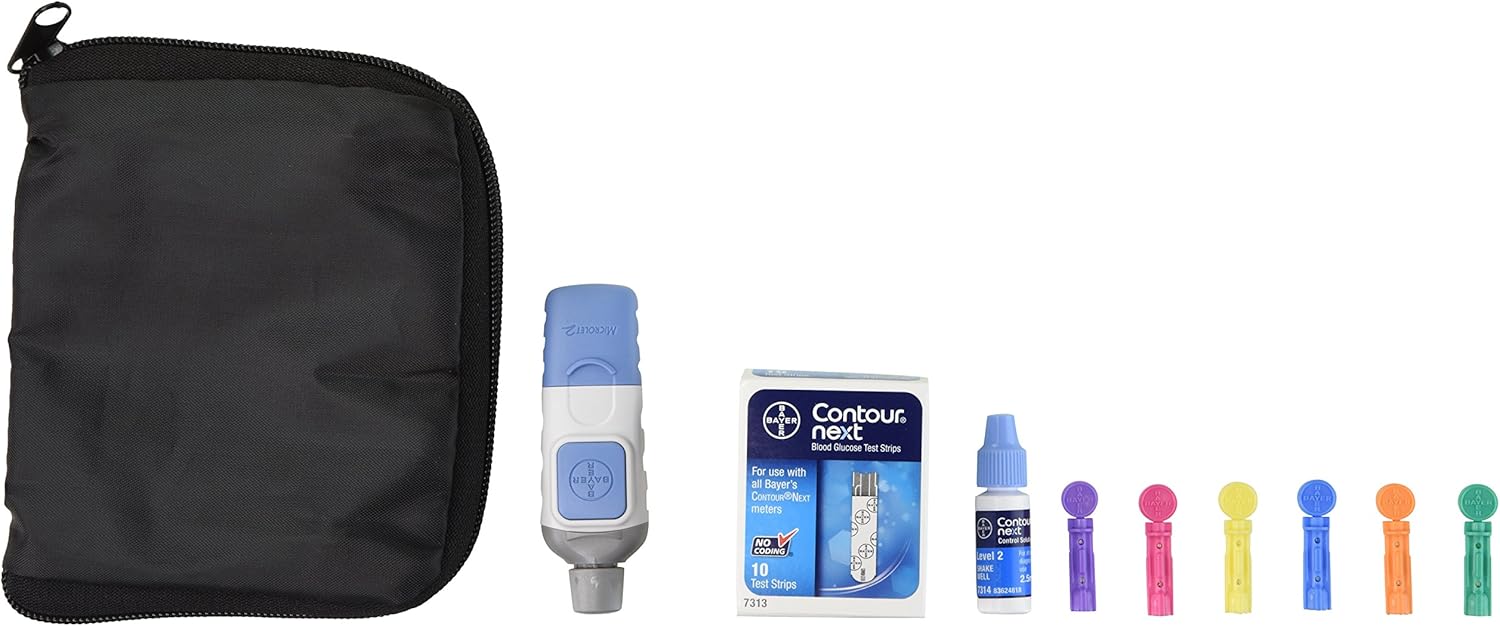
Figure 2: Complete Bayer Contour Next EZ Kit Contents. This image displays all components included in the kit: the meter, lancing device, test strips, lancets, and carrying case.
2. Initial Setup
2.1. Installing Batteries
- Locate the battery compartment on the back of the meter.
- Open the battery compartment cover.
- Insert two CR2032 lithium coin cell batteries, ensuring correct polarity (+/-).
- Close the battery compartment cover securely.
2.2. Setting Up the Lancing Device
- Unscrew the lancing device cap.
- Insert a new lancet firmly into the lancet holder.
- Twist off the protective cap from the lancet.
- Replace the lancing device cap.
- Adjust the penetration depth by rotating the cap. Start with a shallower setting (e.g., 2-3) and adjust as needed for a sufficient blood sample.
- Pull back the cocking control until it clicks, indicating the device is ready.
2.3. Control Solution Test (Recommended)
Before first use, or if you suspect the meter or strips are not working correctly, perform a control solution test. Refer to the control solution instructions for specific target ranges. If the results are outside the specified range, do not use the system and contact customer support.
3. Operating Instructions
3.1. Preparing for a Blood Glucose Test
- Wash your hands thoroughly with warm, soapy water and dry them completely.
- Ensure you have a Contour Next test strip, the lancing device, and the meter ready.
3.2. Performing a Blood Glucose Test
- Insert the grey end of a Contour Next test strip into the meter's test strip port. The meter will turn on automatically.
- When the blood drop symbol flashes, the meter is ready for a blood sample.
- Prick the side of your fingertip with the lancing device. Gently squeeze your finger to form a small drop of blood.
- Touch the tip of the test strip to the blood drop. The blood will be drawn into the strip. Hold until the meter beeps.
- The meter will count down for 5 seconds, then display your blood glucose result.
- Remove the used test strip. The meter will turn off automatically.

Figure 3: Bayer Contour Next EZ Meter with Test Strip Inserted. This image illustrates the meter with a test strip correctly inserted, ready for a blood sample.
3.3. Second-Chance Sampling
If the first blood sample is insufficient, the meter allows for a second application of blood to the same test strip within 30 seconds. This helps prevent wasting test strips.
3.4. Reviewing Results
The meter stores up to 480 test results. Press the 'M' button to review past results. The meter also provides 7, 14, and 30-day averages of your blood glucose levels.
4. Care and Maintenance
4.1. Cleaning the Meter
- Wipe the meter exterior with a soft cloth dampened with water or a mild cleaning solution.
- Do not immerse the meter in water or spray cleaning solutions directly onto it.
4.2. Storing Test Strips
- Store test strips in their original vial with the cap tightly closed.
- Keep strips at room temperature, away from direct sunlight and moisture.
- Do not use expired test strips.
4.3. Disposing of Used Lancets and Test Strips
Always dispose of used lancets and test strips in a puncture-resistant sharps container to prevent accidental needle sticks.
5. Troubleshooting
| Problem | Possible Cause | Solution |
|---|---|---|
| Meter does not turn on. | Dead or incorrectly inserted batteries. | Check battery orientation or replace batteries. |
| Error message on display. | Test strip issue, insufficient blood, or meter malfunction. | Ensure test strip is inserted correctly. Apply sufficient blood. Perform a control solution test. If error persists, contact customer support. |
| Inaccurate results. | Expired test strips, improper storage, or incorrect testing procedure. | Check test strip expiration date. Ensure strips are stored correctly. Review testing steps. Perform a control solution test. |
| Insufficient blood sample. | Lancing device depth too shallow, or finger not squeezed enough. | Adjust lancing device to a deeper setting. Gently squeeze finger to produce a larger blood drop. Utilize Second-Chance sampling. |
6. Technical Specifications
- Model Name: Contour Next EZ
- Item Model Number: 9628
- Measurement Range: Consult device packaging for specific range.
- Sample Size: 0.6 microliters (µL)
- Test Time: 5 seconds
- Memory: Stores up to 480 test results
- Battery Type: Two 3V Lithium Coin Cell (CR2032)
- Battery Life: Approximately 1000 tests
- Operating Temperature: 5°C - 45°C (41°F - 113°F)
- Operating Humidity: 10% - 90% relative humidity
- Dimensions (L x W x H): Approximately 4.9" x 2.9" x 6.6"
- Weight: Approximately 0.01 ounces (excluding batteries)
7. Warranty and Support
7.1. Warranty Information
Bayer warrants this meter to be free from defects in materials and workmanship for a period specified in the warranty card included with your product. This warranty does not cover damage due to misuse, alteration, or failure to follow instructions. Keep your purchase receipt as proof of purchase.
7.2. Customer Support
For technical assistance, questions about your meter, or to report issues, please contact Bayer customer support. Refer to the contact information provided in the product packaging or visit the official Bayer website.


