
Plantronics M165
Plantronics M165 Marque 2 Ultralight Wireless Bluetooth Headset User Manual
Model: M165 | Brand: Plantronics
Introduction
The Plantronics M165 Marque 2 Bluetooth headset is designed for seamless integration with smartphones, offering clear call quality and convenient features. This manual provides essential information for setup, operation, and maintenance of your headset, ensuring you get the most out of your device.
What's in the Box
- Plantronics M165 Marque 2 Bluetooth Headset
- Wall Charger
- Three Sizes of Gel Eartips (Small, Medium, Large)
- Clip-on Earloop
- Quick Start Guide
Product Overview & Features
The Plantronics M165 Marque 2 features advanced technology for an optimal hands-free experience, combining comfort with high-quality audio.

Image: The Plantronics M165 Marque 2 Ultralight Wireless Bluetooth Headset in black, showcasing its sleek design and earloop.

Image: The Plantronics M165 Marque 2 headset comfortably worn in an ear, demonstrating its secure and lightweight fit.
Key Features:
- Dual Microphones: Reduce background and wind noise for clear, crisp call quality.
- DeepSleep Power-Saving Mode: Activates when the headset is away from your phone for over 90 minutes, extending battery readiness up to 180 days.
- Voice Answer: Manage calls hands-free by simply saying "Answer" or "Ignore" when an incoming call is announced.
- Audio Streaming (A2DP): Listen to music, podcasts, or GPS directions directly from your smartphone.
- Multipoint Pairing: Connect to two phones simultaneously and answer calls from either device.
- Comfortable Fit: Includes three sizes of gel eartips and an optional earloop for a customized and secure fit in either ear.
- Find MyHeadset App: For Android users (OS 3.0 or later), this app helps acoustically locate your misplaced headset and monitor its battery level.
Setup
Charging the Headset:
- Connect the wall charger to the headset's charging port.
- Allow the headset to fully charge before first use. The indicator light will change (e.g., from red to blue or off) when charging is complete.
Pairing with Your Smartphone:
- Ensure your headset is charged and turned off.
- Activate Bluetooth on your smartphone.
- Put the headset into pairing mode. Typically, this involves holding the Call button until the indicator light flashes red and blue.
- On your smartphone, search for Bluetooth devices and select "Plantronics M165" or "Marque 2" from the list.
- If prompted, enter the passcode "0000" (four zeros).
- A voice prompt from the headset will confirm successful pairing.
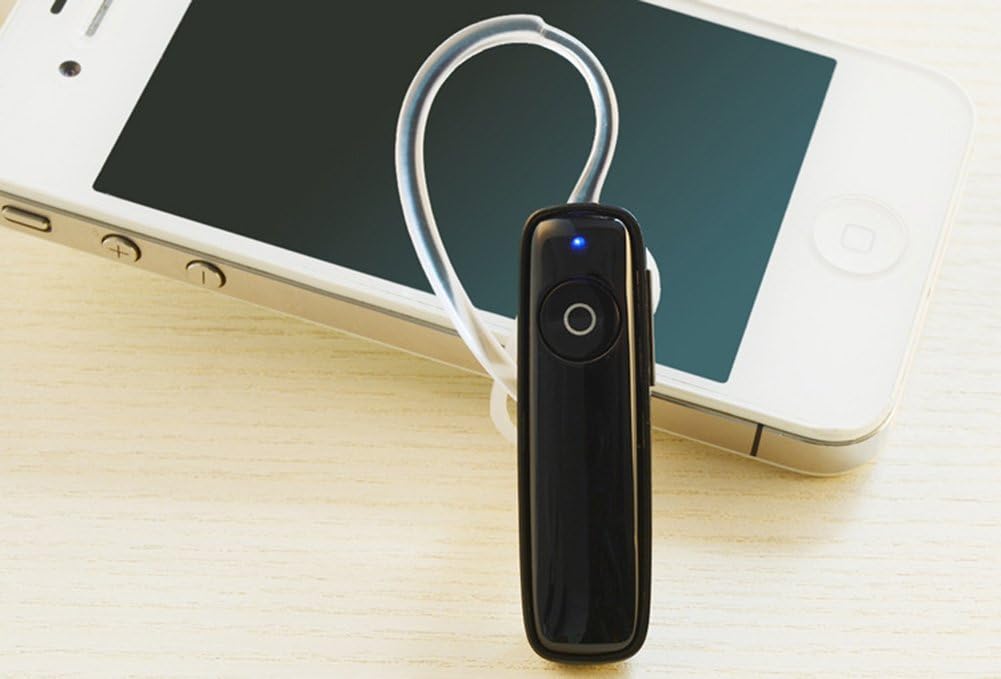
Image: The Plantronics M165 Marque 2 headset positioned next to an iPhone, illustrating its seamless connectivity.

Image: The Plantronics M165 Marque 2 headset surrounded by logos of various smartphone brands, indicating broad compatibility.
Operating the Headset
Basic Controls:
- Power On/Off: Press and hold the Call button until you hear "Power On" or "Power Off."
- Answer/End Call: Press the Call button once.
- Voice Answer: When an incoming call is announced, say "Answer" to accept or "Ignore" to decline.
- Volume Control: Use the dedicated volume buttons on the side of the headset to adjust audio levels.
- Redial Last Number: Double-tap the Call button.
DeepSleep Mode:
The headset automatically enters DeepSleep mode if it is out of range from your phone for more than 90 minutes. This conserves battery life. To "wake" it up, simply tap the Call button when it's back in range (within 33 feet).
Using the Find MyHeadset App:
For Android users (OS 3.0 or later), download the Plantronics Find MyHeadset app from the Google Play Store. This app allows you to:
- Acoustically locate your headset by sending a tone through it.
- View the headset's battery meter directly in your phone's notification bar.
Video: An official Plantronics video demonstrating key features and usage of the Marque 2 headset, including its design and functionality.
Maintenance
- Keep the headset clean by wiping it with a soft, dry cloth. Avoid abrasive cleaners.
- Avoid exposing the headset to extreme temperatures, direct sunlight, or excessive moisture.
- Store the headset in a cool, dry place when not in use.
- Use only the provided charger or a compatible charger to prevent damage to the battery and headset.
- Regularly check and clean the eartips to ensure optimal sound quality and hygiene.
Troubleshooting
Headset not pairing:
- Ensure the headset is in pairing mode (flashing indicator light).
- Turn off and then on your phone's Bluetooth.
- Delete any previous pairings of the headset from your phone's Bluetooth list and try pairing again.
- Ensure the headset has sufficient battery charge.
Poor audio quality:
- Ensure the headset is within range of your phone (typically up to 33 feet or 10 meters).
- Check for physical obstructions between the headset and phone that might interfere with the Bluetooth signal.
- Adjust the volume on both the headset and your phone.
- Ensure the eartip is properly seated in your ear for optimal sound delivery.
Battery not holding charge:
- Ensure the charger is properly connected to both the headset and the power source.
- Try a different power outlet or USB port.
- If the issue persists, the battery may have reached the end of its lifespan and may require service or replacement.
Specifications
| Feature | Detail |
|---|---|
| Model Name | M165 |
| Connectivity Technology | Bluetooth 3.0 |
| Bluetooth Profiles | A2DP, HFP, HSP |
| Talk Time | Up to 7 hours |
| Standby Time | Up to 11 days |
| DeepSleep Battery Readiness | Up to 180 days |
| Item Weight | 7 grams (0.25 ounces) |
| Dimensions | 1.94 x 0.55 x 0.36 inches |
| Noise Control | Active Noise Cancellation (Dual Mic) |
| Compatible Devices | iPhone, Android, and other leading smartphones |
Warranty & Support
For detailed warranty information, product registration, and further technical support, please visit the official Plantronics website or contact their customer service department. A digital version of this user manual is also available for download:
Related documentsM165


Ask a question about this manual
Ask about setup, troubleshooting, compatibility, parts, safety, or missing instructions. Manuals+ will review the question and use this page’s manual context to help answer it.