
1. Introduction
The Marantz UD7007 is a universal disc player designed for high-quality video and audio playback. It supports Blu-ray discs, DVDs, and CDs, as well as high-resolution audio formats like Super Audio CDs and DVD-Audio. This player also offers internet entertainment streaming capabilities through its network connection.
The UD7007 incorporates Marantz's HDAM SA2 (Hyper Dynamic Amplifier Modules) in its analog audio circuitry and features balanced output terminals for enhanced sound quality. The unit's construction is engineered to minimize interference and vibrations, contributing to its performance.
2. Key Features
- Universal Disc Playability: Supports Blu-ray, DVD Audio, DVD Video, Super Audio CD, and CD formats.
- Dual HDMI Outputs: Two HDMI outputs with separated audio and video signal transport (Pure AV Direct mode).
- High-Performance 2-Channel Audio: Features HDAM via balanced and RCA outputs.
- Network Streaming: Access to various online video and music services including YouTube, Netflix, Vudu, and Hulu Plus.
- Quick Response: Fast disc loading and playback, with a Quick Start Mode for even quicker operation.
- DLNA 1.5 Support: For photo, video, and music streaming from a networked PC.
- USB Port: For content streaming from USB drives and other removable storage media.
- Supported Digital Formats: MP3, WMA, AAC, WAV, FLAC, JPEG, PNG, DivX, MPEG, WMV, and AVI.
3. Setup and Connections
3.1 Unpacking
Carefully remove the UD7007 player and all accessories from the packaging. Retain the packaging for future transport or storage.
3.2 Front Panel Overview
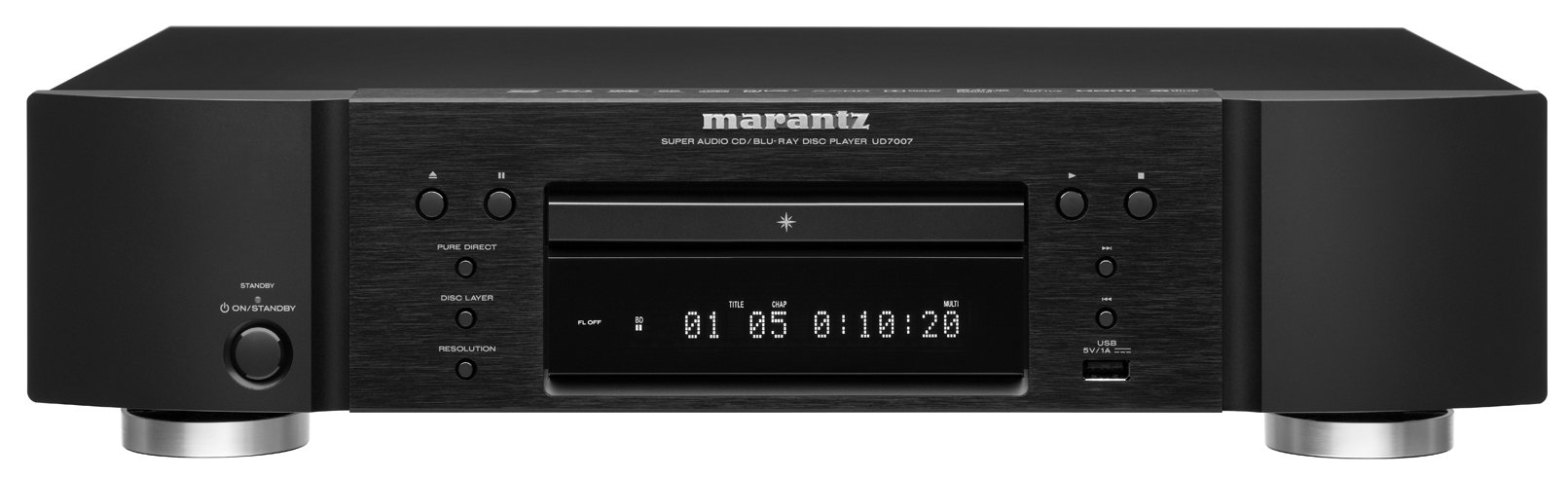
Figure 3.2.1: Front view of the Marantz UD7007 Universal Disc Player. This image shows the disc tray, display, control buttons, and power button on the front panel.
3.3 Rear Panel Connections
Before making any connections, ensure the player and all connected devices are powered off.

Figure 3.3.1: Rear panel of the Marantz UD7007, displaying various input and output ports including HDMI, analog audio, digital audio, Ethernet, and remote control jacks.
3.3.1 Video Connections (HDMI)
- Connect an HDMI cable from one of the player's HDMI OUT ports to an HDMI input on your TV or AV receiver.
- The UD7007 features two HDMI outputs, allowing for separate audio and video signal routing if desired.
3.3.2 Audio Connections
- Analog Audio: For stereo audio, connect RCA cables from the player's ANALOG AUDIO OUT (L/R) to the corresponding inputs on your amplifier or receiver. For balanced audio, use XLR cables from the BALANCED OUT (L/R).
- Digital Audio: Connect an optical or coaxial digital cable from the player's DIGITAL AUDIO OUT to your AV receiver or DAC for multi-channel audio.
3.3.3 Network Connection
- Connect an Ethernet cable from the player's NETWORK port to your home router or network switch. This enables access to online streaming services and DLNA features.
3.3.4 USB Connection
- A USB port is located on the front panel for connecting USB storage devices.
3.4 Power Connection
After all other connections are made, connect the supplied power cord to the AC IN terminal on the rear of the player and then to a wall outlet.
4. Basic Operation
4.1 Powering On/Off
Press the STANDBY/ON button on the front panel or the remote control to power the unit on or off.
4.2 Disc Playback
- Press the OPEN/CLOSE button to open the disc tray.
- Place a disc gently onto the disc tray with the label side facing up.
- Press the OPEN/CLOSE button again to close the tray.
- Playback will typically start automatically. If not, press the PLAY button.
4.3 Remote Control Functions

Figure 4.3.1: The remote control for the Marantz UD7007, featuring glowing keys for easier operation in low light conditions.
The remote control provides access to all player functions. Key buttons include:
- Power (Standby/On): Turns the player on or off.
- Disc Tray (Open/Close): Opens and closes the disc tray.
- Playback Controls: Play, Pause, Stop, Fast Forward, Rewind, Skip.
- Navigation: Arrow keys and ENTER for menu navigation.
- SETUP: Accesses the main settings menu.
- HOME: Returns to the main home menu for streaming services.
- RESOLUTION: Adjusts video output resolution.
- Dedicated buttons for streaming services like Netflix, YouTube, Hulu, and Vudu.
4.4 Network Streaming
Ensure the player is connected to your network via Ethernet. From the Home Menu, select the desired streaming service.
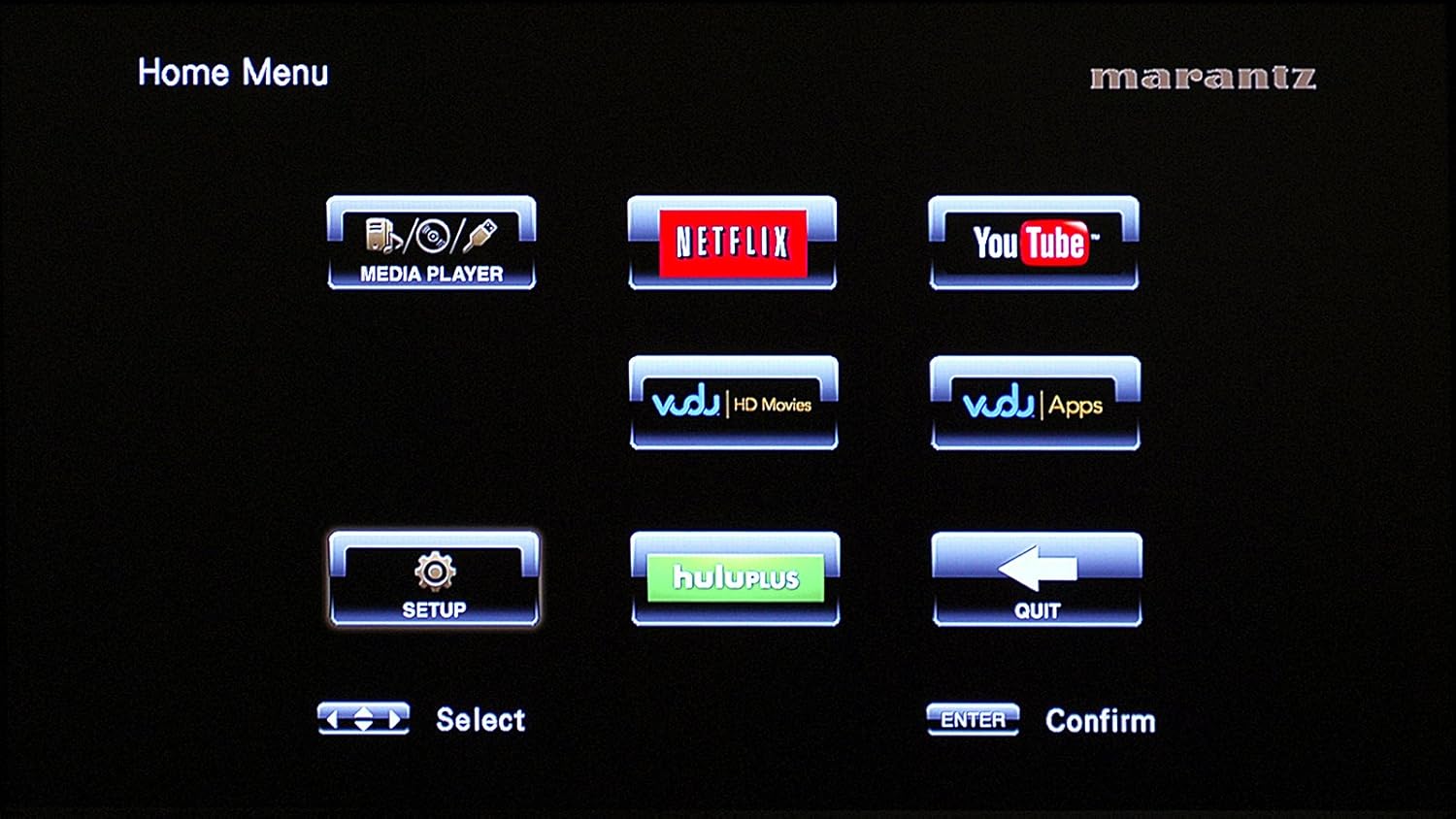
Figure 4.4.1: The Home Menu interface of the UD7007, showing options for Media Player, Netflix, YouTube, Vudu, Hulu Plus, and Setup.
5. Settings Menu Navigation
Press the SETUP button on the remote control to access the main settings menu.
5.1 General Settings

Figure 5.1.1: The General Settings menu, providing options for System, Language, Parental Control, Network, and Others.
This section allows you to configure system-wide options, language preferences, parental controls, and network settings.
5.2 Video Settings

Figure 5.2.1: The Video Settings menu, offering adjustments for TV, HDMI, and 3D display options.
Adjust video output parameters, HDMI settings, and 3D display options here. The HDMI source-direct mode allows content to be displayed in its native resolution.
5.3 Audio Settings

Figure 5.3.1: The Audio Settings menu, where users can configure Audio Output (HDMI, Bitstream) and Dynamic Range Control.
Configure audio output settings, including HDMI audio format (e.g., Bitstream) and dynamic range control.
6. Maintenance
6.1 Cleaning the Unit
- Wipe the exterior of the player with a soft, dry cloth.
- Do not use abrasive cleaners, waxes, or solvents as they may damage the finish.
- Ensure the unit is unplugged before cleaning.
6.2 Disc Care
- Handle discs by their edges to avoid fingerprints.
- Store discs in their cases when not in use to prevent scratches and dust accumulation.
- Clean dirty discs with a soft, lint-free cloth, wiping from the center outwards.
7. Troubleshooting
7.1 No Power
- Check if the power cord is securely connected to both the player and the wall outlet.
- Verify that the wall outlet is functional by plugging in another device.
7.2 No Picture
- Ensure the HDMI cable is correctly connected to both the player and the TV/receiver.
- Select the correct input source on your TV or AV receiver.
- Check the video output settings in the player's setup menu.
7.3 No Sound
- Verify all audio cables (HDMI, RCA, optical, coaxial) are securely connected.
- Ensure the correct audio input is selected on your amplifier or receiver.
- Check the audio output settings in the player's setup menu.
- Confirm that the volume on your amplifier/receiver is not muted or set too low.
7.4 Disc Not Playing / Disc Tray Issues
- Ensure the disc is clean and free of scratches.
- Verify the disc is inserted correctly with the label side up.
- Check if the disc format is supported by the player.
- If the disc tray does not open or close, ensure no obstructions are present.
7.5 Network Connection Issues
- Confirm the Ethernet cable is securely connected.
- Restart your router and modem.
- Check network settings in the player's setup menu to ensure proper configuration (e.g., IP address, DNS).
8. Specifications
| Model Name | UD7007 |
| Product Dimensions (W x H x D) | 17.32 x 4.31 x 12.11 inches (440 x 109.5 x 307.5 mm) |
| Item Weight | 15.9 pounds (7.2 kg) |
| Media Type | Blu-Ray Disc, CD, DVD, Super Audio CD, DVD-Audio |
| Resolution | Up to 1080p (1920x1080) |
| Connector Type | HDMI, RCA, XLR, Optical, Coaxial, Ethernet, USB |
| Connectivity Technology | Ethernet, HDMI, RCA, USB |
| Audio Output Mode | Surround, Stereo (Analog, Balanced) |
| Manufacturer | Marantz |
| Date First Available | September 5, 2012 |
9. Warranty Information
The Marantz UD7007 Universal Disc Player is backed by a 3-year limited warranty. For detailed terms and conditions, please refer to the warranty card included with your product or contact Marantz customer support.
10. Customer Support
For further assistance, technical support, or service inquiries, please visit the official Marantz website or contact their customer service department. Contact information can typically be found in the product packaging or on the Marantz website.


