
Hormann GOODLUCKFAIRY
Hormann SupraMatic P Series 4 BiSecur Garage Door Opener User Manual
Model: GOODLUCKFAIRY
1. Introduction
This manual provides essential information for the installation, operation, and maintenance of your Hormann SupraMatic P Series 4 BiSecur garage door opener. Please read this manual thoroughly before beginning installation or operation to ensure safe and efficient use of the product.
The Hormann SupraMatic P Series 4 BiSecur is a high-quality garage door operator designed for residential use, offering advanced features such as soft start and stop, integrated lighting, and enhanced security through obstacle detection and BiSecur technology.
2. Safety Instructions
WARNING: Failure to follow these safety instructions may result in serious injury or property damage. Keep this manual for future reference.
- Ensure all installation and maintenance work is performed by qualified personnel.
- Disconnect power to the garage door opener before performing any maintenance or repairs.
- Keep children and pets away from the garage door area, especially during operation.
- Do not operate the garage door opener if it is damaged or malfunctioning.
- Regularly inspect the garage door system, including springs, cables, rollers, and hinges, for signs of wear or damage.
- The integrated light barrier (photocell) must be installed and functioning correctly to ensure obstacle detection safety.
- This product is designed for dry indoor environments only, with a temperature range of -20 °C to 60 °C.

Figure 2.1: Control panel showing a warning symbol and Bluetooth button. This panel is crucial for programming and monitoring the opener's status.
3. Package Contents
Verify that all components listed below are present in your package:
- SupraMatic P Series 4 Drive Head
- HS 5 BiSecur Hand Transmitter (868 MHz)
- Integrated Bidirectional 3-channel BiSecur Receiver (868 MHz)
- EL 101 Light Barrier (Photocell)
- K-rail (Drive Rail)
- Mounting Hardware (screws, anchors, brackets, connecting arm)
- Quick Release Mechanism for manual operation
- Installation Manual with Assembly Diagram

Figure 3.1: Included mounting hardware and quick release mechanism. These components are essential for securing the opener and enabling manual operation.

Figure 3.2: The main drive unit and the HS 5 BiSecur hand transmitter. This image shows the primary components of the system.
4. Setup and Installation
Installation of the SupraMatic P Series 4 requires careful attention to detail. Refer to the detailed installation manual provided in the package for specific steps and diagrams.
4.1 Mounting the Drive Unit and Rail
The drive unit should be securely mounted to the garage ceiling, centered above the garage door. The K-rail, which houses the chain mechanism, connects the drive unit to the door. Ensure the rail is level and properly aligned with the door's movement path.

Figure 4.1: Installed garage door opener. The drive unit is mounted to the ceiling, and the rail extends towards the garage door, connecting to it via an arm.
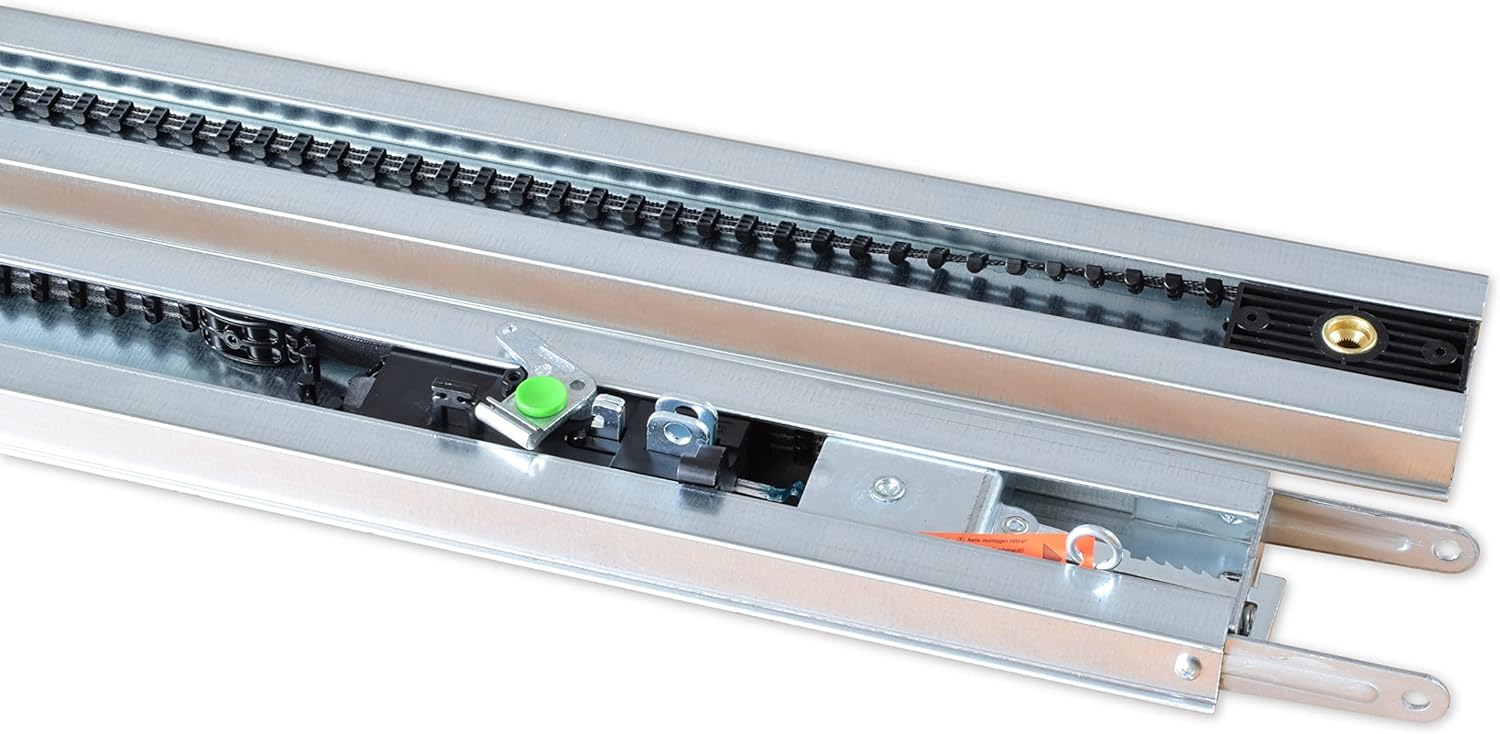
Figure 4.2: Detail of the chain drive mechanism within the K-rail. This mechanism is responsible for the smooth movement of the garage door.
4.2 Electrical Connection
Connect the opener to a standard 230 V - 240 V AC power supply. Ensure the power outlet is easily accessible and properly grounded. Refer to the wiring diagram in the installation manual for correct connections.
4.3 Installing the Light Barrier (Photocell)
The EL 101 light barrier is a critical safety component. Install the transmitter and receiver units on opposite sides of the garage door opening, approximately 15-20 cm above the floor. Ensure they are perfectly aligned so the beam is not interrupted. This system detects obstacles in the door's path and prevents the door from closing, enhancing safety.
4.4 Initial Programming
After physical installation, the opener needs to be programmed to learn the door's travel limits. Follow the instructions in the manual for setting the open and close positions, and for programming the hand transmitter. The control panel on the drive unit (Figure 2.1) will guide you through the programming steps.

Figure 4.3: Detailed view of the control panel. This panel is used for programming, status display, and manual control of the opener.
5. Operating Instructions
Your Hormann SupraMatic P Series 4 BiSecur opener offers convenient and secure operation.
5.1 Using the Hand Transmitter (Remote Control)
The HS 5 BiSecur hand transmitter allows you to open and close your garage door wirelessly. Press the designated button to activate the opener. The BiSecur technology provides enhanced security against code grabbing.
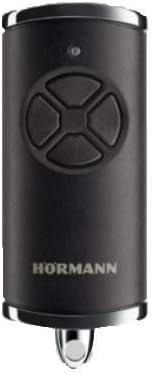
Figure 5.1: The HS 5 BiSecur hand transmitter. This remote control uses secure BiSecur technology for reliable operation.
5.2 Integrated Bluetooth Functionality
The integrated Bluetooth allows for control via a compatible smartphone app. Refer to the manufacturer's website or app store for the official Hormann app and pairing instructions. This feature provides an alternative control method and may offer additional functionalities.
5.3 Special Features
- Soft Start and Stop: The opener features a gentle acceleration and deceleration, reducing wear on the door and the operator, and ensuring quiet operation.
- Automatic Obstacle Detection: If an obstacle is detected by the light barrier or if the door encounters resistance during closing, the door will automatically reverse to the open position.
- Adjustable Hold-Open Time: The door can be programmed to remain open for a set period (30-180 seconds) after activation.
- Integrated Garage Lighting: The opener includes built-in lighting that illuminates the garage for a set duration (default 1 minute) after operation.
- Second Opening Height: This feature allows the door to open to a partial height, useful for ventilation without fully opening the garage. Consult the programming section of the detailed manual for setup.
- Quick Release: In case of power failure, use the quick release mechanism (Figure 3.1) to manually open or close the garage door.
6. Maintenance
Regular maintenance ensures the longevity and safe operation of your garage door opener. Perform the following checks periodically:
- Monthly: Test the safety reversal system by placing an object (e.g., a 2x4 piece of wood) in the door's path. The door should reverse upon contact. If it does not, discontinue use and contact a qualified technician.
- Monthly: Check the light barrier (photocell) for proper alignment and cleanliness. Ensure the indicator lights are on and the door reverses if the beam is interrupted.
- Annually: Inspect all moving parts of the garage door (springs, cables, rollers, hinges) for wear and tear. Lubricate moving parts as recommended by your garage door manufacturer.
- Annually: Check the chain tension. The toothed belt drive is designed to be low-maintenance, but ensure there is no excessive slack.
- Keep the drive unit and rail clean and free of debris.
- Do not attempt to repair the drive unit yourself. Contact a qualified service technician for any internal repairs.
7. Troubleshooting
If you encounter issues with your garage door opener, refer to the following common troubleshooting steps:
| Problem | Possible Cause | Solution |
|---|---|---|
| Opener does not respond to remote. | Dead remote battery, remote out of range, remote not programmed, power outage. | Replace remote battery. Move closer to opener. Reprogram remote. Check power supply to opener. |
| Door reverses unexpectedly or does not close. | Light barrier obstructed or misaligned, obstacle in door path, force settings too low. | Clear obstruction from light barrier and door path. Clean and align photocells. Adjust force settings (refer to manual). |
| Door opens partially then stops. | Travel limits not set correctly, "second opening height" activated. | Reprogram travel limits. Deactivate "second opening height" if not desired. |
| Opener makes noise but door does not move. | Door disengaged from opener (quick release activated), broken spring. | Check if quick release is engaged. Do not operate with broken springs; contact a professional. |
For more complex issues or if the problem persists, consult the full installation manual or contact Hormann customer support.
8. Specifications
- Model: Hormann SupraMatic P Series 4 BiSecur
- Motor Type: 24 V DC geared motor
- Mains Connection: 230 V - 240 V AC
- Power Consumption: 0.2 kW (operating), <1 W (standby)
- Traction Force: Up to 750 N
- Peak Force: Up to 1000 N
- Opening Speed: Max. 22 cm/s
- Max. Door Width: 5500 mm
- Max. Door Cycles: 50 cycles per day
- Housing Material: Plastic and aluminum, galvanized steel base
- Temperature Range: -20 °C to 60 °C
- Included Hand Transmitter: HS 5 BiSecur (868 MHz)
- Included Light Barrier: EL 101
- Connectivity: Integrated BiSecur receiver, Bluetooth
- Weight: Approximately 4.6 kg
9. Warranty and Support
For specific warranty terms and conditions, please refer to the documentation included with your product or visit the official Hormann website. Warranty periods and coverage may vary based on region and purchase date.
For technical support, spare parts, or service inquiries, please contact your authorized Hormann dealer or the manufacturer's customer service department. Keep your proof of purchase and product model number (GOODLUCKFAIRY) ready when contacting support.
Related documentsGOODLUCKFAIRY


Ask a question about this manual
Ask about setup, troubleshooting, compatibility, parts, safety, or missing instructions. Manuals+ will review the question and use this page’s manual context to help answer it.