
1. Introduction
The Bose SoundLink Air Digital Music System provides high-quality audio playback through Apple AirPlay technology. This system allows you to stream music wirelessly from your Apple devices (iPhone, iPod touch, iPad) or a computer running iTunes over your home wireless network. Designed for versatility, it delivers clear, room-filling sound in a compact form factor.
Key features include:
- Full, lifelike sound from a compact system.
- Wireless music streaming via Apple AirPlay.
- Infrared remote control for system volume and basic Apple device functions.
- Auxiliary input for connecting non-AirPlay compatible devices.

Image 1: Front view of the Bose SoundLink Air Digital Music System with its remote control.
2. What's in the Box
Verify that all components are present in the packaging:
- SoundLink Air Digital Music System
- Remote control (battery pre-installed)
- USB cable
- Power supply with 8-foot (2.43 m) cord
3. Setup
Follow these steps to set up your SoundLink Air system:
- Connect Power: Plug the power supply into the system and then into a wall outlet. The power supply features interchangeable prongs for international travel, eliminating the need for bulky converters.
- Initial Configuration (Wi-Fi Setup):
- Connect the SoundLink Air system to a computer using the included USB cable.
- Open a web browser on your computer and navigate to the Bose setup website (refer to the quick start guide for the specific URL).
- Follow the on-screen instructions to configure your system's connection to your home wireless network. This process will guide you through entering your Wi-Fi network name and password.
- Placement: Once configured, you can place the system anywhere within range of your home Wi-Fi network.

Image 2: A user interacting with an iPhone, likely during the AirPlay setup or music selection process for the SoundLink Air system.
4. Operating the System
The SoundLink Air system offers multiple ways to enjoy your music.
4.1. AirPlay Streaming
After successful Wi-Fi setup, you can stream audio wirelessly:
- From Apple Devices: On your iPhone, iPod touch, or iPad, open a music application. Look for the AirPlay icon (⌘) and select your SoundLink Air system from the list of available devices.
- From iTunes (Computer): On a computer running iTunes, select the AirPlay icon (⌘) and choose your SoundLink Air system. You can also select "Multiple Speakers" to stream to additional SoundLink Air systems or other AirPlay-enabled devices networked to your computer.
You retain full use of your Apple device while streaming music.
4.2. Auxiliary Input
To connect devices that do not support AirPlay:
- Locate the auxiliary input port on the back of the SoundLink Air system.
- Connect your audio device using a standard 3.5mm audio cable (not included).
- The system will automatically switch to the auxiliary input when a signal is detected.

Image 3: Rear view of the SoundLink Air system, highlighting the auxiliary input and power connection ports.
4.3. Remote Control
Use the included remote control to manage basic functions:
- Power: Turn the system on or off.
- Volume: Adjust the audio output level.
- Playback: Control basic Apple device functions like play/pause and track navigation (if supported by the streaming application).
Volume can also be adjusted using buttons on the system itself or directly from your streaming device.

Image 4: The Bose SoundLink Air Digital Music System positioned in a modern living space, demonstrating its compact design.
5. Maintenance
To ensure the longevity and optimal performance of your SoundLink Air system:
- Cleaning: Wipe the exterior surfaces with a soft, dry cloth. Avoid using liquid cleaners or solvents.
- Placement: Position the system on a stable, flat surface away from direct sunlight, heat sources, and excessive moisture. Ensure adequate ventilation around the unit.
- Storage: If storing the system for an extended period, disconnect it from power and store it in a cool, dry place.
6. Troubleshooting
If you encounter issues with your SoundLink Air system, refer to the following common solutions:
- No Sound:
- Ensure the system is powered on and the volume is not muted or set too low.
- Verify that the correct input source (AirPlay or Auxiliary) is selected.
- Check the volume on your streaming device.
- AirPlay Connection Drops or Intermittent Audio:
- Confirm your SoundLink Air system is within range of your Wi-Fi router.
- Check your Wi-Fi network's stability. Other devices experiencing network issues may indicate a router problem.
- Restart your Wi-Fi router, your streaming device, and the SoundLink Air system.
- Minimize interference from other wireless devices (e.g., microwaves, cordless phones).
- System Not Appearing in AirPlay List:
- Ensure the system is powered on and connected to your Wi-Fi network. The LED interface should indicate network connection status.
- Verify your Apple device or computer is on the same Wi-Fi network as the SoundLink Air system.
- Perform a factory reset if issues persist (refer to the Bose support website for specific instructions).
7. Specifications
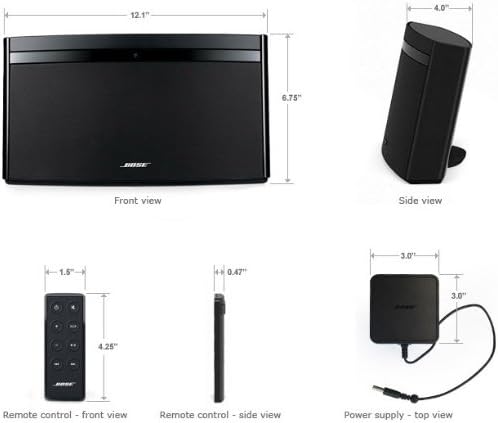
Image 5: Dimensional diagram of the SoundLink Air system, its remote control, and power supply.
| Feature | Detail |
|---|---|
| Model Name | SoundLink Air Digital Music System |
| Model Number | 350160-1100 |
| Brand | Bose |
| Connectivity Technology | AirPlay over Wi-Fi, Auxiliary, USB |
| Audio Output Mode | Stereo |
| Speaker Type | Portable |
| Special Feature | Lightweight, Touch Control |
| Recommended Uses | For Music Players |
| Compatible Devices | iPhone, iPod touch, iPad, computers running iTunes |
| Product Dimensions (D x W x H) | 14.4" x 14.4" x 8.5" (approx. 36.6 cm x 36.6 cm x 21.6 cm) |
| Item Weight | 4.67 pounds (approx. 2.12 kg) |
| Control Method | Remote, On-device buttons, Streaming device |
| Power Source | AC Power (Optional rechargeable battery sold separately) |
| UPC | 017817581738 |
8. Warranty and Support
The Bose SoundLink Air Digital Music System comes with a limited warranty. For specific details regarding warranty coverage, duration, and terms, please refer to the warranty card included with your product or visit the official Bose website.
For technical support, troubleshooting assistance, or service inquiries, please contact Bose customer support through their official website or the contact information provided in your product documentation.
Online Resources: For the latest information, FAQs, and software updates, visit the Bose support section on their official website.


