
Introduction
About the Neumann TLM 103
The Neumann TLM 103 is a large diaphragm, cardioid condenser microphone. It is recognized for its balanced performance and extremely low self-noise, making it suitable for various recording, broadcast, and production applications. The microphone features the K 103 Capsule, based on the K 87 capsule found in the Neumann U 67 and U 87 microphones. This capsule provides a flat frequency response, ensuring accurate sound reproduction. Neumann's transformer-less output stage contributes to low noise output, even at minimal levels, and its balanced output maximizes gain while maintaining a low noise floor. The cardioid polar pattern effectively isolates the primary sound source.
What's in the Box
The Neumann TLM 103-MT-Set typically includes the following components:
- Neumann TLM 103 Condenser Microphone
- Shock Mount (EA 1)
- Aluminum Case
- Warranty Card

Image: The Neumann TLM 103 microphone and its shock mount neatly packed within a protective aluminum case.
Setup
Connecting the Microphone
The TLM 103 is a condenser microphone and requires 48V phantom power to operate. Connect the microphone to an audio interface or mixer using a standard XLR cable. Ensure your audio interface or mixer is capable of supplying 48V phantom power and that this feature is activated.
Mounting the Microphone
The microphone can be mounted using the included shock mount. The shock mount helps to isolate the microphone from vibrations and handling noise, which can otherwise be transmitted through the microphone stand. Securely attach the shock mount to a compatible microphone stand.
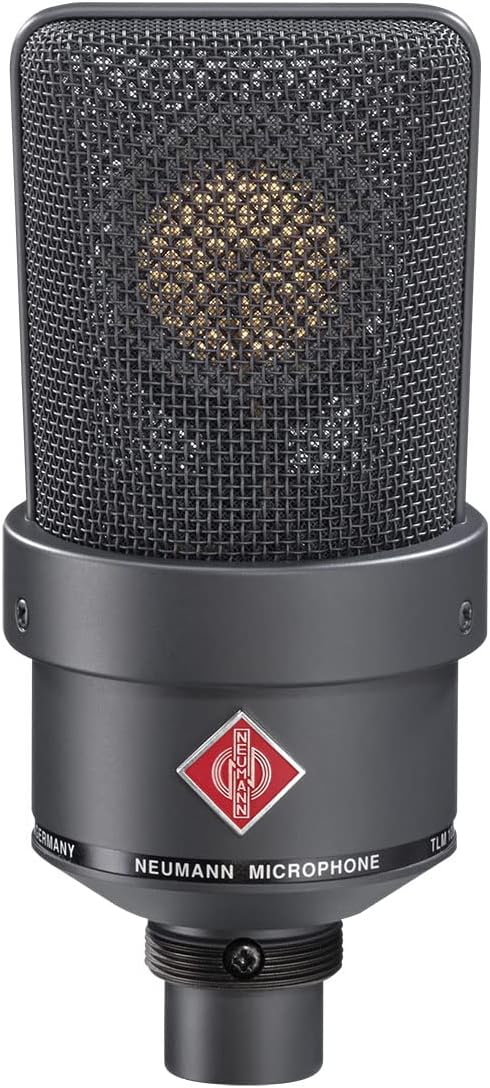
Image: A close-up view of the Neumann TLM 103 condenser microphone, showcasing its black finish and grille.

Image: The Neumann EA 1 shock mount, designed to securely hold the TLM 103 microphone and reduce vibrations.
Operating Instructions
Polar Pattern
The Neumann TLM 103 features a fixed cardioid polar pattern. This pattern is most sensitive to sounds coming from the front of the microphone and rejects sounds from the sides and rear. This characteristic makes it ideal for isolating a single sound source, such as a vocalist or an instrument, in a studio environment.
Optimal Placement
For vocal recordings, position the microphone approximately 6-12 inches (15-30 cm) from the sound source. Experiment with distance and angle to achieve the desired tone and minimize plosives. For instrument recording, place the microphone to capture the instrument's natural sound, considering its acoustic properties and the desired stereo image if applicable.
Phantom Power Activation
Before connecting or disconnecting the microphone, ensure that 48V phantom power is turned off on your audio interface or mixer. Once the microphone is securely connected, activate the phantom power. Always deactivate phantom power before disconnecting the microphone to prevent potential damage to the equipment.
Key Features
- Large Diaphragm: Captures a wide frequency range with detailed sound.
- Cardioid Polar Pattern: Excellent for isolating sound sources and reducing background noise.
- Low Self-Noise: Ensures clean recordings with minimal inherent microphone noise.
- Flat Frequency Response: Provides accurate and natural sound reproduction.
- Transformer-less Circuitry: Contributes to a low noise floor and high output gain.
- High Sound Pressure Level (SPL) Capability: Suitable for recording loud sources without distortion.
- Robust Aluminum Construction: Durable and reliable for studio use.
Technical Specifications
| Specification | Value |
|---|---|
| Brand | Neumann |
| Model Name | TLM 103 MT MONO SET |
| Microphone Form Factor | Large Diaphragm |
| Polar Pattern | Unidirectional (Cardioid) |
| Connectivity Technology | XLR |
| Connector Type | XLR |
| Frequency Response | 20 Hz - 20 kHz |
| Audio Sensitivity | 76 Decibels |
| Signal-to-Noise Ratio | 7 dB |
| Power Source | Corded Electric (48V Phantom Power) |
| Material | Aluminum |
| Color | Black |
| Item Weight | 8.13 pounds |
| Product Dimensions (L x W x H) | 13.9 x 6.6 x 16.1 inches |
| Recommended Uses | Singing, Streaming |
| Compatible Devices | Personal Computer, Laptop |
Maintenance
To ensure the longevity and optimal performance of your Neumann TLM 103 microphone, follow these maintenance guidelines:
- Cleaning: Gently wipe the microphone body with a soft, dry cloth. Avoid using liquid cleaners or solvents, as these can damage the finish or internal components. Do not attempt to clean the microphone grille or capsule directly.
- Storage: When not in use, store the microphone in its original aluminum case to protect it from dust, moisture, and physical damage. Ensure the microphone is completely dry before storage.
- Handling: Handle the microphone with care. Avoid dropping it or subjecting it to strong impacts, as this can affect its delicate internal components and sound quality.
- Environment: Operate and store the microphone in a stable environment, away from extreme temperatures, high humidity, and strong magnetic fields.
Troubleshooting
If you encounter issues with your Neumann TLM 103 microphone, consider the following common troubleshooting steps:
- No Sound Output:
- Verify that 48V phantom power is activated on your audio interface or mixer.
- Check all XLR cable connections to ensure they are secure and undamaged.
- Confirm that the input gain on your audio interface or mixer is set appropriately.
- Test with a different XLR cable or audio input channel if available.
- Distorted Sound:
- Reduce the input gain on your audio interface or mixer to prevent clipping.
- Increase the distance between the sound source and the microphone if the source is excessively loud.
- Ensure no other audio processing (e.g., compression, EQ) is causing unintended distortion.
- Excessive Noise/Hum:
- Check for proper grounding of all audio equipment.
- Ensure XLR cables are not running parallel to power cables, which can induce hum.
- Minimize electromagnetic interference from other electronic devices.
Warranty and Support
The Neumann TLM 103-MT-Set includes a warranty card. Please refer to the warranty card for specific terms, conditions, and duration of the manufacturer's warranty. For technical support, service, or further inquiries, please contact Neumann customer service or visit their official website. Retain your proof of purchase for any warranty claims.