
Barkan E20.B
Barkan E20.B Fixed TV Wall Mount User Manual
Model: E20.B
Product Overview
The Barkan E20.B Fixed TV Wall Mount is designed to securely hold flat or curved screen televisions ranging from 13 to 39 inches in size, with a maximum weight capacity of 88 lbs (40 kg). This mount provides a slim profile, keeping your TV close to the wall at a distance of 1.1 inches (2.8 cm).
It supports various VESA (Video Electronics Standards Association) mounting patterns, including 75x75mm, 100x100mm, 100x200mm, 200x100mm, and 200x200mm, as well as non-VESA patterns up to 200x200mm. The design incorporates two connection bars that allow for height adjustment before final locking and lateral adjustment after installation, ensuring optimal TV positioning.

Image: The Barkan E20.B Fixed TV Wall Mount, showcasing its sturdy black metal construction and integrated level.

Image: A television mounted flush against a wall in a modern living room, demonstrating the fixed mounting style.
Key Features
- Universal Compatibility: Fits most 13-39 inch TVs up to 88 lbs (40 kg).
- VESA Support: Compatible with VESA patterns 75x75, 100x100, 100x200, 200x100, 200x200 mm, and non-VESA up to 200x200 mm.
- Slim Profile: Mounts TV 1.1 inches (2.8 cm) from the wall.
- Easy Assembly: Designed for quick and straightforward installation.
- Height and Lateral Adjustment: Allows for precise positioning of the TV before final locking.
- Spring Lock Mechanism: Ensures secure attachment of the TV to the wall plate.
- Fall Proof System: Prevents accidental disengagement of the screen for enhanced safety.
- Integrated Level: For easy and accurate installation.
Package Contents
Before beginning installation, please verify that all components are present in your package. If any parts are missing or damaged, contact Barkan customer support.
- E20 Mount Assembly
- Assembly Instructions
- Wall Screws and Anchors
- Mounting Hardware (various TV screws and spacers)

Image: Detailed view of the Barkan hardware kit, including various wall mounting screws, anchors, TV mounting screws (M8, M6, M4), metal washers, and plastic spacers.
Setup and Installation
Before You Begin
Ensure you have the necessary tools and that your wall is compatible with the mount. Always prioritize safety during installation.
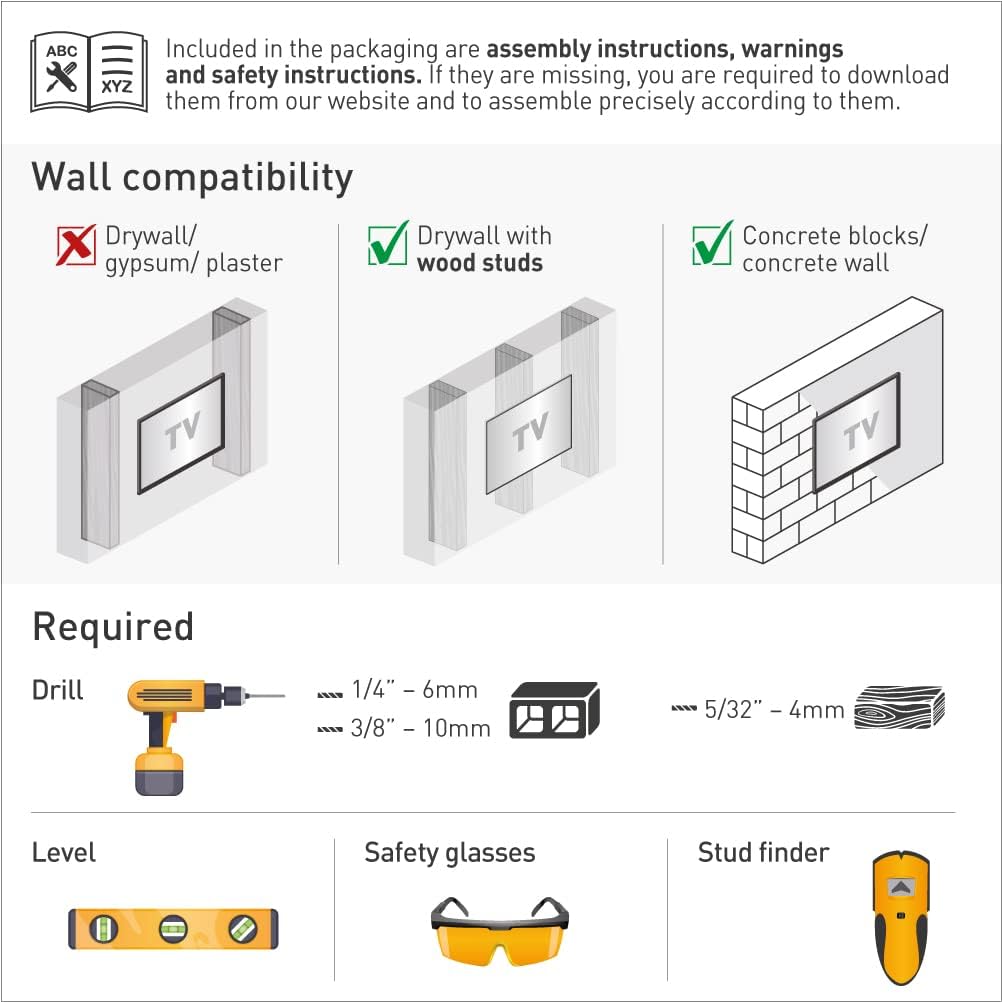
Image: Diagram illustrating wall compatibility (Drywall/gypsum/plaster is not compatible; Drywall with wood studs and Concrete blocks/concrete wall are compatible) and required tools (Drill with 1/4"-6mm or 3/8"-10mm bit for wood/concrete, 5/32"-4mm for wood, Level, Safety glasses, Stud finder).
Wall Compatibility:
- Compatible: Drywall with wood studs, Concrete blocks/concrete wall.
- Not Compatible: Drywall/gypsum/plaster without studs.
Required Tools:
- Drill (with appropriate bits for wall type)
- Level
- Safety Glasses
- Stud Finder (for wood stud installation)
Installation Steps (Self Assembly 1-2-3)
- Attach Adapters to TV: Secure the back-screen adapters to the rear side of your television using the appropriate screws and spacers from the mounting hardware kit. Ensure a snug fit. Note: Certain Samsung TVs may require M8 x 1¾”/ 45mm screws (not included).
- Install Bracket on Wall: Position the wall bracket on your desired wall location. Use a level to ensure it is perfectly horizontal. Mark the drilling points and drill pilot holes. Secure the bracket to the wall using the provided wall screws and anchors suitable for your wall type.
- Snap TV onto Bracket: Carefully lift the television with the attached adapters and align them with the wall bracket. Snap the TV onto the bracket. The spring lock mechanism will engage, securing the TV in place.

Image: Diagram illustrating the "AS EASY AS 1-2-3" assembly steps, along with product benefits such as 2 height positions, lateral adjustment, included level, and spring lock.
Backscreen Connection Positioning Options
The vertical rails of the mount offer various positioning options for TV backscreen connections, supporting VESA patterns from 75x75mm to 600x400mm. Refer to the diagram below for common configurations.

Image: Diagrams showing five different backscreen connection positioning options for the vertical rails, illustrating how the mount adapts to various TV VESA patterns.
If your TV's backscreen connections do not align with any of the illustrated positions, please contact Barkan support for assistance.
Adjustments
The mount allows for convenient adjustments to achieve the perfect viewing angle.
- Height Adjustment: The two back-screen adapters allow for setting the TV's height before final locking.
- Lateral Adjustment: The TV can be moved horizontally along the wall plate after installation and before locking, providing flexibility for centering.
Once the TV is in the desired location, ensure the back-screen adapters are securely locked onto the wall plate. This protects the TV from accidental disengagement.
Operating Instructions
Once installed, the Barkan E20.B is a fixed TV wall mount, meaning it does not offer tilt, swivel, or extension capabilities. Its primary function is to hold the TV securely and flush against the wall.
To ensure continued secure operation, periodically check all screws and connections to confirm they remain tight. The spring lock mechanism provides a secure hold, but regular inspection is recommended.
Maintenance
The Barkan E20.B TV Wall Mount requires minimal maintenance. Follow these guidelines to ensure its longevity and continued performance:
- Cleaning: Use a soft, dry cloth to wipe down the mount. Avoid abrasive cleaners or solvents that could damage the finish.
- Periodic Inspection: Annually, or if you notice any changes, inspect all mounting points and screws to ensure they are secure and tight. Loose connections can compromise safety.
- Weight Limit: Do not exceed the maximum weight capacity of 88 lbs (40 kg). Overloading can lead to mount failure and damage to your TV or property.
Troubleshooting
If you encounter any issues during installation or use, refer to the following common troubleshooting tips:
- TV Not Level:
- Ensure the wall bracket was installed using a level.
- Utilize the height adjustment feature of the back-screen adapters to fine-tune the TV's level before final locking.
- TV Not Centered:
- Use the lateral adjustment feature to slide the TV horizontally along the wall plate until it is centered as desired.
- Mounting Screws Don't Fit TV:
- The kit includes a variety of common TV screws. If none fit, your TV may require specific screws (e.g., M8 x 1¾”/ 45mm for some Samsung models) not included. These can be purchased separately from a hardware store.
- Ensure you are using the correct diameter and length of screw for your TV's VESA holes.
- Difficulty Attaching TV to Wall Plate:
- Ensure the back-screen adapters are correctly aligned with the wall plate.
- Verify that no cables or obstructions are preventing the TV from seating properly.
For further assistance, refer to the Barkan website or contact customer support.
Specifications

Image: Technical diagram showing the dimensions of the Barkan E20.B mount, including height, width, and distance from the wall.

Image: Table summarizing the key specifications of the Barkan E20.B Fixed TV Wall Mount.
| Feature | Specification |
|---|---|
| Model Number | E20.B |
| Screen Sizes | 13 - 39 inches (33 - 109 cm) |
| Maximum Load Capacity | 88 lbs (40 kg) |
| Distance from Wall | 1.1 inches (2.8 cm) |
| VESA Compatibility | 75x75, 100x100, 100x200, 200x100, 200x200 mm (and non-VESA up to 200x200 mm) |
| Movement Type | Fixed |
| Color | Black |
| Item Weight | 1.74 pounds |
| Product Dimensions | 11.77 x 3.74 x 1.3 inches |
Warranty and Support
Lifetime Limited Warranty
The Barkan E20.B TV Wall Mount comes with a Lifetime Limited Warranty. This warranty covers defects in materials and workmanship under normal use. Barkan products undergo strict quality tests, and this mount has been tested with four times its declared weight capacity to ensure durability and safety.
For warranty claims or detailed terms and conditions, please refer to the official Barkan website or contact customer support.
Customer Support
Barkan Mounts is committed to providing excellent customer service. If you have any questions, require assistance with installation, or need further information, please visit the official Barkan website. The website offers FAQs, video demonstrations, and other helpful resources.
Customer service experts are available to assist you. For direct support, please refer to the contact information provided on the Barkan website.
Official Website: www.barkanmounts.com
Related documentsE20.B


Ask a question about this manual
Ask about setup, troubleshooting, compatibility, parts, safety, or missing instructions. Manuals+ will review the question and use this page’s manual context to help answer it.