
1. Safety Information
Please read all safety instructions carefully before using the Vortice 25080 Air Filter and Ionizer. Retain this manual for future reference.
- Ensure the unit is placed on a stable, level surface to prevent tipping.
- Do not block air inlets or outlets. Maintain adequate clearance around the unit for proper airflow.
- Unplug the unit from the power outlet before cleaning, performing maintenance, or when not in use for extended periods.
- Do not operate the unit with a damaged power cord or plug. Contact qualified service personnel for repairs.
- Keep the unit away from water and moisture. Do not use in bathrooms or other damp environments.
- This appliance is not intended for use by persons (including children) with reduced physical, sensory or mental capabilities, or lack of experience and knowledge, unless they have been given supervision or instruction concerning use of the appliance by a person responsible for their safety.
2. Product Overview
The Vortice 25080 is an air filter and ionizer designed to improve indoor air quality. It features multiple fan speeds and an ionizer function.
2.1 Unit Components

Figure 1: Front view of the Vortice 25080 Air Filter and Ionizer. This image displays the main unit with its air intake grille and control panel on the top right.

Figure 2: Close-up view of the control panel. This panel includes a rotary switch for fan speed, a red 'Saturated Filter' indicator light, an ON/OFF switch, and an 'IONIZER' switch.
2.2 Dimensions
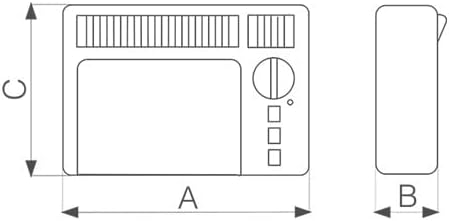
Figure 3: Dimensional diagram of the Vortice 25080 Air Filter. The diagram illustrates the unit's length (A), width (B), and height (C) for placement planning.
3. Setup
3.1 Unpacking
Carefully remove the air filter from its packaging. Inspect the unit for any signs of damage. Retain packaging materials for future transport or storage.
3.2 Placement
Place the Vortice 25080 on a firm, level surface. Ensure there is at least 20 cm (8 inches) of clear space around all sides of the unit to allow for optimal air circulation. Avoid placing it near heat sources, direct sunlight, or in areas with high humidity.

Figure 4: Example of the Vortice 25080 Air Filter placed vertically in a room. The unit can be oriented horizontally or vertically depending on space and preference, ensuring proper airflow.
3.3 Initial Filter Installation
The unit comes with a filter pre-installed. Before first use, ensure the filter is correctly seated. Refer to the 'Maintenance' section for instructions on accessing the filter compartment.

Figure 5: The Vortice 25080 Air Filter with its top cover removed, revealing the internal filter assembly. This view is relevant for filter inspection and replacement.
Once placed and the filter is confirmed, plug the power cord into a suitable electrical outlet.
4. Operating Instructions
4.1 Powering On/Off
- To turn the unit ON, locate the ON/OFF switch on the control panel (refer to Figure 2) and flip it to the '1' position.
- To turn the unit OFF, flip the ON/OFF switch to the '0' position.
4.2 Fan Speed Control
The Vortice 25080 features multiple fan speed settings. Use the rotary switch on the control panel (refer to Figure 2) to select your desired fan speed:
- Rotate the knob clockwise to increase the fan speed.
- Rotate the knob counter-clockwise to decrease the fan speed.
4.3 Ionizer Function
The ionizer function helps to further purify the air by releasing negative ions. To activate or deactivate the ionizer:
- Locate the 'IONIZER' switch on the control panel (refer to Figure 2).
- Flip the switch to the 'ON' position to activate the ionizer.
- Flip the switch to the 'OFF' position to deactivate the ionizer.
4.4 Saturated Filter Indicator
The red 'SATURATED FILTER' indicator light on the control panel (refer to Figure 2) illuminates when the air filter requires cleaning or replacement. When this light appears, proceed to the 'Maintenance' section for filter servicing instructions.
5. Maintenance
Regular maintenance ensures optimal performance and longevity of your Vortice 25080 Air Filter and Ionizer.
5.1 Filter Replacement/Cleaning
The filter should be cleaned or replaced when the 'SATURATED FILTER' indicator light illuminates, or approximately every 3-6 months depending on usage and air quality.
- Unplug the unit: Always disconnect the power cord from the electrical outlet before performing any maintenance.
- Access the filter: Refer to Figure 5. Carefully open the filter compartment cover.
- Remove the filter: Gently pull out the old or dirty filter.
- Clean or Replace:
- If the filter is washable (check filter type), clean it according to manufacturer instructions, typically with mild soap and water, then allow it to dry completely before reinstallation.
- If the filter is disposable, replace it with a new, genuine Vortice replacement filter (Model 25080 filter).
- Reinstall filter: Insert the clean or new filter into the compartment, ensuring it is seated correctly.
- Close cover: Securely close the filter compartment cover.
- Reset indicator: After replacing or cleaning the filter, the 'SATURATED FILTER' light should reset automatically or can be manually reset by turning the unit off and on.
5.2 Cleaning the Unit
Wipe the exterior of the unit with a soft, dry cloth. For stubborn dirt, a slightly damp cloth can be used, followed by immediate drying. Do not use abrasive cleaners, solvents, or spray directly onto the unit.
6. Troubleshooting
If you encounter issues with your Vortice 25080, refer to the following common problems and solutions:
- Unit does not turn on:
- Ensure the power cord is securely plugged into a working electrical outlet.
- Check if the ON/OFF switch is in the '1' position.
- Verify the circuit breaker has not tripped.
- Reduced airflow:
- Check if the air filter is clogged. Clean or replace the filter as described in the 'Maintenance' section.
- Ensure air inlets and outlets are not blocked.
- 'SATURATED FILTER' light remains on after cleaning/replacement:
- Ensure the filter is correctly installed and the compartment cover is securely closed.
- Try turning the unit off and then on again to reset the sensor.
- Unusual noise:
- Ensure the unit is on a stable, level surface.
- Check for any foreign objects inside the unit (after unplugging).
- If the noise persists, contact customer support.
If the problem persists after attempting these solutions, please contact Vortice customer support.
7. Specifications
| Feature | Specification |
|---|---|
| Model Number | 25080 |
| Brand | Vortice |
| Product Dimensions | 4.72 x 16.54 x 12.4 inches |
| Weight | 10.58 Pounds |
| Noise Level | 55 Decibels |
| Wattage | 36 watts |
| Manufacturer | Vortice |
| Date First Available | January 6, 2015 |
8. Warranty and Support
The Vortice 25080 Air Filter and Ionizer comes with a manufacturer's warranty. For specific warranty details, including coverage and duration, please refer to the warranty card included with your product or visit the official Vortice website.
For technical support, replacement parts, or any inquiries not covered in this manual, please contact Vortice customer service through their official channels. When contacting support, please have your product model number (25080) and purchase date available.


