
1. Important Safety Instructions
Always observe the following safety precautions when operating the FERM TCM1010 Tile Cutter to prevent electric shock, fire, and serious injury.
- Personal Protective Equipment (PPE): Always wear safety glasses and earplugs during operation. Consider a face shield and waterproof apron.
- Electrical Safety: Ensure the power supply matches the tool's specifications. Use a Residual Current Device (RCD) for added protection, especially when working with water. The tool is equipped with a PRCD plug for safety.
- Work Area: Keep the work area clean, well-lit, and free from obstructions. Do not operate in explosive atmospheres, such as in the presence of flammable liquids, gases, or dust.
- Water Cooling: The machine uses water for cooling the blade and reducing dust. Ensure the water tray is always filled to the appropriate level before starting.
- Blade Safety: Never touch the blade when the machine is connected to power. Ensure the blade guard is in place and functioning correctly.
- Stability: Secure the tile cutter on a stable, level surface before use.
- Unplug When Not in Use: Always unplug the tool from the power source before making adjustments, changing accessories, or storing it.
2. Product Overview
The FERM TCM1010 is a 600W water-cooled tile cutter designed for precise cutting of wall and floor tiles. Its water cooling system ensures dust-free operation and extends blade life. The galvanized steel table is adjustable for miter cuts from 0 to 45 degrees, and a parallel guide assists in achieving accurate results.
Main Features:
- Powerful 600 Watt motor.
- Water-cooled diamond blade for precise, dust-free cutting and extended blade life.
- Equipped with a safety switch and PRCD plug for operational safety.
- Galvanized steel work table, adjustable from 0 to 45 degrees.
- Includes a parallel guide for accurate cuts.
Package Contents:
- FERM TCM1010 Tile Cutter
- Water Tray
- Parallel Guide
- 180mm Diamond Blade
- 2 Wrenches
- Safety Glasses
- Earplugs

Figure 2.1: Overview of the FERM TCM1010 Tile Cutter with labeled components and features.
3. Assembly and Setup
3.1 Unpacking and Placement:
Carefully remove all components from the packaging. Inspect the machine for any damage. Place the tile cutter on a firm, level, and stable workbench or surface. Ensure there is adequate space around the machine for safe operation and material handling.

Figure 3.1: Front view of the FERM TCM1010 Tile Cutter.
3.2 Filling the Water Tray:
Locate the water tray beneath the cutting table. Fill the tray with clean water until the blade is sufficiently submerged (approximately 1-2 cm above the blade's lowest point). This ensures proper cooling and dust suppression during cutting. Regularly check and refill the water level during operation.
3.3 Installing the Parallel Guide:
The parallel guide is used for making straight, consistent cuts. Insert the guide into the slots on the cutting table. Adjust its position to the desired cutting width and secure it using the locking knob(s).

Figure 3.2: Parallel guide in position on the cutting table.
3.4 Adjusting the Cutting Angle (Miter Cuts):
For angled cuts (miter cuts), the cutting table can be tilted. Loosen the angle adjustment knob located on the side of the machine. Tilt the table to the desired angle between 0 and 45 degrees, using the integrated scale for reference. Tighten the knob securely to lock the table in place.
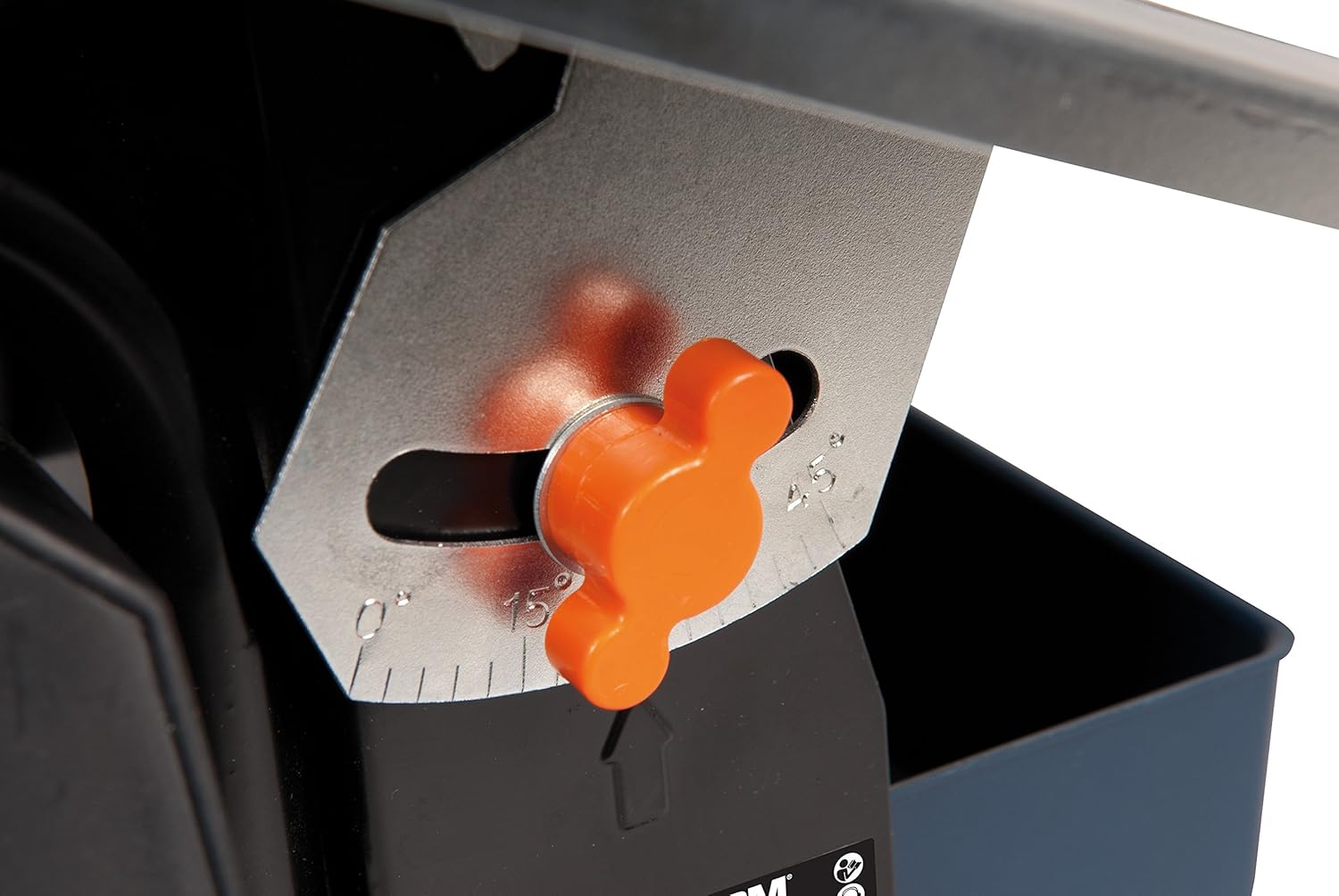
Figure 3.3: Angle adjustment mechanism for miter cuts.
4. Operation
4.1 Pre-Operation Checks:
- Ensure the water tray is filled.
- Verify the blade is correctly installed and the blade guard is in place.
- Confirm all adjustments (parallel guide, angle) are securely locked.
- Wear all required PPE (safety glasses, earplugs).
4.2 Making a Cut:
- Place the tile firmly against the parallel guide (if used) and flat on the cutting table.
- Switch on the machine using the green 'I' button on the power switch. Allow the blade to reach full speed before starting the cut.
- Slowly and steadily push the tile through the blade. Do not force the tile; let the blade do the work. Excessive pressure can cause the blade to bind or the tile to chip.
- Maintain a firm grip on the tile throughout the cutting process.
- Once the cut is complete, switch off the machine using the red 'O' button and wait for the blade to stop completely before removing the tile or making further adjustments.
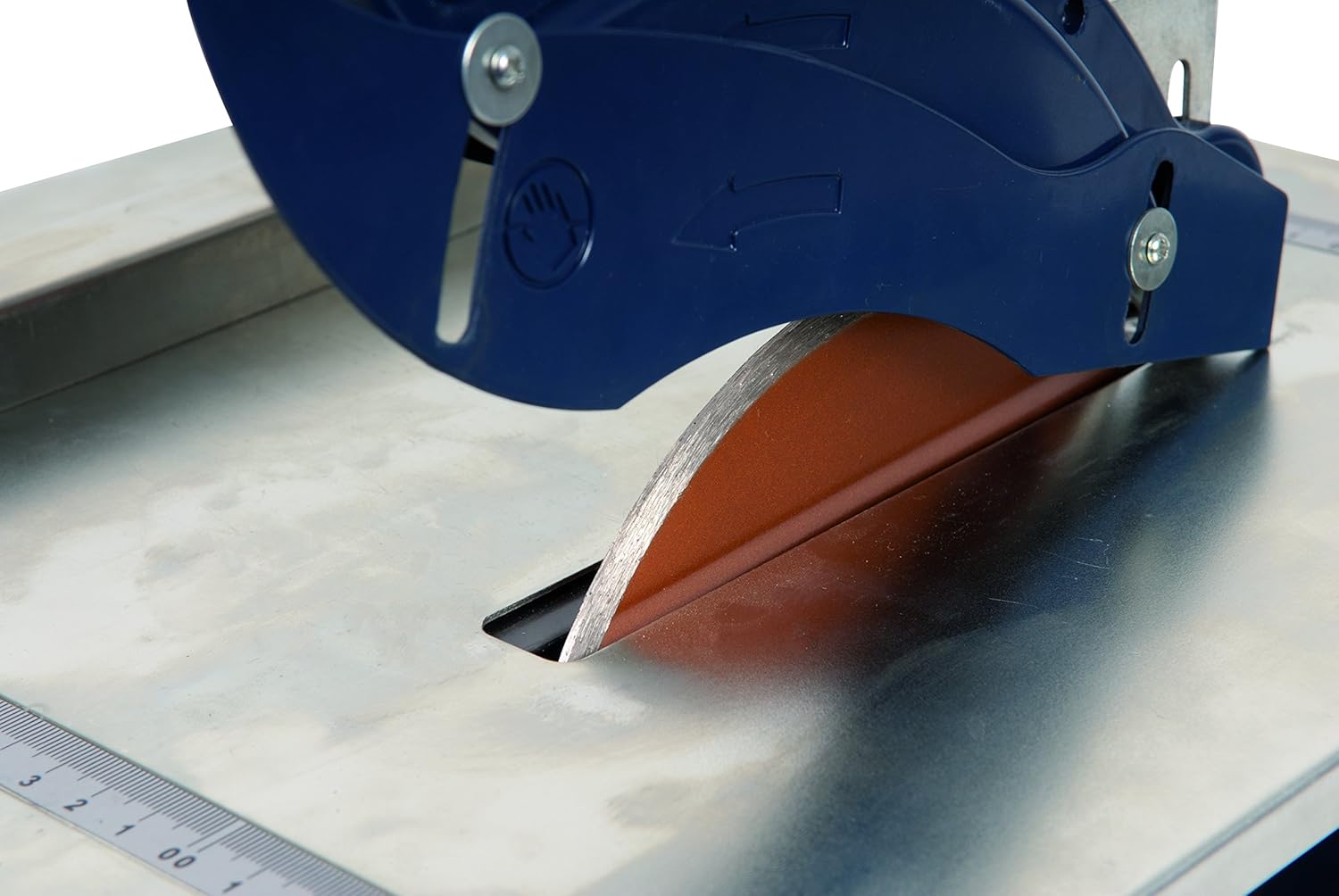
Figure 4.1: Diamond blade in the water tray.

Figure 4.2: Power switch with ON (green) and OFF (red) buttons.
5. Maintenance
5.1 Cleaning the Water Tray:
After each use, or when the water becomes excessively cloudy with tile residue, unplug the machine and empty the water tray. Clean out any accumulated sludge or debris to ensure proper water circulation and cooling. Rinse the tray thoroughly.
5.2 General Cleaning:
Wipe down the cutting table and other surfaces with a damp cloth to remove tile dust and water residue. Ensure all moving parts are free from debris. Do not use harsh chemicals or abrasive cleaners.
5.3 Blade Replacement:
When the diamond blade becomes dull or damaged, it needs to be replaced. Always unplug the machine before attempting blade replacement. Use the provided wrenches to loosen the blade retaining nut. Carefully remove the old blade and install the new 180mm diamond blade, ensuring it is oriented correctly. Tighten the retaining nut securely.
5.4 Storage:
Store the tile cutter in a clean, dry place, out of reach of children. Ensure the water tray is empty and clean before storage to prevent corrosion or mold growth.
6. Troubleshooting
- Machine does not start: Check if the power cord is securely plugged in. Verify the PRCD plug is reset if tripped. Ensure the safety switch is not engaged.
- Blade not cutting efficiently: The blade may be dull or damaged and requires replacement. Ensure the water tray is filled for proper cooling.
- Cuts are not straight: Ensure the parallel guide is correctly installed and securely locked. Check that the tile is held firmly against the guide during the cut.
- Excessive chipping of tiles: Reduce the feed rate (push the tile slower). Ensure the blade is sharp. Some tile types are more prone to chipping.
- Excessive water splashing: Ensure the blade guard is properly positioned. Adjust the water level if too high.
7. Technical Specifications
| Specification | Value |
|---|---|
| Model Number | TCM1010 |
| Power | 600 Watts |
| Voltage | 230 Volts |
| No-load Speed | 2950 rpm |
| Blade Diameter | 180 mm |
| Max. Cutting Capacity at 90° | 34 mm |
| Max. Cutting Capacity at 45° | 18 mm |
| Table Dimensions | 330 x 360 mm |
| Weight | 8.7 kg |
| Cord Length | 1.85 Meters |
| Blade Material | Diamond |
| Special Feature | Depth Adjustment |
| Certification | CE, ETL, ISO 9001 |
8. Warranty and Support
For warranty information, technical support, or spare parts, please refer to the documentation provided with your purchase or contact FERM customer service directly. Keep your proof of purchase for any warranty claims.