1. Introduction
This manual provides essential instructions for the safe and proper installation, operation, and maintenance of the Intermatic WG1603-11D Timer Clock Motor. This motor is designed as a replacement component for Intermatic T1900, T8800, and R8800 series time clocks. Please read this manual thoroughly before proceeding with installation or operation.
2. Safety Information
WARNING: Risk of Electric Shock. Disconnect power at the circuit breaker or fuse box before installing or servicing this motor. Failure to do so may result in serious injury or death.
- Installation should be performed by a qualified electrician or authorized service personnel.
- Ensure the power supply matches the motor's voltage requirements (208-277V, 60Hz).
- Do not operate the motor if it appears damaged.
- Keep hands and tools clear of moving parts during operation.
3. Setup and Installation
The Intermatic WG1603-11D motor is a direct replacement for compatible Intermatic time clock series. Follow these steps for proper installation:
- Power Disconnection: Locate the circuit breaker or fuse controlling the time clock and turn off the power supply. Verify that power is off using a voltage tester.
- Access Time Clock: Open the time clock enclosure to access the existing motor.
- Disconnect Old Motor: Carefully disconnect the wiring from the old motor. Note the orientation and connection points for reinstallation. The WG1603-11D features fixed tab connectors designed for easy slip-on connection.
- Remove Old Motor: Unmount the old motor from its position within the time clock.
- Install New Motor: Position the new Intermatic WG1603-11D motor in the same location as the old one. Ensure it is securely mounted.
- Connect Wiring: Connect the fixed tab connectors of the new motor to the corresponding connection poles within the time clock. Ensure connections are secure and correct.
- Close Enclosure: Close and secure the time clock enclosure.
- Restore Power: Restore power to the time clock at the circuit breaker or fuse box.
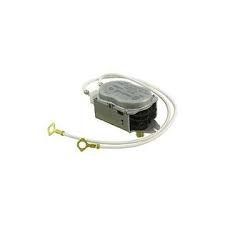
Image 1: The Intermatic WG1603-11D Timer Clock Motor, showing its compact design and fixed tab connectors for easy installation.
4. Operating Instructions
Once the WG1603-11D motor is installed, the time clock will resume its normal operation. The motor itself does not require direct user interaction for operation; it functions as an internal component driving the time clock mechanism.
- Ensure the time clock is properly programmed according to its specific model's instructions.
- Verify that the time clock's hands or digital display are moving correctly after power restoration.
5. Maintenance
The Intermatic WG1603-11D Timer Clock Motor is designed for long-term, maintenance-free operation. No routine lubrication or adjustment is required for the motor itself.
- Periodically inspect the time clock enclosure for dust, debris, or moisture accumulation.
- Ensure all electrical connections remain secure.
- If the time clock exhibits erratic behavior or stops functioning, refer to the troubleshooting section.
6. Troubleshooting
If the time clock is not functioning correctly after motor replacement, consider the following:
- Time Clock Not Running:
- Check if power is supplied to the time clock. Verify the circuit breaker or fuse.
- Ensure the motor's fixed tab connectors are securely attached to the time clock's terminals.
- Confirm the motor's voltage (208-277V) matches the supply voltage.
- Inspect for any visible damage to the motor or wiring.
- Incorrect Time Keeping:
- This motor is a replacement for the drive mechanism. If time keeping is incorrect, refer to the original time clock's manual for programming or adjustment instructions.
- Ensure the time clock is not subjected to extreme temperatures or vibrations that could affect its accuracy.
If issues persist, contact a qualified electrician or Intermatic customer support.
7. Specifications
| Model Number | WG1603-11D |
| Voltage | 208-277V |
| Frequency | 60Hz |
| Compatibility | Intermatic T1900, T8800, R8800 Series Time Clocks |
| Connection Type | Fixed Tab Connectors |
| Material | Steel |
| Item Weight | 0.2 Pounds (approx. 90.7 grams) |
| Product Dimensions | 7 x 7 x 7 inches (approx. 17.8 x 17.8 x 17.8 cm) |
8. Warranty and Support
For warranty information and technical support regarding the Intermatic WG1603-11D Timer Clock Motor, please refer to the official Intermatic website or contact their customer service department. Keep your purchase receipt as proof of purchase.
Intermatic Contact Information:
- Official Intermatic Website
- Refer to the original time clock's documentation or Intermatic's website for specific support contact details.


