
Introduction
This manual provides comprehensive instructions for the Redi-Remote replacement remote control, specifically designed for DIVINCI OR860 and DV606 units. This remote is a custom-built replacement and is not an original manufacturer's remote. It is engineered to perform all functions of the original remote for the specified models without requiring any programming.
Please read this manual carefully before using your new remote control to ensure proper operation and longevity.
Setup
1. Battery Installation
Your Redi-Remote requires four (4) AAA batteries for operation. These batteries are included with your purchase.
- Locate the battery compartment on the back of the remote control.
- Slide open the battery compartment cover.
- Insert four AAA batteries, ensuring the positive (+) and negative (-) terminals align correctly with the markings inside the compartment.
- Close the battery compartment cover securely.
Note: Always replace all four batteries at the same time. Do not mix old and new batteries, or different types of batteries.
2. Compatibility and Initial Use
This Redi-Remote is specifically designed to be compatible with DIVINCI OR860 and DV606 units. No programming is required. Once batteries are installed, the remote is ready for use with your compatible device.
Important: This remote control cannot be programmed to control any auxiliary devices. It is designed to operate solely with the specific DIVINCI units mentioned.
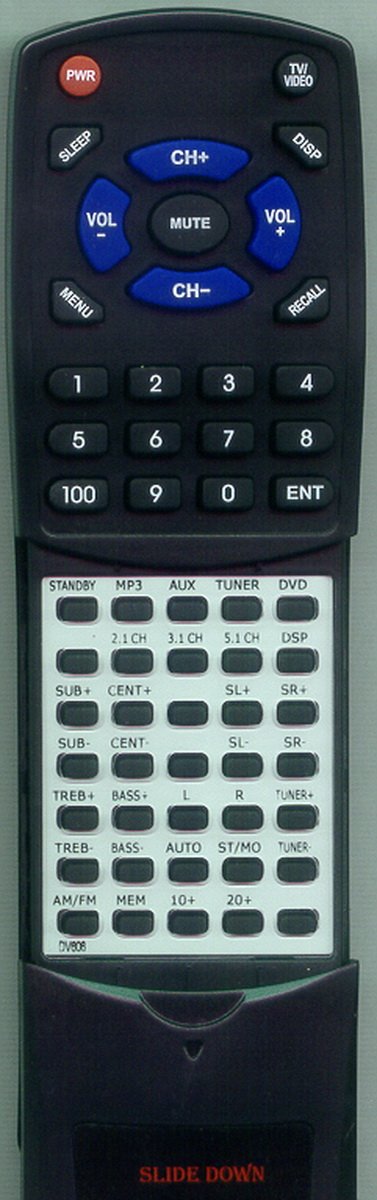
Image of the Redi-Remote replacement remote control, showing its overall design and button layout. The remote is black with clearly labeled buttons.
Operating Instructions
Basic Operation
To operate your DIVINCI unit, simply point the remote control directly at the unit and press the desired function button. Ensure there are no obstructions between the remote and the unit's infrared receiver.
Sliding Cover Feature
The remote control features a sliding cover over its lower half. To access additional buttons, gently slide this cover downwards. Slide it back up to conceal the lower buttons when not in use.
Limitations
- This remote control is not equipped with laser pointers or LED lights.
- It cannot be programmed to control any auxiliary devices; its functionality is limited to the specified DIVINCI units.
Maintenance
Cleaning
To clean the remote control, use a soft, dry cloth. For stubborn dirt, slightly dampen the cloth with water or a mild, non-abrasive cleaner. Do not use harsh chemicals or abrasive materials, as these can damage the remote's surface or internal components.
Battery Replacement
If the remote control's performance degrades (e.g., reduced range, inconsistent response), it may be time to replace the batteries. Follow the battery installation steps outlined in the Setup section. Always replace all four AAA batteries simultaneously.
Troubleshooting
- Remote not responding:
- Check if the batteries are inserted correctly with the correct polarity.
- Replace all four AAA batteries with new ones.
- Ensure there is a clear line of sight between the remote control and the DIVINCI unit's infrared receiver. Remove any obstructions.
- Verify that you are within the maximum operating range of 20 feet.
- Specific buttons not working:
- Ensure the sliding cover is fully open if you are trying to access buttons on the lower half of the remote.
- Clean the remote's surface, especially around the buttons, to ensure no debris is interfering with button presses.
If you continue to experience issues after following these troubleshooting steps, please refer to the Support section.
Specifications
| Brand | Redi-Remote |
| Model Number | RTDV606 |
| Compatible Devices | DIVINCI OR860, DIVINCI DV606 |
| Connectivity Technology | Infrared |
| Special Feature | No Programming Required |
| Maximum Number of Supported Devices | 1 |
| Button Quantity | 58 |
| Maximum Range | 20 Feet |
| Battery Type | AAA |
| Number of Batteries Required | 4 (included) |
| Color | Black |
| Item Dimensions (L x W x H) | 7.5" x 2.25" x 0.75" |
| Item Weight | 4.5 Ounces |
Warranty Information
Specific warranty details for this Redi-Remote product are not provided in the available product information. Please refer to your purchase documentation or contact the seller for any warranty-related inquiries.
Support
If you have any concerns with the remote control after purchase, or if you require further assistance beyond the scope of this manual, please contact the seller directly through your purchase platform. They will be able to provide specific support for your product.