
1. Introduction
This manual provides instructions for the Redi-Remote replacement remote control, model RT274930. This remote is designed to function as a direct replacement for specific RCA television models, offering full functionality without the need for programming.
2. Compatibility
The Redi-Remote model RT274930 is compatible with the following RCA television models:
- RCA L32WD26D
- RCA L26HD32D
- RCA 076R0PF010
- RCA L32HD32D
- RCA L26WD26D
- RCA 274930
- RCA L22HD32D
This remote is specifically designed for these units and cannot be programmed to control auxiliary devices.
3. Package Contents
- 1 x Redi-Remote Replacement Remote Control (Model RT274930)
- 4 x AAA Batteries
4. Setup
To begin using your Redi-Remote replacement remote control, follow these steps:
- Locate the battery compartment on the back of the remote control.
- Slide open the battery compartment cover.
- Insert the four (4) AAA batteries, ensuring the positive (+) and negative (-) terminals align correctly with the markings inside the compartment.
- Close the battery compartment cover securely.
The remote control is now ready for use with your compatible RCA television. No additional programming is required.
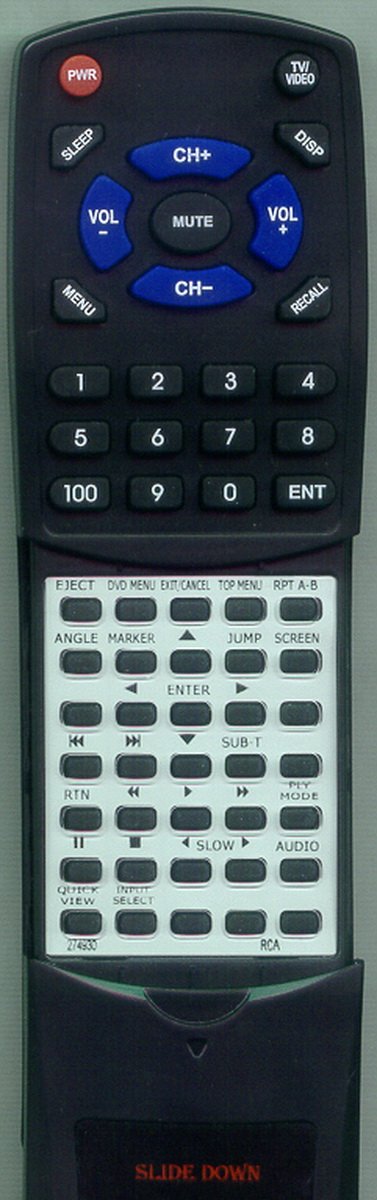
Image: The Redi-Remote Replacement Remote Control, showing its button layout and design. This remote is designed for direct use with specified RCA TV models.
5. Operating Instructions
The Redi-Remote functions identically to your original RCA remote control for the specified models. Simply point the remote at your television and press the desired buttons.
Note on Button Access: A sliding cover is present over the lower half of the remote. To access additional functions, gently slide this cover downwards to reveal the hidden buttons.
6. Features and Limitations
- No Programming Required: This remote is pre-programmed for immediate use with compatible RCA TV models.
- Dedicated Functionality: Designed to control only the specific RCA unit it is intended for. It cannot be programmed to control auxiliary devices such as DVD players, sound systems, or cable boxes.
- No Laser Pointers or LED Lights: This remote does not include laser pointers or integrated LED lights.
7. Troubleshooting
If the remote control does not function as expected, consider the following:
- Check Batteries: Ensure the AAA batteries are inserted correctly with the correct polarity (+/-). Replace batteries if they are old or depleted.
- Line of Sight: Ensure there is a clear line of sight between the remote control and the television's infrared receiver. Obstructions can block the signal.
- Compatibility: Verify that your RCA television model is listed in the compatibility section (Section 2) of this manual.
- Remote Reset: Remove the batteries, wait 30 seconds, then reinsert them. This can sometimes resolve minor issues.
If issues persist after following these steps, please refer to the Support section.
8. Specifications
| Model Number | RT274930 |
| Brand | Redi-Remote |
| Compatible Devices | RCA Televisions (specific models listed in Section 2) |
| Power Source | 4 x AAA Batteries (included) |
| Dimensions (L x W x H) | 7.5 x 2.25 x 0.75 inches (19.05 x 5.72 x 1.91 cm) |
| Weight | 4.5 ounces (127.57 grams) |
| Color | Black |
9. Care and Maintenance
- Keep the remote control dry. Moisture can damage internal circuits.
- Avoid exposing the remote to extreme temperatures.
- Clean the remote with a soft, dry cloth. Do not use abrasive cleaners or solvents.
- If the remote will not be used for an extended period, remove the batteries to prevent leakage.
10. Support
For any concerns or questions regarding your Redi-Remote replacement remote control, please contact the seller directly for assistance.