
Introduction
This manual provides instructions for the Redi-Remote replacement remote control, model RT6710V00108D. This remote is designed to function as a direct replacement for the original Zenith remote control number 6710V00108D and is compatible with a wide range of Zenith television units. It is important to note that this is a custom-built replacement remote and not an original Zenith product.
Compatible Zenith Models include: H2017Y MASTER, M3701C, M4201C, H2031DT MASTER, H20E50DT MASTER, H27H38DT MASTER, H2533DT MASTER, 1240021306, 12415733, HP602, H2708DT MASTER, H2735DT33 MASTER, 1240015733, H20H52DT, 22LG30DC MASTER, H24F36DT MASTER, H2059DT MASTER, 6710V00108D, LST5100P, H2522DT MASTER, H20C34Y MASTER, H20D50DT MASTER, H2520Y MASTER, LST4600A, DU27FB32C MASTER, LST5600A, H20F50DT MASTER, DU27FB34C MASTER, H2733DT MASTER, H2014Y MASTER, H20H50DT, H27F36DT MASTER, M3701CBA, M3201C, 6710V00108M, H2055W, 12421306, H20C50DT MASTER, H2061Y MASTER, H2033DT MASTER.
Product Overview
The Redi-Remote replacement remote control is designed for ease of use and direct functionality with your compatible Zenith television. It features an ergonomic design for comfortable handling.
Key Features:
- Performs every function for the specific unit it is designed to control.
- Measures approximately 7 1/2" x 2 1/4" x 3/4".
- Features a sliding cover over the lower half of the remote to reveal additional buttons.
- Operates via Infrared (IR) technology.
Remote Control Layout:
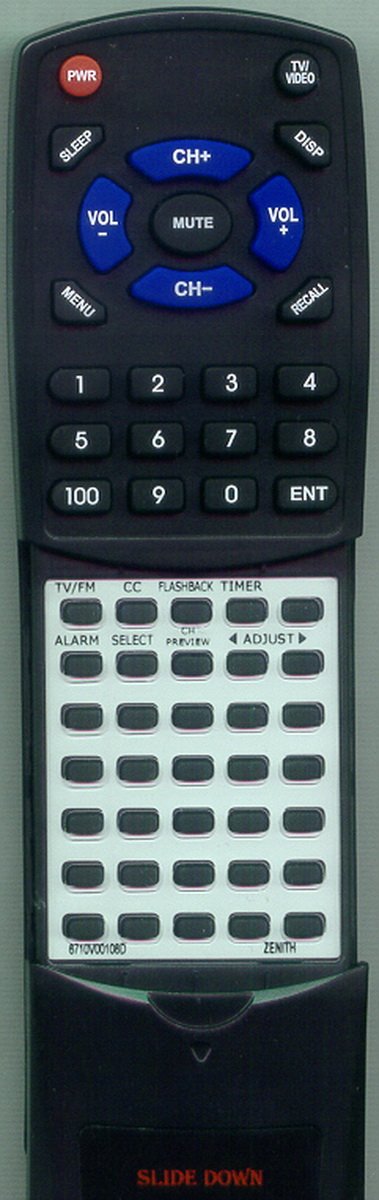
Figure 1: Redi-Remote Replacement Remote Control. This image shows the ergonomic design and button layout of the remote. The remote is black with white buttons, and the upper section with primary controls is visible.
The remote control features standard television control buttons such as Power, Channel Up/Down, Volume Up/Down, and number keys. A unique feature is the sliding cover located on the lower half of the remote. This cover can be slid down to access additional, less frequently used functions.
Setup
1. Battery Installation
- Locate the battery compartment on the back of the remote control.
- Slide open the battery compartment cover.
- Insert four (4) AAA batteries, ensuring the positive (+) and negative (-) terminals align correctly with the markings inside the compartment. Note: Batteries are included with your purchase.
- Close the battery compartment cover securely.
2. Initial Use
No programming is required for this replacement remote. Once batteries are installed, the remote is ready for immediate use with your compatible Zenith television. Simply point the remote at your television and press the desired function button.
Operating Instructions
Basic Functions:
- Power: Press the POWER button to turn the television on or off.
- Volume Control: Use the VOL + and VOL - buttons to adjust the sound level.
- Channel Selection: Use the CH + and CH - buttons to change channels sequentially. Use the number pad to directly enter channel numbers.
- Mute: Press the MUTE button to silence the television audio. Press again to restore sound.
Accessing Additional Functions (Sliding Cover):
The lower half of the remote control is covered by a sliding panel. To access additional functions such as Menu, Input, or other specific settings, gently slide this cover downwards. Once revealed, these buttons can be used as per your television's original remote functionality.
Maintenance
- Cleaning: To clean the remote, wipe it with a soft, dry cloth. Do not use liquid cleaners or abrasive materials, as these may damage the remote's surface or internal components.
- Battery Replacement: If the remote's performance degrades or it stops responding, replace all four AAA batteries with new ones. Do not mix old and new batteries.
- Storage: Store the remote in a dry place away from extreme temperatures and direct sunlight.
Troubleshooting
- Remote not responding:
- Ensure batteries are inserted correctly with the correct polarity.
- Replace old batteries with new ones.
- Ensure there are no obstructions between the remote and the television's IR receiver.
- Confirm the remote is pointed directly at the television.
- Certain buttons not working:
- Check if the sliding cover is fully open if you are trying to access buttons beneath it.
- Ensure the remote is clean and free from debris that might obstruct button presses.
Specifications
| Model Number: | RT6710V00108D |
| Brand: | Redi-Remote |
| Compatible Devices: | Zenith Televisions (specific models listed in Introduction) |
| Connectivity Technology: | Infrared (IR) |
| Power Source: | 4 x AAA Batteries (included) |
| Product Dimensions: | 7 x 2.5 x 1 inches (approx.) |
| Item Weight: | 4.5 ounces (approx.) |
Warranty and Support
This Redi-Remote product is a custom-built replacement remote. For any concerns regarding the remote control after purchase, please contact the seller directly for assistance. Specific warranty details may vary and should be confirmed with the point of purchase.