
1. Introduction and Overview
This manual provides instructions for the Redi-Remote replacement remote control, designed specifically for use with various SANYO television models. This remote is a custom-built replacement and is not an original SANYO product. It is engineered to perform all essential functions for the compatible SANYO units listed below without requiring any programming.
Compatible SANYO Models: DP50749, DP42849, DP46849, DP52449, GXDB
Key Features:
- No programming required; ready to use with compatible SANYO TVs.
- Controls all functions for the specific unit it is designed for.
- Not programmable for auxiliary devices.
- Does not include laser pointers or LED lights.
2. Setup: Battery Installation
The remote control requires 4 AAA batteries for operation. These batteries are included with your purchase.
- Locate the battery compartment on the back of the remote control.
- Slide the battery compartment cover downwards or press the latch and lift to open.
- Insert 4 AAA batteries, ensuring the positive (+) and negative (-) terminals align correctly with the markings inside the compartment.
- Replace the battery compartment cover by sliding it back into place until it clicks securely.
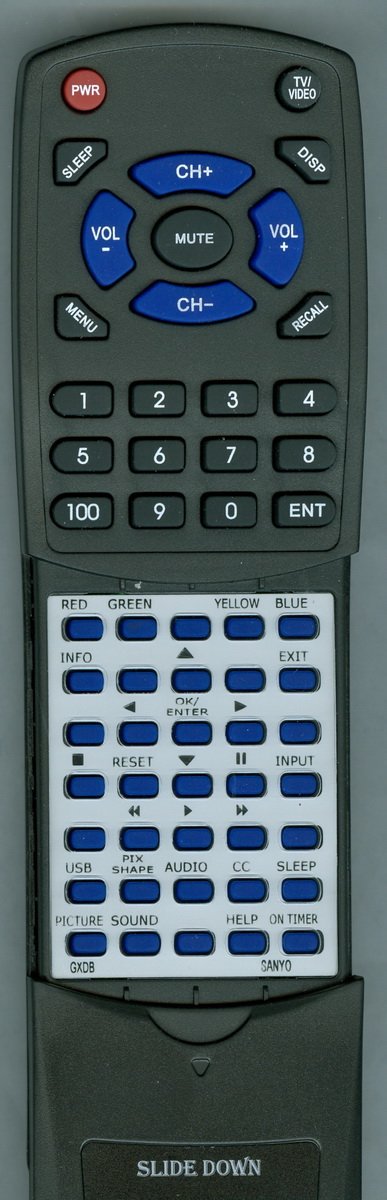
Image: Redi-Remote Replacement Remote Control. This image displays the front view of the remote control, highlighting its button layout and overall design. The remote is black with clearly labeled buttons.
3. Operating Instructions
This remote control is designed for immediate use with your compatible SANYO television. Point the remote directly at the TV's infrared receiver for optimal performance.
Basic Functions:
- Power: Press the POWER button to turn the TV on or off.
- Volume: Use the VOL + and VOL - buttons to adjust the sound level.
- Channel: Use the CH + and CH - buttons to change channels.
- Mute: Press the MUTE button to silence the TV audio.
- Input/Source: Use the INPUT or SOURCE button to select different video inputs (e.g., HDMI, AV).
Advanced Functions (Sliding Cover):
The lower half of the remote control features a sliding cover. Slide this cover downwards to reveal additional buttons for advanced functions, such as menu navigation, playback controls, and numerical input.
- Menu: Access the TV's on-screen menu for settings adjustments.
- Navigation Arrows (Up/Down/Left/Right): Use these to move through menu options.
- Enter/OK: Confirm selections within the menu.
- Number Pad: Directly enter channel numbers.
- Playback Controls: (e.g., Play, Pause, Stop, Rewind, Fast Forward) for connected media devices or TV functions.
4. Maintenance
Proper care will ensure the longevity and reliable performance of your remote control.
- Cleaning: Wipe the remote control with a soft, dry cloth. Do not use liquid cleaners or abrasive materials, as these can damage the surface or internal components.
- Battery Replacement: If the remote's response becomes sluggish or inconsistent, replace all four AAA batteries with new ones. Do not mix old and new batteries, or different types of batteries.
- Storage: Store the remote in a dry place, away from extreme temperatures and direct sunlight. If the remote will not be used for an extended period, remove the batteries to prevent leakage.
- Avoid Drops: Protect the remote from physical impact, as drops can damage internal circuitry.
5. Troubleshooting
If you experience issues with your remote control, please refer to the following common solutions:
- Remote Not Responding:
- Ensure the batteries are inserted correctly with the correct polarity (+/-).
- Replace the batteries with fresh AAA batteries.
- Check for any obstructions between the remote control and the TV's infrared sensor.
- Ensure you are within a reasonable range and pointing the remote directly at the TV.
- Specific Buttons Not Working:
- If buttons under the sliding cover are not working, ensure the cover is fully open and not obstructing the buttons.
- Clean the remote's surface, especially around the unresponsive buttons, to remove any dirt or debris that might be interfering.
- TV Not Responding to Any Remote Command:
- Verify that the TV itself is powered on and not in standby mode.
- Try unplugging the TV from the power outlet for a few minutes, then plug it back in. This can sometimes reset the TV's internal systems.
6. Specifications
| Product Dimensions | 7 x 2.5 x 1 inches |
| Item Weight | 4.5 ounces |
| Batteries Required | 4 AAA batteries (included) |
| Connectivity Technology | Infrared (IR) |
| Max Number of Supported Devices | 1 (SANYO Television) |
| Special Feature | No Programming Required |
| Compatible Devices | SANYO DP50749, DP42849, DP46849, DP52449, GXDB Televisions |
7. Support
For any concerns or issues with your Redi-Remote replacement remote control after purchase, please contact the seller directly for assistance. Specific warranty information is not provided in this manual; please refer to your purchase documentation or contact the seller for details regarding warranty coverage.