1. Introduction
This user manual provides essential information for the safe and effective use of the PHOENIX CONTACT UT 16 Feed-Through Screw Connection Terminal Block. Please read this manual thoroughly before installation and operation to ensure proper functionality and safety.
2. Product Overview
The PHOENIX CONTACT UT 16 is a high-quality, gray, feed-through terminal block designed for secure electrical connections. It features a robust screw connection system, making it suitable for various industrial electrical applications. This terminal block is rated for 1000V and supports wire gauges from 16 to 4 AWG, with a current rating of 76 AMP.
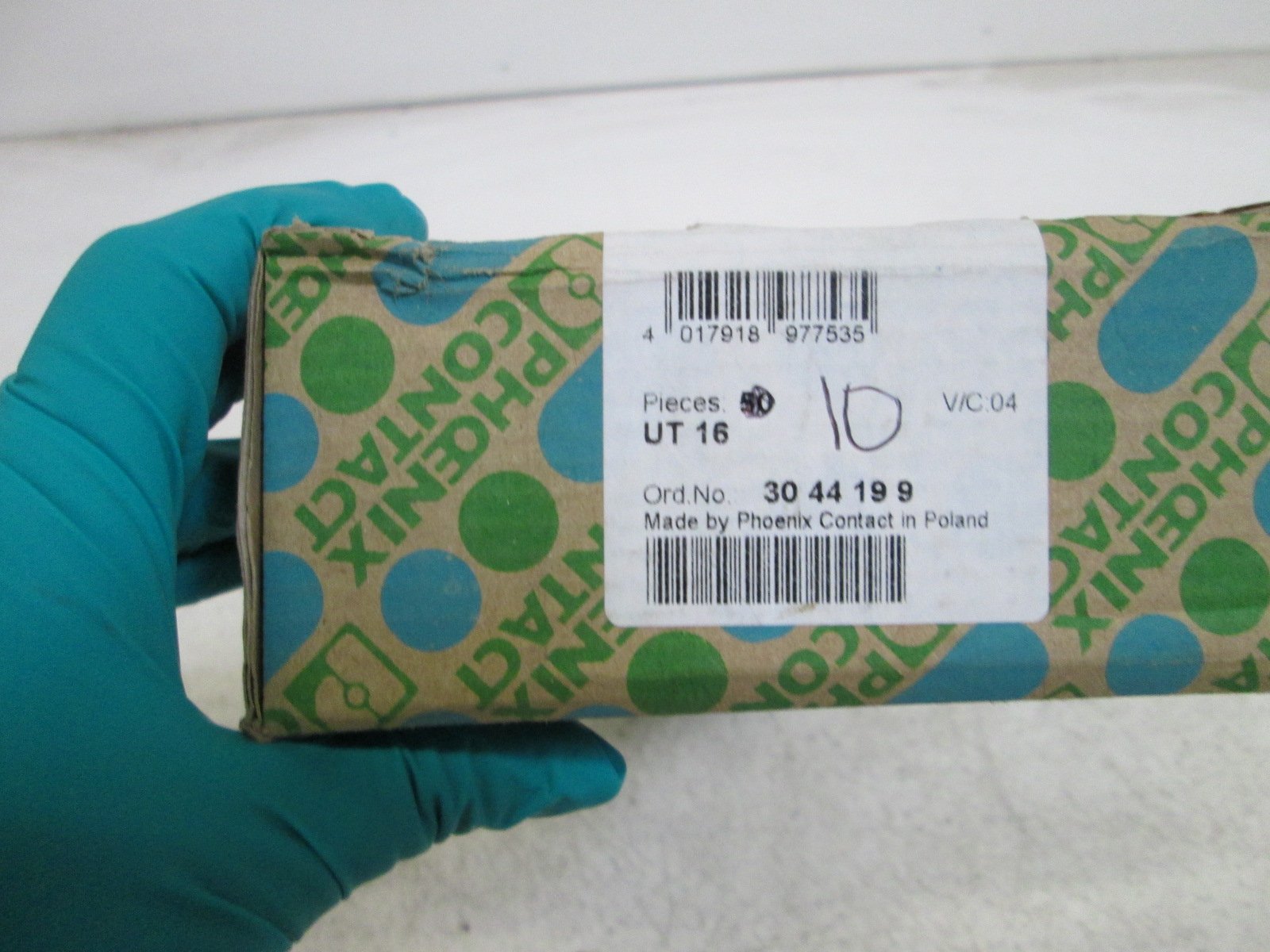
Figure 2.1: The PHOENIX CONTACT UT 16 terminal block in its original packaging, displaying the model number UT 16 and order number 3044199, along with the EAN 4017918977535. The packaging indicates it is made by Phoenix Contact in Poland.

Figure 2.2: A stack of PHOENIX CONTACT UT 16 terminal blocks, illustrating their modular design and how they can be compactly arranged for installation.

Figure 2.3: A detailed view of two PHOENIX CONTACT UT 16 terminal blocks, showcasing the robust screw terminals and the internal conductor connection points.

Figure 2.4: The PHOENIX CONTACT UT 16 terminal block displayed next to its packaging, providing a visual reference for its physical dimensions and the branding.
3. Specifications
The following table outlines the key technical specifications for the PHOENIX CONTACT UT 16 terminal block:
| Attribute | Value |
|---|---|
| Model Number | UT 16 |
| Brand | PHOENIX CONTACT |
| Type | Feed-Through Terminal Block |
| Connection Type | Screw Connection |
| Color | Gray |
| Voltage Rating | 1000V |
| Current Rating | 76 AMP |
| Wire Gauge (AWG) | 16-4 AWG |
| Package Dimensions | 2.04 x 0.96 x 0.96 inches |
| Weight | 1.5 Pounds |
| Certification | CSA |
4. Setup and Installation
Proper installation is crucial for the safe and reliable operation of the UT 16 terminal block. Always ensure power is disconnected before beginning any installation work.
4.1. Safety Precautions
- Ensure all power sources are disconnected and locked out before installation.
- Use appropriate personal protective equipment (PPE), including insulated tools and safety glasses.
- Installation should only be performed by qualified personnel in accordance with local electrical codes and regulations.
4.2. Mounting
The UT 16 terminal blocks are designed for DIN rail mounting. Snap the terminal block onto the appropriate DIN rail until it clicks securely into place.
4.3. Wire Connection
- Strip the insulation from the wire end to the recommended length (typically 10-12 mm for screw connections).
- Insert the stripped wire into the terminal opening.
- Tighten the screw connection firmly using an appropriate screwdriver. Ensure the wire is securely clamped and no bare strands are exposed.
- Verify the connection by gently pulling on the wire. It should not come loose.
For optimal performance and safety, ensure that the wire gauge used is within the specified range of 16-4 AWG.
5. Operation
Once installed and wired correctly, the PHOENIX CONTACT UT 16 terminal block operates passively as a secure electrical connection point. It requires no active user interaction during normal operation.
- Ensure the terminal block is not subjected to voltages or currents exceeding its specified ratings (1000V, 76 AMP).
- Avoid exposing the terminal block to extreme temperatures, humidity, or corrosive environments beyond its operational limits.
6. Maintenance
The PHOENIX CONTACT UT 16 terminal block is designed for long-term, maintenance-free operation under normal conditions. However, periodic inspection is recommended to ensure continued reliability.
6.1. Inspection
- Visual Inspection: Periodically check for any signs of physical damage, discoloration, or loose connections.
- Connection Integrity: If accessible and safe to do so (with power disconnected), verify that all screw connections remain tight. Over time, vibrations or thermal cycling can cause screws to loosen.
- Cleanliness: Keep the terminal block free from dust, dirt, and moisture. Use a dry, lint-free cloth for cleaning. Do not use solvents or abrasive cleaners.
6.2. Replacement
If any damage is observed or if the terminal block shows signs of electrical failure, it must be replaced immediately by a qualified electrician. Do not attempt to repair damaged terminal blocks.
7. Troubleshooting
The UT 16 terminal block is a passive component, so most issues relate to improper installation or external factors.
| Problem | Possible Cause | Solution |
|---|---|---|
| Loose connection / Intermittent contact | Screw not tightened sufficiently; Wire not properly inserted; Wire insulation caught under screw. | Disconnect power, re-strip wire if necessary, re-insert wire fully, and tighten screw firmly. Ensure no insulation is under the clamp. |
| Overheating / Discoloration | Overcurrent; Loose connection; Incorrect wire gauge. | Immediately disconnect power. Verify circuit current does not exceed 76 AMP. Check all connections for tightness. Ensure correct wire gauge (16-4 AWG) is used. Replace damaged terminal block. |
| Physical Damage (cracks, breaks) | Impact; Incorrect installation force; Exposure to harsh chemicals. | Disconnect power and replace the damaged terminal block. Handle with care during installation. |
If troubleshooting steps do not resolve the issue, or if you suspect a defect, contact PHOENIX CONTACT technical support or a qualified electrician.
8. Warranty and Support
PHOENIX CONTACT products are manufactured to high-quality standards. For specific warranty information, please refer to the official PHOENIX CONTACT website or contact their customer service directly. Technical support is available for assistance with product inquiries, installation guidance, and troubleshooting.
PHOENIX CONTACT Official Website: www.phoenixcontact.com


