
Introduction
This manual provides essential information for the setup, operation, and maintenance of your Acctim 24690 Portland Tide Clock. This precision quartz movement clock is designed to track the moon's movement around the Earth, indicating the approximate state of the tide. Please read these instructions carefully to ensure proper use and longevity of your tide clock.
Product Overview
Features
- Easy-to-read display with a distinctive beach design.
- Synchronized with lunar tides for accurate indication.
- The tide hand completes a full rotation every 12 hours and 35 minutes, corresponding to two lunar days.
- Equipped with a precision quartz movement for reliable performance.
- Compact dimensions: 200mm diameter.
Components
The Acctim Portland Tide Clock consists of a main clock unit with a single tide hand, a quartz movement, and a battery compartment located on the rear.

Figure 1: Front view of the Acctim 24690 Portland Tide Clock, showing the beach-themed dial, the 'Acctim' logo, and the single tide hand. The dial indicates 'High Tide', 'Low Tide', and 'Hours Until' markings.
Setup
1. Battery Installation
- Locate the battery compartment on the rear of the tide clock.
- Insert one (1) AA battery, ensuring the positive (+) and negative (-) terminals are aligned correctly according to the markings inside the compartment.
- Close the battery compartment cover securely.
Note: An AA battery is not included with the product.
2. Setting the Tide Clock
To set your tide clock accurately, you will need to know the exact time of the next high tide or low tide for your specific location. This information can typically be found from local tide tables, weather services, or marine forecasts.
- Once you know the precise time of the next high tide, rotate the setting knob (usually located on the back of the clock) until the tide hand points directly to the "HIGH TIDE" mark on the dial.
- Alternatively, if you know the precise time of the next low tide, rotate the setting knob until the tide hand points directly to the "LOW TIDE" mark on the dial.
- The tide clock will now begin to track the lunar tide cycle.
Important: Due to variations in lunar cycles and local geographical factors, it is recommended to check and re-synchronize your tide clock with local tide tables approximately once a month, ideally during a full or new moon, to maintain optimal accuracy.
Operating Instructions
Understanding the Display

Figure 2: Angled view of the Acctim 24690 Portland Tide Clock, highlighting the dial's numerical markings and the single tide hand. The upper half indicates 'HIGH TIDE' and hours until low tide, while the lower half indicates 'LOW TIDE' and hours until high tide.
- The dial is marked with "HIGH TIDE" at the top and "LOW TIDE" at the bottom.
- Numbers from 1 to 5 are displayed on both sides, indicating the approximate hours until the next high or low tide.
- The single hand moves clockwise, completing a cycle in approximately 12 hours and 35 minutes.
Reading the Tide
To determine the current tide status, simply observe the position of the tide hand:
- If the hand points to "HIGH TIDE", it indicates that high tide is currently occurring or has just occurred.
- If the hand points to "LOW TIDE", it indicates that low tide is currently occurring or has just occurred.
- If the hand is between "HIGH TIDE" and "LOW TIDE", the numbers indicate the approximate hours until the next high or low tide. For example, if the hand points to "3 HOURS UNTIL LOW TIDE", it means low tide is expected in approximately three hours.
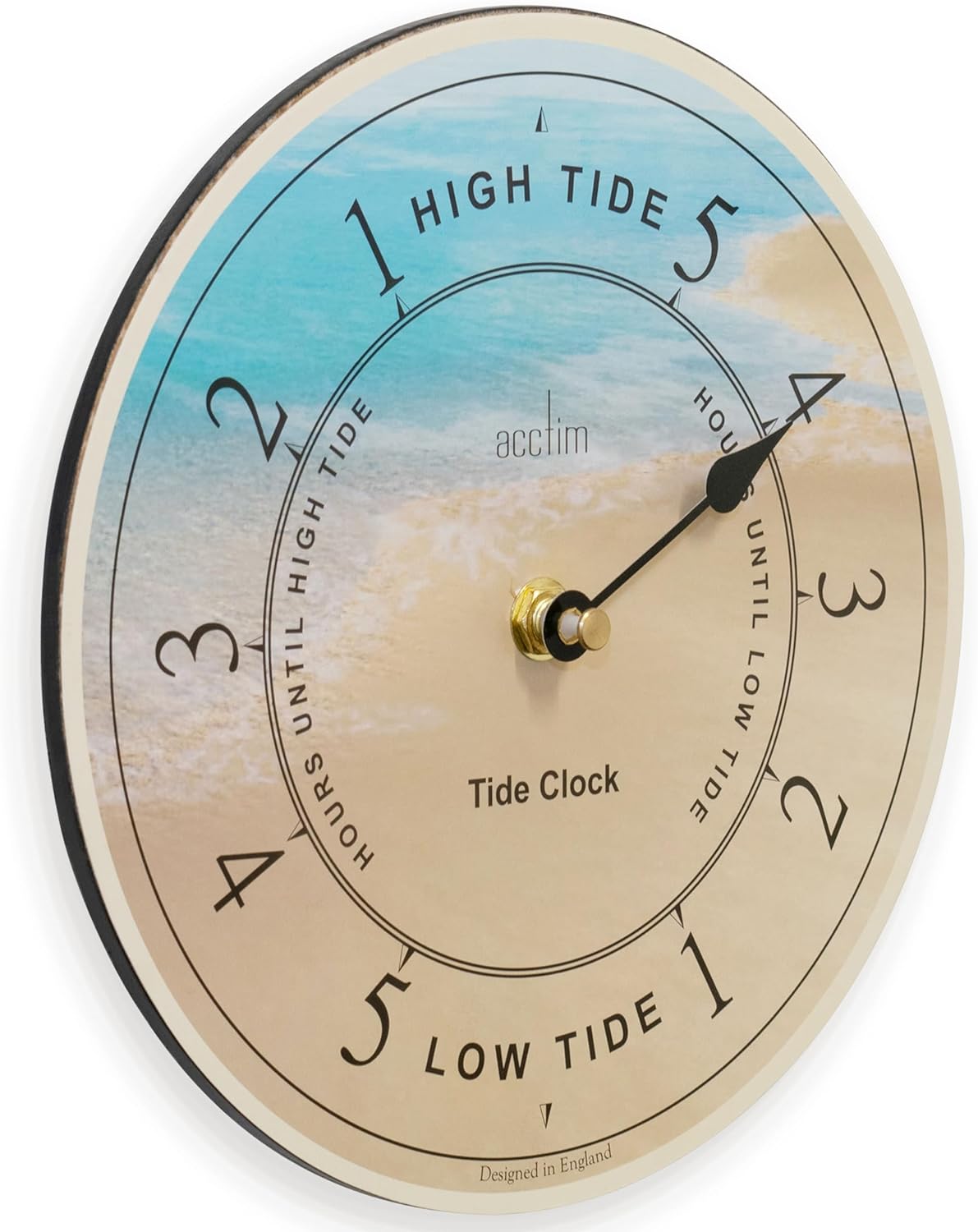
Figure 3: Another angled view of the Acctim 24690 Portland Tide Clock, providing a clear perspective of the clock's depth and the detailed markings on the dial for tide indication.
Maintenance
Cleaning
To clean your tide clock, gently wipe the surface with a soft, dry cloth. Avoid using abrasive cleaners, solvents, or excessive moisture, as these can damage the finish or internal components.
Battery Replacement
When the tide hand stops moving or its movement becomes erratic, it is likely time to replace the battery. Follow the battery installation steps outlined in the "Setup" section to replace the AA battery. Always dispose of used batteries responsibly according to local regulations.
Troubleshooting
| Problem | Possible Cause | Solution |
|---|---|---|
| Tide hand is not moving. | Dead or incorrectly installed battery. | Check battery installation. Replace with a fresh AA battery. |
| Tide readings are inaccurate. | Clock is out of synchronization with local tides. | Re-synchronize the tide clock with the exact time of the next high or low tide for your location. Refer to "Setting the Tide Clock" section. Remember to adjust monthly. |
| Tide hand moves erratically. | Low battery power. | Replace the AA battery with a fresh one. |
Specifications
| Brand | Acctim |
| Model Number | 24690 |
| Colour | Blue/Yellow |
| Product Dimensions | 20.6 x 20.6 x 5.41 cm |
| Item Weight | 170 g |
| Special Features | Second Hand (Note: This refers to the tide hand's continuous movement, not a traditional second hand for timekeeping) |
| Power Source | 1 x AA Battery (not included) |
| Manufacturer | Acctim |
| ASIN | B008R9A1MI |
Warranty and Support
The Acctim 24690 Portland Tide Clock is backed by a 1-year guarantee from the date of purchase. This warranty covers manufacturing defects under normal use. Please retain your proof of purchase for warranty claims.
For technical support, warranty inquiries, or further assistance, please contact Acctim Customer Service. Refer to the product packaging or the official Acctim website for current contact information.