
1. Introduction
The Nash-ville NA-508 is a dynamic handheld microphone designed for clear and reliable vocal and speech reproduction. Its robust construction and advanced features make it suitable for various applications, including live music performance, public auditoriums, churches, convention halls, and schools.
Key features include a strong, wire-mesh, spherical front grille that houses a highly effective wind and 'pop' filter. Internal design elements work to minimize external and handling noise, ensuring optimal audio quality.
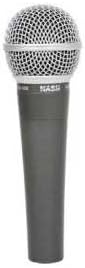
Figure 1: The Nash-ville NA-508 Dynamic Handheld Microphone. This image shows the microphone's main body, the silver wire-mesh grille, and the Nashville branding on the handle.
2. Setup and Connection
Follow these steps to properly set up your NA-508 microphone:
- Unpacking: Carefully remove the microphone from its packaging. Inspect for any visible damage.
- Cable Connection: The NA-508 uses an XLR connector for audio output. Connect a standard XLR microphone cable to the XLR port at the base of the microphone. Ensure the connection is secure.
- Connecting to Audio Equipment: Connect the other end of the XLR cable to a compatible audio input on your mixer, amplifier, or audio interface. Ensure the input is designed for microphone-level signals.
- Power Source: While the NA-508 is a dynamic microphone and typically does not require phantom power, some audio equipment may provide it. Ensure your equipment settings are appropriate for a dynamic microphone. The microphone is listed as "Battery Powered" in some specifications, which might refer to an internal battery for specific features or a general classification. For standard operation, it functions passively.
- Mounting (Optional): If using a microphone stand, secure the microphone into a compatible microphone clip and attach it to the stand.
3. Operating Instructions
To achieve the best performance from your NA-508 microphone:
- Microphone Placement: Hold the microphone approximately 2-6 inches (5-15 cm) from your mouth for vocal applications. Experiment with distance to find the optimal sound for your voice or instrument.
- Polar Pattern: The NA-508 features a Cardioid Uni-Directional polar pattern. This means it is most sensitive to sounds coming from the front and rejects sounds from the sides and rear. Point the top of the microphone directly at the sound source.
- Wind and Pop Filter: The integrated wire-mesh grille and internal filter effectively reduce plosive sounds (like 'p' and 'b') and wind noise. Maintain a consistent distance to maximize its effectiveness.
- Gain Staging: Adjust the gain (input level) on your mixer or audio interface to ensure a strong signal without clipping (distortion). Start with the gain low and gradually increase it while speaking or singing into the microphone.
- Feedback Prevention: Position the microphone behind loudspeakers or monitors to minimize acoustic feedback.
4. Maintenance and Care
Proper care will extend the life and performance of your microphone:
- Cleaning: Use a soft, dry cloth to wipe the microphone body. For the grille, a soft brush can be used to gently remove debris. Do not use liquid cleaners directly on the microphone.
- Storage: When not in use, store the microphone in a protective case or pouch to prevent dust accumulation and physical damage. Avoid extreme temperatures and high humidity.
- Handling: Avoid dropping the microphone or subjecting it to strong impacts, as this can damage the internal components.
- Cable Care: Always grasp the connector, not the cable, when plugging or unplugging. Coil cables neatly to prevent kinks and damage.
5. Troubleshooting
If you encounter issues with your NA-508 microphone, refer to the following common problems and solutions:
| Problem | Possible Cause | Solution |
|---|---|---|
| No Sound Output |
|
|
| Low Volume or Weak Signal |
|
|
| Distorted Sound |
|
|
| Excessive Handling Noise |
|
|
6. Technical Specifications
Detailed specifications for the Nash-ville NA-508 Dynamic Handheld Microphone:
- Type: Dynamic
- Polar Pattern: Cardioid Uni-Directional
- Frequency Response: 50Hz - 15KHz
- Impedance: 250 OHM ± 20%
- Sensitivity: -72 ± 2dB (Audio Sensitivity: 72 dB)
- Connectivity Technology: XLR
- Included Components: Microphone
- Microphone Form Factor: Microphone Only
- Power Source: Battery Powered (Note: Dynamic microphones typically do not require external power for standard operation.)
- Model Number: NA 508
- UPC: 008474925249
- Manufacturer: Nash-ville
7. Warranty Information
Warranty details for the Nash-ville NA-508 Dynamic Handheld Microphone are typically provided with the product packaging or can be obtained from the point of purchase. Please retain your proof of purchase for any warranty claims. For specific warranty terms and conditions, refer to the documentation included with your microphone or contact Nash-ville customer support.
8. Customer Support
For further assistance, technical support, or inquiries regarding your Nash-ville NA-508 microphone, please contact Nash-ville customer service. Contact information can usually be found on the manufacturer's official website or within the product packaging.
Note: Always refer to the latest information provided by the manufacturer for the most accurate and up-to-date support details.