
Absolute USA DD-3000AT
Absolute DD-3000AT 7-Inch Double Din Multimedia DVD Player Receiver User Manual
Model: DD-3000AT | Brand: Absolute USA
Introduction
This manual provides comprehensive instructions for the installation, operation, and maintenance of your Absolute DD-3000AT 7-Inch Double Din Multimedia DVD Player Receiver. Please read this manual thoroughly before using the product to ensure proper functionality and to prevent damage.
Key Features
- Multimedia Receiver: Supports DVD, VCD, MPEG4, MP3, CD, CD-R, and CD-RW formats.
- Built-in Analog TV Tuner: Allows reception of analog television broadcasts.
- SD/USB Card Slot: Provides connectivity for external storage devices.
- Remote Control: Full-function remote for convenient operation.
- Double Din Standard: Designed for double DIN car stereo openings.
- 7-Inch Touch Screen Display: Intuitive touch interface for control.
- Detachable Front Panel: Enhanced security feature.
Package Contents
Please verify that all items are present in the package:
- Absolute DD-3000AT Multimedia DVD Player Receiver Unit
- Remote Control
- Power/Speaker Wiring Harness
- Mounting Hardware (Screws, Brackets)
- User Manual (This document)
- Analog TV Antenna (May be included or sold separately)

Figure 1: Absolute DD-3000AT unit and remote control, shown within its retail packaging.
Setup and Installation
Professional installation is recommended for this product. Ensure the vehicle's battery is disconnected before beginning installation.
1. Wiring Connections
Connect the provided wiring harness to the corresponding wires in your vehicle's dashboard. Refer to the wiring diagram for specific connections.
- Power Wires: Connect the yellow wire to constant 12V, red wire to accessory 12V, and black wire to ground.
- Speaker Wires: Connect speaker wires according to polarity (e.g., white/white-black for front left, gray/gray-black for front right, etc.).
- Antenna Connection: Connect the vehicle's radio antenna to the unit.
- Analog TV Antenna: Connect the analog TV antenna (if included or purchased separately) to the dedicated TV antenna input.
- RCA Outputs: Use RCA cables for connecting external amplifiers or subwoofers.
- Video Inputs/Outputs: Connect external video sources or monitors as needed.

Figure 2: Rear view of the DD-3000AT unit, illustrating the various audio/video input/output ports and wiring connections.
2. Mounting the Unit
Slide the unit into the double DIN opening in your vehicle's dashboard. Secure it using the provided mounting brackets and screws. Ensure the unit is firmly in place to prevent vibration.

Figure 3: Side view of the DD-3000AT chassis, demonstrating its double DIN form factor for in-dash installation.

Figure 4: The DD-3000AT unit with its detachable front panel removed, revealing the internal mechanism and security feature.
Operating Instructions
1. Basic Operation
- Power On/Off: Press the POWER button on the front panel or remote control.
- Volume Control: Rotate the VOLUME knob or use the VOL+/- buttons on the remote.
- Mode Selection: Press the MODE button to cycle through available sources (DVD, TV, Radio, USB, SD, AV-IN).
- Touch Screen: Navigate menus and control functions by touching the screen directly.
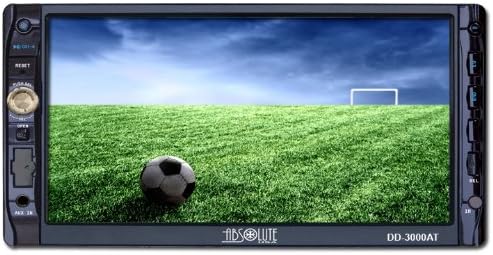
Figure 5: Front view of the DD-3000AT, showcasing its 7-inch touch screen display in operation.

Figure 6: The DD-3000AT unit alongside its full-function remote control, used for convenient operation.
2. DVD/CD Playback
- Insert a DVD or CD into the disc slot. The unit will automatically switch to DVD/CD mode and begin playback.
- Use the on-screen controls or remote control for Play/Pause, Stop, Skip, and Fast Forward/Rewind functions.
3. USB/SD Playback
- Insert a USB drive into the USB port or an SD card into the SD card slot.
- Select USB or SD mode. The unit will display the file browser.
- Navigate through folders and select audio, video, or image files for playback.
4. Analog TV Tuner
- Switch to TV mode.
- Perform an auto-scan for available analog TV channels in your area.
- Use the channel up/down buttons to switch between channels.
- Note: Analog TV broadcast availability varies by region and is subject to signal strength.
Maintenance
- Cleaning the Screen: Use a soft, lint-free cloth to gently wipe the touch screen. Do not use abrasive cleaners or solvents.
- Cleaning the Unit: Wipe the exterior of the unit with a dry, soft cloth.
- Disc Care: Handle discs by their edges. Keep them clean and free of scratches.
- Detachable Panel: When detaching the front panel, store it in the provided case to protect it from damage.
Troubleshooting
| Problem | Possible Cause | Solution |
|---|---|---|
| No Power | Incorrect wiring; Blown fuse; Vehicle battery low. | Check power connections (yellow, red, black wires). Inspect vehicle fuses. Charge or replace vehicle battery. |
| No Sound | Speaker wires disconnected; Volume too low; Mute function active. | Verify speaker wire connections. Increase volume. Deactivate mute. |
| Disc Error | Dirty or scratched disc; Incorrect disc format. | Clean the disc. Try a different disc. Ensure disc format is supported. |
| No TV Signal | Antenna not connected; Weak signal; No analog broadcasts in area. | Connect TV antenna securely. Move to an area with better signal. Verify analog TV broadcast availability. |
| Touch Screen Unresponsive | System freeze; Calibration issue. | Perform a soft reset (refer to manual for reset button location, usually a small pinhole). Recalibrate touch screen if option is available in settings. |
Specifications
| Feature | Detail |
|---|---|
| Product Dimensions | 10 x 6 x 9.5 inches |
| Item Weight | 5.5 pounds |
| Model Number | DD-3000AT |
| Connectivity Technologies | USB |
| Other Display Features | Wireless |
| Color | Full function |
| Manufacturer | Absolute USA Inc. |
| Media Type | SD, VCD, CD-R, DVD, MPEG4, MP3, CD, CD-RW |
| Screen Size | 7 inches |
| Display Type | LCD |
| Built-in Tuner | Analog TV Tuner |
Warranty and Support
For warranty information and technical support, please refer to the warranty card included with your product or visit the official Absolute USA website. Keep your purchase receipt as proof of purchase for warranty claims.
Manufacturer: Absolute USA Inc.
Website: www.absoluteusa.com (Note: This link is provided for informational purposes and may be subject to change.)
Related documentsDD-3000AT


Ask a question about this manual
Ask about setup, troubleshooting, compatibility, parts, safety, or missing instructions. Manuals+ will review the question and use this page’s manual context to help answer it.