
1. Introduction
This manual provides detailed instructions for the safe and effective use of your FUJIFILM FinePix F800EXR digital camera. Please read this manual thoroughly before using the camera to ensure proper operation and to maximize its features. Keep this manual in a safe place for future reference.
2. Safety Information
To prevent injury or damage to the camera, please observe the following safety precautions:
- Do not disassemble, modify, or attempt to repair the camera yourself. Refer all servicing to qualified personnel.
- Keep the camera away from water and moisture. Do not operate with wet hands.
- Avoid exposing the camera to extreme temperatures, direct sunlight for extended periods, or high humidity.
- Use only specified batteries and chargers. Improper use may result in fire, explosion, or leakage.
- Keep out of reach of children. Small parts may pose a choking hazard.
- Do not point the camera's flash directly at people or animals from a close distance.
3. Package Contents
Verify that all items are present in your camera package:
- FUJIFILM FinePix F800EXR Digital Camera
- Rechargeable Lithium-ion Battery
- AC Power Adapter / Battery Charger
- USB Cable
- Hand Strap
- Owner's Manual (this document)
- Software CD-ROM
Note: Memory card is typically sold separately.
4. Camera Overview
Familiarize yourself with the camera's components and controls.
4.1 Front View
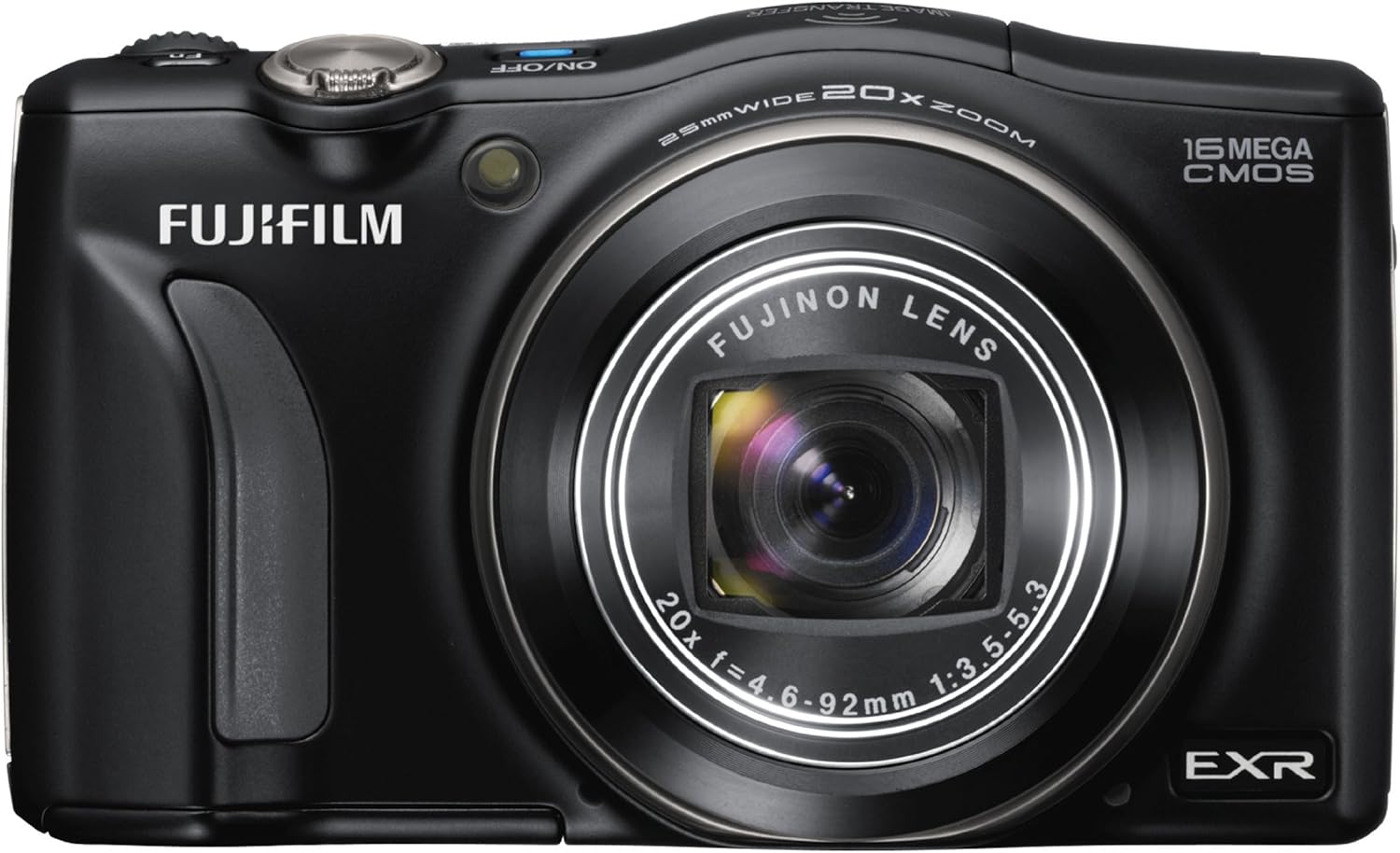
The front of the camera features the main lens assembly, the built-in flash, and the autofocus assist lamp.
4.2 Angled View

This view illustrates the camera with its lens extended, showcasing the optical zoom capability and the ergonomic grip.
4.3 Rear View

The rear panel features the 3-inch LCD screen for viewing and menu navigation, along with various control buttons and the mode dial for selecting shooting modes.
4.4 Top View

The top of the camera includes the power button, shutter release button, zoom control, and the mode dial for quick access to different shooting settings.
5. Setup
5.1 Charging the Battery
- Insert the battery into the supplied battery charger.
- Plug the charger into a power outlet. The charging indicator will illuminate.
- Once charging is complete (indicator light changes or turns off), remove the battery.
5.2 Inserting the Battery and Memory Card
- Open the battery/memory card compartment cover on the bottom of the camera.
- Insert the charged battery with the correct orientation until it clicks into place.
- Insert a compatible SD/SDHC/SDXC memory card into the card slot until it clicks. Ensure the card is facing the correct way.
- Close the compartment cover securely.
5.3 Initial Settings
Upon first power-on, you will be prompted to set the language, date, and time. Follow the on-screen instructions using the directional pad and MENU/OK button.
6. Operating the Camera
6.1 Powering On/Off
Press the ON/OFF button located on the top of the camera to power it on or off.
6.2 Basic Shooting
- Turn the mode dial to EXR or AUTO mode for automatic scene optimization.
- Frame your shot using the LCD monitor.
- Press the shutter release button halfway down to focus. The focus indicator will illuminate.
- Press the shutter release button fully down to take the picture.
6.3 Zoom Operation
Use the zoom lever around the shutter release button to adjust the optical zoom (20x) and digital zoom (up to 16x). Move the lever towards W for wide-angle and T for telephoto.
6.4 Flash Modes
The camera features an automatic flash. You can adjust flash settings (e.g., forced flash, slow sync) via the camera's menu system if desired.
6.5 Playback Mode
Press the Playback button (usually marked with a play icon) to view your captured images and videos. Use the directional pad to navigate through your media.
6.6 Menu Navigation
Press the MENU/OK button to access camera settings. Use the directional pad to scroll through options and the MENU/OK button to confirm selections. Press BACK or DISP to exit menus.
6.7 Advanced Filters
The FinePix F800EXR includes various advanced filter functions to enhance creative expression. These can be accessed through the mode dial or menu, depending on the specific filter.
7. Connecting to Other Devices
7.1 Image Transfer to Smartphone
The camera supports image transfer to smartphones via high-speed infrared communication. Refer to the camera's menu for specific instructions on enabling and pairing with compatible devices.
7.2 Connecting to a Computer
Use the supplied USB cable to connect the camera to a computer. The camera will appear as a removable disk, allowing you to transfer photos and videos. Install the included software for additional functionality.
8. Maintenance and Care
- Cleaning the Camera Body: Wipe with a soft, dry cloth. For stubborn dirt, use a cloth lightly dampened with water and then dry thoroughly.
- Cleaning the Lens: Use a lens brush or a blower to remove dust. For smudges, use a lens cleaning cloth and lens cleaning fluid. Avoid touching the lens surface with your fingers.
- Storage: When not in use for extended periods, remove the battery and store the camera in a cool, dry, well-ventilated area, away from direct sunlight and chemicals.
9. Troubleshooting
If you encounter issues with your camera, refer to the following common problems and solutions:
| Problem | Possible Cause / Solution |
|---|---|
| Camera does not turn on. | Battery is depleted or incorrectly inserted. Ensure battery is charged and inserted correctly. |
| Pictures are blurry. | Camera shake, subject movement, or incorrect focus. Hold camera steady, use a faster shutter speed, or ensure autofocus is engaged. |
| Memory card error. | Memory card is full, corrupted, or incompatible. Try formatting the card (this will erase all data) or use a different card. |
| Flash does not fire. | Flash mode is set to 'off' or 'red-eye reduction' is active. Ensure flash is set to 'auto' or 'forced flash'. |
For more detailed troubleshooting, please consult the official Fujifilm support website.
10. Specifications
Key technical specifications for the FUJIFILM FinePix F800EXR:
- Model Name: FX-F800EXR B
- Image Sensor: 16 MP EXR-CMOS (1/2-inch)
- Lens: FUJINON 20x Optical Zoom (24-480mm equivalent), F2.8-F5.6
- Image Stabilization: Optical
- Display: 3-inch LCD
- Autofocus: Contrast Detection, 49 points
- ISO Sensitivity: Expanded ISO Minimum 100, Expanded ISO Maximum 25600
- Shutter Speed: Minimum 1/4000 seconds
- File Format: JPEG
- Video Resolution: 2160p (MP4 format)
- Connectivity: Infrared
- Battery Type: Lithium Ion
- Battery Average Life: 30 Hours
- Weight: 232 Grams
- Color: Black
- Special Features: Super-Resolution Technology, Advanced Filters
11. Warranty and Support
For information regarding product warranty, service, and technical support, please refer to the warranty card included with your product or visit the official Fujifilm website. Contact details for customer support are typically available on the manufacturer's regional websites.


