
1. Introduction
The Portta Mini HDMI to AV signal converter is designed to transform a high-quality HDMI video and audio signal into a standard definition AV (CVBS) composite video signal and FL/FR stereo audio signals. This enables modern HDMI-only devices, such as Blu-Ray players, gaming consoles (like PS3), or PCs, to connect to older televisions, VHS VCRs, DVD recorders, and other display equipment that only support composite AV input. The converter supports both NTSC and PAL television formats, making it versatile for various regions.

Image: Front view of the Portta Mini HDMI to AV Converter, showing the HDMI input port and the NTSC/PAL format switch.
2. Package Contents
Please check the package contents upon opening to ensure all items are present:
- 1 x Portta Mini HDMI to AV Converter (Model: W3CTHC1)
- 1 x USB Power Cable
- 1 x User Manual / Warranty Card

Image: The Portta Mini HDMI to AV Converter, USB power cable, and user manual/warranty card included in the package.
3. Features
- Plug and Play: No driver installation required, offering portable, flexible, and easy operation.
- Low Power Consumption: The device is powered via an included USB cable, eliminating the need for an external AC power adapter.
- Format Support: Supports both NTSC and PAL standard TV format outputs.
- HDMI Compliance: Compliant with HDMI 1.3 specifications.
- High-Quality Conversion: Converts HDMI video and audio signals to composite AV (CVBS) and FL/FR stereo audio.
4. Specifications
| Input Port | 1 x HDMI |
| Output Ports | 1 x RCA (Yellow for Video, White for Left Audio, Red for Right Audio) |
| HDMI Input Resolution Support | 640x480@60Hz, 800x600@60Hz, 1024x768@60Hz, 1280x720@60Hz, 1280x1024@60Hz, 1360x768@60Hz, 1600x1200@60Hz, 1920x1080@60Hz; 480i/60Hz, 480p/60Hz, 576i/60Hz, 576p/60Hz, 720p/60Hz, 1080i/60Hz, 1080p/60Hz |
| CVBS Output | PAL, NTSC_M, NTSC_J |
| Dimensions (L x W x H) | Approximately 60.5mm x 54mm x 20.5mm |
| Weight | 70 Grams |
| Color | Black |
| Connector Type | HDMI, RCA (DVI compatible via HDMI) |
| Finish Type | Matte |
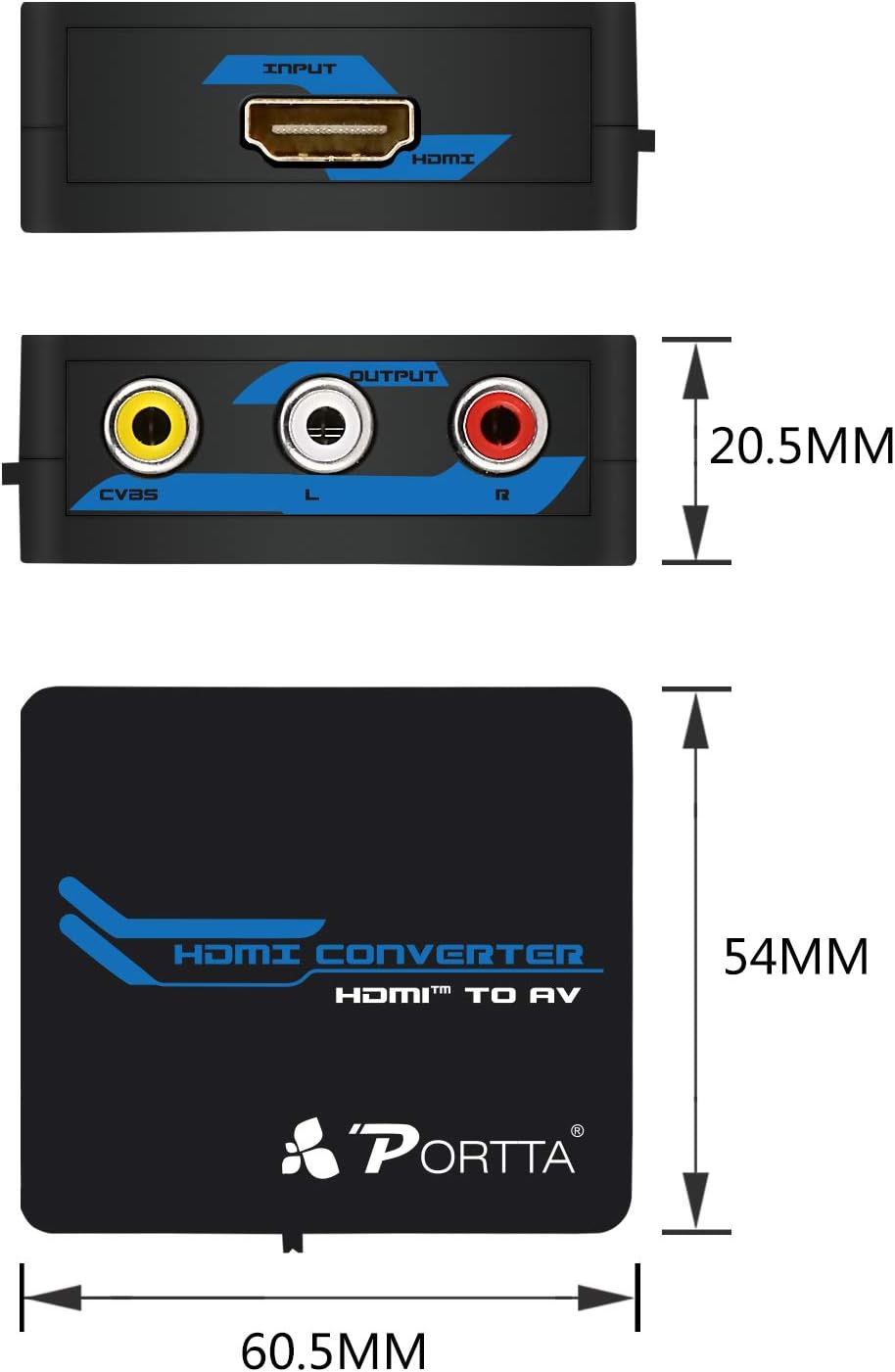
Image: Detailed dimensions of the Portta Mini HDMI to AV Converter.
5. Setup
Follow these steps to connect your Portta Mini HDMI to AV Converter:
- Connect HDMI Source: Use an HDMI cable to connect your HDMI source device (e.g., PS3, Blu-Ray player, PC) to the HDMI input port on the converter.
- Connect to Display: Connect the RCA output ports (Yellow for video, White for left audio, Red for right audio) on the converter to the corresponding AV input ports on your television or display device using an RCA cable.
- Provide Power: Connect the supplied USB power cable from the converter's USB/POWER port to a USB power source. This can be a USB port on your TV, a USB wall adapter (not included), or a USB port on your PC. This step is essential for the converter to function correctly and prevent signal flickering.
- Secure Connections: Ensure all cables are securely plugged into their respective ports.

Image: Diagram illustrating the connection of a PC to the converter via HDMI, USB power, and RCA output to a TV.
6. Operating Instructions
Once the converter is set up, follow these steps for operation:
- Power On Devices: Turn on your HDMI source device and your television or display device.
- Select TV Input: On your television, select the correct AV input channel where the converter is connected. This is typically labeled as AV, Video, or Composite.
- Choose Video Format: Use the NTSC/PAL switch located on the side of the converter to select the appropriate video format for your region. NTSC is commonly used in North America and parts of Asia, while PAL is prevalent in Europe and other regions. Adjust this switch if the image appears distorted, black and white, or incorrect.

Image: A laptop connected to an older TV using the Portta HDMI to AV Converter, demonstrating a typical usage scenario.
7. Maintenance
To ensure the longevity and optimal performance of your Portta Mini HDMI to AV Converter, please follow these maintenance guidelines:
- Storage: Store the device in a cool, dry place, away from direct sunlight, high temperatures, and humidity.
- Protection: Avoid exposing the converter to moisture, liquids, or extreme physical impact.
- Cleaning: Clean the device with a soft, dry cloth. Do not use harsh chemicals, solvents, or abrasive cleaners, as these can damage the casing or internal components.
- Cable Care: Ensure that all connected cables are not bent, twisted, or strained excessively, which can lead to damage to the connectors or cables themselves.
8. Troubleshooting
If you encounter issues while using the converter, please refer to the following troubleshooting tips:
- No Picture or Distorted Image:
- Ensure all cables (HDMI, RCA, USB power) are securely connected to their respective ports.
- Verify that the USB power cable is connected to a reliable power source. Insufficient power can cause flickering, a black screen, or an unstable signal.
- Check the NTSC/PAL switch on the converter. Toggle it to the other setting to match your TV's supported video format.
- Confirm your TV is set to the correct AV input channel.
- Important Note: This converter downscales HDMI to standard definition (480i/576i). If your HDMI source is outputting a very high resolution (e.g., 1080p), some content might appear cropped or scaled incorrectly on older TVs that do not support scaling. This is a characteristic of the conversion process, not a defect.
- No Audio:
- Ensure the white and red RCA audio cables are correctly connected to the corresponding audio input ports on your TV.
- Check the audio output settings on your HDMI source device to ensure audio is being sent via HDMI.
- Adjust the volume on your TV.
- Poor Picture Quality:
- The output is standard definition composite video, which inherently has lower clarity than an HDMI signal. This is expected for conversion to older AV standards.
- Ensure you are using good quality HDMI and RCA cables. Damaged or low-quality cables can degrade the signal.
9. Warranty and Support
Warranty Information:
This Portta WPETHC1 Mini HDMI to AV Converter comes with a 5-year manufacturer's warranty from the date of purchase. This warranty covers defects in materials and workmanship under normal use.
Technical Support:
For technical assistance, troubleshooting beyond this manual, or to make a warranty claim, please contact Portta customer service. You can typically find contact information on the official Portta website (Portta Store) or through the retailer where you purchased the product. Please have your product model number (W3CTHC1) and proof of purchase ready when contacting support.
