
Introduction
The iRobot Roomba 630 Vacuum Cleaning Robot is designed to provide a superior level of clean for your home with minimal effort. This robot utilizes iAdapt Navigation, a full suite of sensors to navigate and adapt to your changing home environment. Its 3-Stage Cleaning System effectively agitates, brushes, and suctions floors, automatically adjusting to various floor types including carpet, tile, hardwood, and laminate. Simply press the CLEAN button to start, and the Roomba 630 will automatically dock and recharge when its battery is low.

Figure 1: Top view of the iRobot Roomba 630 Vacuum Cleaning Robot.
Setup
1. Charging the Roomba
Before first use, fully charge your Roomba 630. Place the Home Base charging station against a wall in an open, uncluttered area. Ensure there is at least 1.5 feet (0.5 meters) of clear space on either side of the Home Base and 4 feet (1.2 meters) in front of it. Plug the power cord into the Home Base and then into a wall outlet. Place your Roomba onto the Home Base, ensuring the metal charging contacts on the robot align with those on the Home Base. The CLEAN button will pulse amber while charging and turn solid green when fully charged.

Figure 2: The Roomba 630 automatically docks to its Home Base for recharging.
2. Initial Placement
For optimal performance, ensure the area to be cleaned is free of excessive clutter, loose cables, and small objects that could obstruct the robot. Roomba is designed to clean various floor types, including hard floors and carpets.
Operating Your Roomba 630
Basic Operation
To start a cleaning cycle, simply press the large CLEAN button on the top of your Roomba. The robot will begin cleaning and automatically adjust its cleaning pattern based on its iAdapt Navigation system. To pause cleaning, press CLEAN again. To end the cleaning cycle and send Roomba back to its Home Base, press the DOCK button.
For concentrated cleaning of a specific area, place Roomba directly on the spot and press the SPOT button. Roomba will clean the area by spiraling outwards about 3 feet (1 meter) in diameter and then spiraling inwards to its starting point, providing an intensive clean for spills or concentrated dirt.
Video 1: An overview of the Roomba 600 Series, demonstrating its features and cleaning capabilities.
Navigation and Cleaning Modes
The Roomba 630 uses iAdapt Responsive Cleaning Technology, which allows it to navigate your home, adapting to different environments and obstacles. It employs a variety of sensors to detect dirtier areas (Dirt Detect technology), navigate around furniture, and avoid stairs.

Figure 3: The Roomba 630 efficiently cleans along wall edges and baseboards.
Some models include a Virtual Wall, which creates an invisible barrier that Roomba will not cross. This is useful for keeping Roomba in specific rooms or away from delicate items.
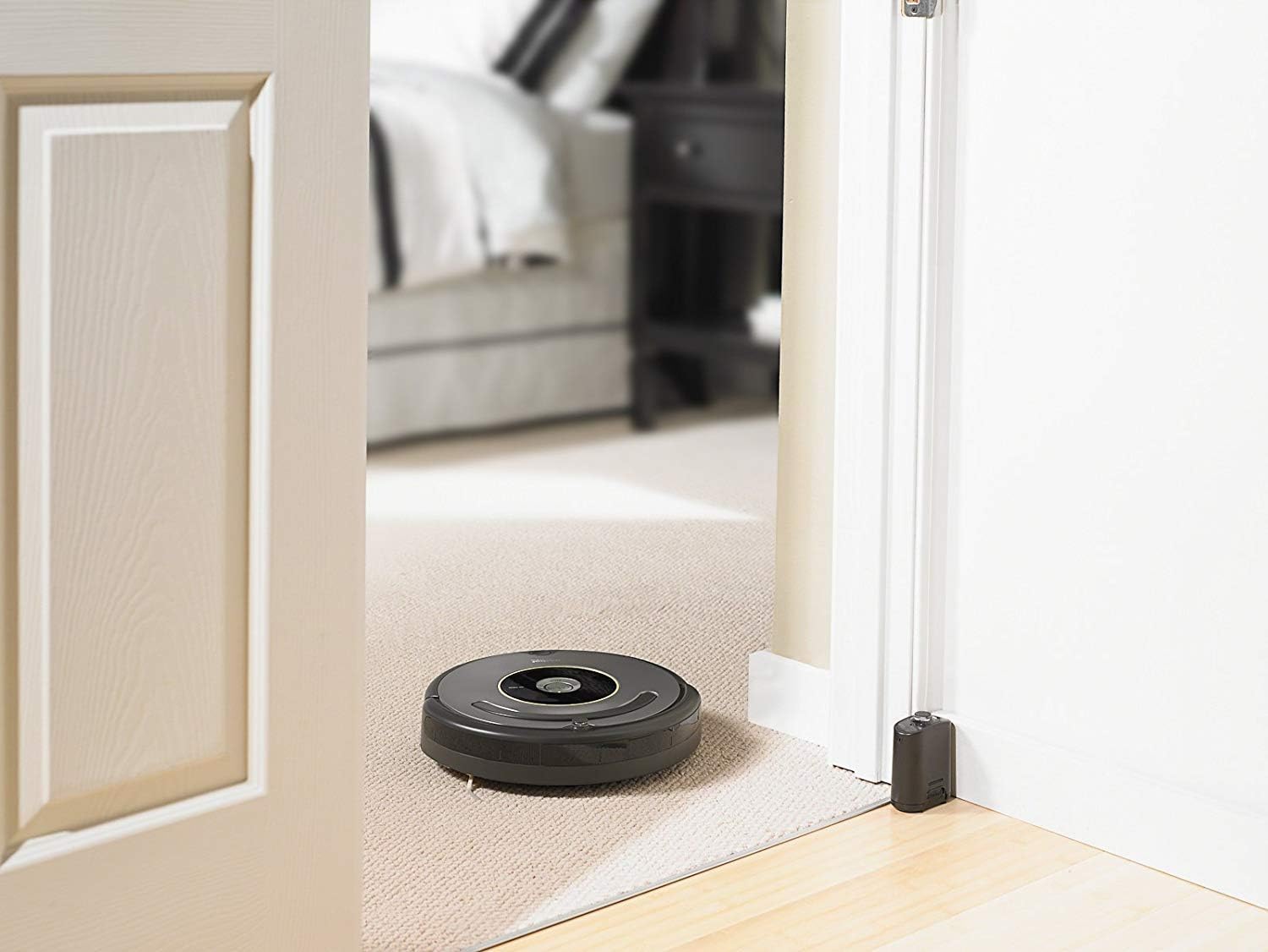
Figure 4: A Virtual Wall creates an invisible barrier to guide Roomba's cleaning path.
Maintenance
Regular maintenance ensures your Roomba 630 operates at peak performance. It is recommended to perform maintenance after each use or as needed, depending on the amount of debris collected.
1. Emptying the Dust Bin
After each cleaning cycle, press the bin release button and pull out the dust bin. Open the bin door and empty all debris into a trash receptacle. The dust bin itself cannot be rinsed with water, but the removable filter inside can be cleaned.
2. Cleaning Brushes and Filters
The main brushes and side brush should be cleaned regularly to remove hair and debris. Remove the brushes by lifting the brush guard. Use the included cleaning tool to remove hair and debris from the brushes and their bearings. The filter should also be removed from the dust bin and tapped clean or replaced as needed. Both brushes and bearings can be rinsed with water for thorough cleaning.

Figure 5: Diagram illustrating the 3-Stage Cleaning System with brushes and vacuum path.
Troubleshooting
- Roomba is making unusual noises: Check the main brushes and side brush for any tangled hair or debris. A broken part of a walnut shell or similar hard object can get stuck and cause unusual loader noise. Stop the robot immediately and inspect the brushes.
- Roomba is not charging or making a humming noise at the Home Base: Ensure the Home Base is plugged into a working outlet. Sometimes, changing the outlet can resolve humming noises during charging. Verify that the charging contacts on both the robot and the Home Base are clean.
- Roomba gets stuck frequently: Clear the cleaning area of loose wires, small rugs with long fringes, or other obstacles. Roomba is designed to navigate through most environments but can get caught on certain items.
- Reduced cleaning performance: Empty the dust bin and clean the filter. Also, clean the main brushes and side brush thoroughly to ensure optimal debris pickup.
Specifications
| Feature | Detail |
|---|---|
| Brand | iRobot |
| Model Name | R630020 |
| Special Feature | 3-Stage Cleaning System, iAdapt Navigation, Automatic Floor Type Adjustment |
| Color | Gray |
| Included Components | Brush |
| Filter Type | Disk |
| Voltage | 12 Volts |
| Power Source | Battery Powered |
| Control Method | Remote |
| Lithium Battery Voltage | 12 Volts |
| Compatible Devices | Amazon Echo |
| Form Factor | Robotic |
| UPC | 885155003423 |
| Product Dimensions | 13.4 x 3.6 x 13.4 inches |
| Item Weight | 8.8 pounds |
| Manufacturer | iRobot |
| Batteries | 1 Lithium Ion batteries required (included) |
| Specific instructions for use | Hardwood, Tile, Linoleum and Carpet |
| Surface Recommendation | Carpets, Floors, Tile, Carpet, Floor |
Warranty and Support
The iRobot Roomba 630 comes with a 1-year limited warranty. For detailed warranty information, product registration, or technical support, please visit the official iRobot website or contact iRobot customer service.
You can find additional support and resources at the iRobot Store on Amazon.