
1. Important Safety Instructions
Please read this manual carefully before using the Emerio FH-102990 Commercial Heater. Failure to follow these instructions may result in electric shock, fire, or serious injury. Keep this manual for future reference.
- Always ensure the heater is placed on a stable, level surface to prevent tipping.
- Do not operate the heater near water or in damp locations.
- Keep flammable materials (furniture, curtains, paper, clothing, etc.) at least 1 meter (3 feet) from the front, sides, and rear of the heater.
- Do not cover the heater or block the air intake/outlet openings. This can cause overheating and fire.
- Do not insert any objects into the heater's openings.
- Unplug the heater when not in use or before cleaning.
- This appliance is not intended for use by persons (including children) with reduced physical, sensory or mental capabilities, or lack of experience and knowledge, unless they have been given supervision or instruction concerning use of the appliance by a person responsible for their safety.
- If the supply cord is damaged, it must be replaced by the manufacturer, its service agent, or similarly qualified persons in order to avoid a hazard.
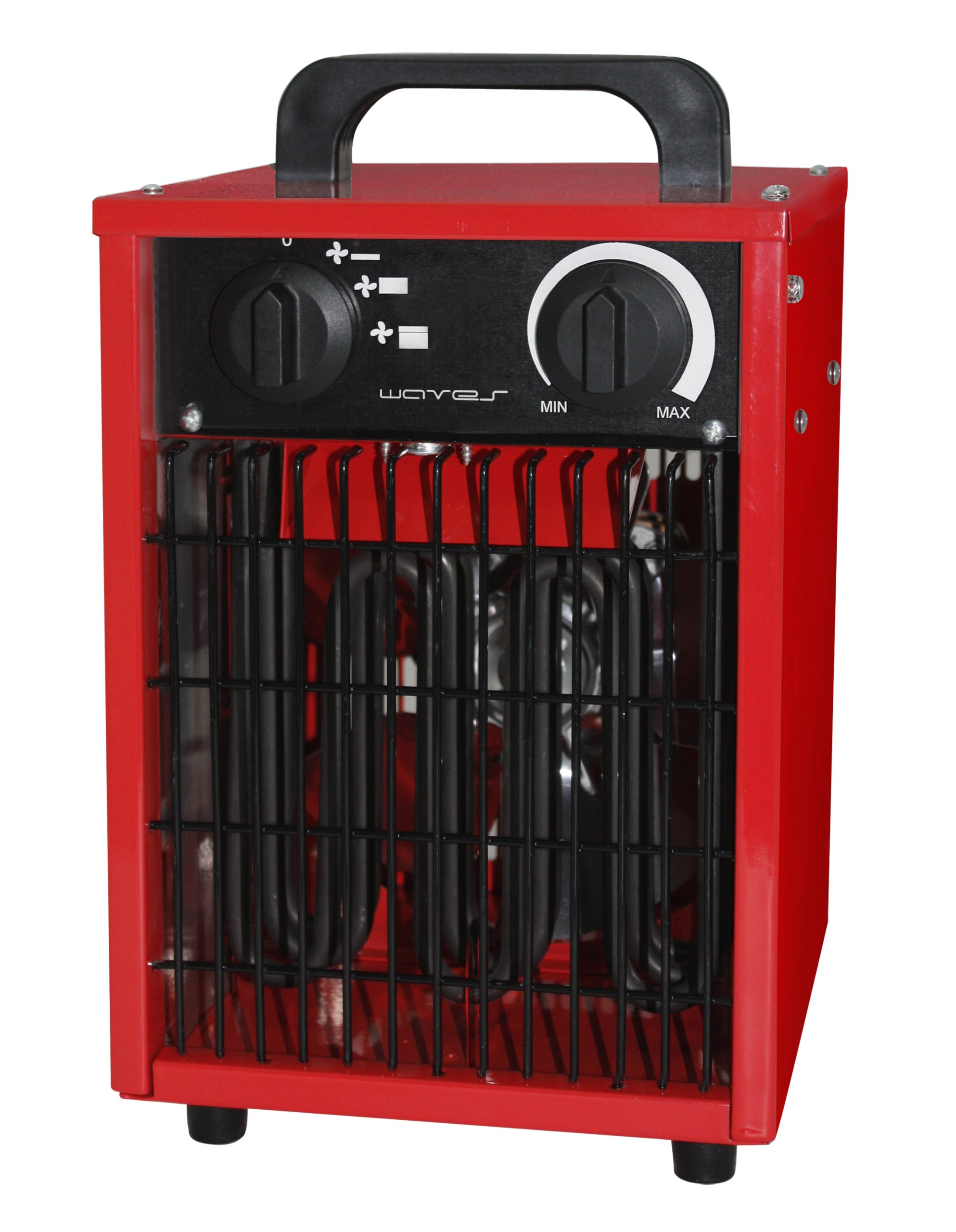
Image of the Emerio FH-102990 commercial heater, showing its compact design and robust casing suitable for commercial environments.
2. Setup
2.1 Unpacking
Carefully remove the heater from its packaging. Retain the packaging for storage or in case of return. Check for any signs of damage. If the heater appears damaged, do not use it and contact your supplier.
2.2 Placement
- Place the heater on a firm, level, and heat-resistant surface.
- Ensure there is adequate clearance around the heater for proper air circulation. Maintain a minimum distance of 1 meter (3 feet) from walls, furniture, and other objects.
- Do not place the heater directly below a power outlet.
- Avoid placing the heater in areas where it could be easily knocked over or where children or pets could come into contact with it.
2.3 Power Connection
Ensure the voltage indicated on the heater's rating label matches your local power supply. Plug the power cord into a grounded electrical outlet. Do not use extension cords unless absolutely necessary, and ensure any extension cord used is rated for the heater's power consumption.
3. Operating Instructions
3.1 Powering On/Off
To turn the heater on, rotate the function control knob to the desired setting (Fan, Low Heat, High Heat). To turn the heater off, rotate the function control knob to the "OFF" position. Always unplug the heater from the power outlet when not in use.
3.2 Temperature Control (Thermostat)
The heater is equipped with an adjustable thermostat. Rotate the thermostat knob clockwise to increase the desired temperature setting, and counter-clockwise to decrease it. The heater will cycle on and off to maintain the set temperature.
3.3 Heat Settings
- Fan Only: Provides air circulation without heat. Useful for cooling or ventilation.
- Low Heat: Provides a lower level of heating for moderate warmth.
- High Heat: Provides maximum heating output for rapid warming of the area.
4. Maintenance
Regular maintenance ensures optimal performance and extends the life of your heater. Always unplug the heater and allow it to cool completely before performing any maintenance.
4.1 Cleaning
- Exterior: Wipe the exterior surfaces with a soft, damp cloth. Do not use abrasive cleaners or solvents, as these may damage the finish.
- Air Intake/Outlet: Use a vacuum cleaner with a brush attachment to gently remove dust and debris from the air intake and outlet grilles. Ensure these areas are clear to prevent overheating.
- Do not immerse the heater in water or spray water directly onto it.
4.2 Storage
When not in use, store the heater in a cool, dry place, preferably in its original packaging, to protect it from dust and damage.
5. Troubleshooting
| Problem | Possible Cause | Solution |
|---|---|---|
| Heater does not turn on. |
|
|
| Heater produces no heat. |
|
|
| Heater cycles on and off frequently. |
|
|
If you experience problems not listed above, or if the suggested solutions do not resolve the issue, please contact customer support.
6. Specifications
| Brand | Emerio |
| Model Number | FH-102990 |
| Package Dimensions | 36.2 x 25.8 x 23.8 cm |
| Product Weight | 4.72 kg |
| ASIN | B008LT4H7O |
| Available on Amazon.es since | 13 July 2012 |
7. Warranty and Support
For warranty information and customer support, please refer to the warranty card included with your product or visit the official Emerio website. Do not attempt to repair the heater yourself, as this may void the warranty and pose safety risks. For technical assistance or service, contact Emerio customer service directly.
This manual is subject to change without notice. Please refer to the latest version available on the manufacturer's website.