
RCA RTS736W
RCA RTS736W 30-Inch Streaming Soundbar User Manual
Model: RTS736W
Introduction
This user manual provides comprehensive instructions for the installation, operation, and maintenance of your RCA RTS736W 30-Inch Streaming Soundbar. Please read this manual thoroughly before using the product to ensure proper functionality and to prevent damage.
The RCA RTS736W is designed to enhance your home audio experience with its 3.0 channel sound and integrated Wi-Fi for streaming online content.
Key Features
- Wi-Fi Built-In for streaming video content to a TV.
- 3.0 Channel Left/Center/Right audio configuration.
- HDMI 1080p Output for high-definition connectivity.
- Includes 1 Rear Analog Audio-in Jack and 1 Side Line-in Jack for various audio sources.
- Flexible placement options: includes table or wall mounting brackets.
Package Contents
Verify that all items are present in the package:
- RCA RTS736W 30-Inch Streaming Soundbar
- Remote Control
- Power Adapter
- Table or Wall Mounting Brackets
- User Manual (this document)
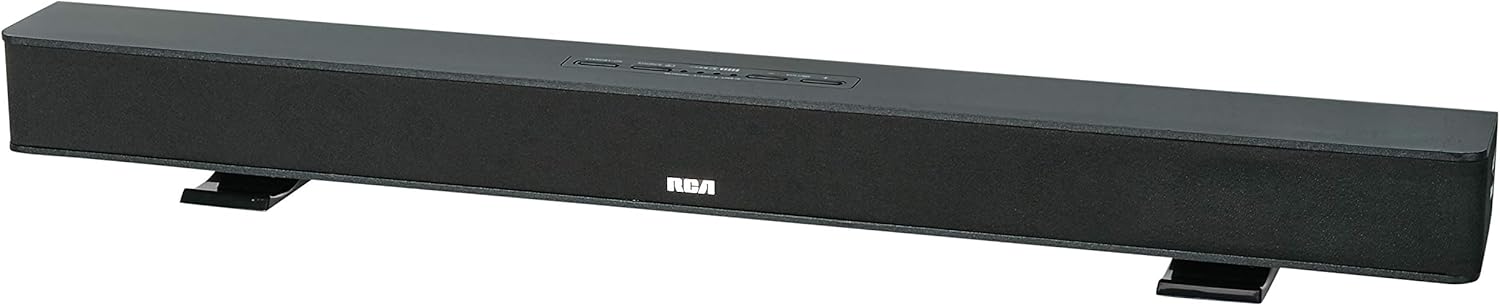
Image: The RCA RTS736W 30-Inch Streaming Soundbar, shown with its sleek black design and integrated controls.
Setup
1. Placement Options
The soundbar offers flexible placement:
- Tabletop Placement: Place the soundbar on a flat, stable surface in front of your television. Ensure there is adequate ventilation around the unit.
- Wall Mounting: Use the included wall mounting brackets to secure the soundbar to a wall. Refer to the separate wall mounting template (if provided) for detailed instructions. Ensure the wall can support the weight of the soundbar.

Image: The RCA RTS736W soundbar positioned on a TV stand, demonstrating a typical home theater setup with various streaming service icons displayed on the television screen.
2. Connecting to Power
- Connect the power adapter to the DC IN 13.5V port on the back of the soundbar.
- Plug the other end of the power adapter into a wall outlet.
3. Audio Connections
Choose one of the following methods to connect the soundbar to your audio source:
- HDMI Output: Connect an HDMI cable from the HDMI OUT port on the soundbar to an HDMI input on your television. This connection supports 1080p video output from the soundbar's streaming functions.
- Analog Audio-in (AUX 1 / AUX 2): Use RCA audio cables to connect your TV or other audio devices to the AUX 1 or AUX 2 input jacks on the back of the soundbar. Match the red and white connectors.
- Side Line-in Jack: For portable devices like smartphones or tablets, connect a 3.5mm audio cable from your device's headphone jack to the Line-in jack located on the side of the soundbar.

Image: A close-up view of the rear panel of the RCA RTS736W soundbar, highlighting the AUX 1, AUX 2, DC IN 13.5V, HDMI OUT, and VIDEO OUT ports for various connections.
4. Network Connection (Wi-Fi)
To utilize the streaming features, connect the soundbar to your home Wi-Fi network. This process is typically guided by on-screen prompts when the soundbar is first powered on and connected to a TV via HDMI.
- Ensure your TV is connected to the soundbar via HDMI and powered on.
- Follow the on-screen instructions to select your Wi-Fi network and enter the password.
Operating Instructions
1. Power On/Off
Press the Power button on the soundbar or the remote control to turn the unit on or off.
2. Input Selection
Press the Input button on the remote control or the soundbar to cycle through available audio sources: HDMI, AUX 1, AUX 2, Line-in, and Wi-Fi streaming.
3. Volume Control
Use the Volume + and Volume - buttons on the remote control or the soundbar to adjust the audio level.
Press the Mute button to temporarily silence the audio.
4. Streaming Content
Once connected to Wi-Fi and your TV via HDMI, you can access various streaming applications. Navigate using the directional buttons and OK button on the remote control.
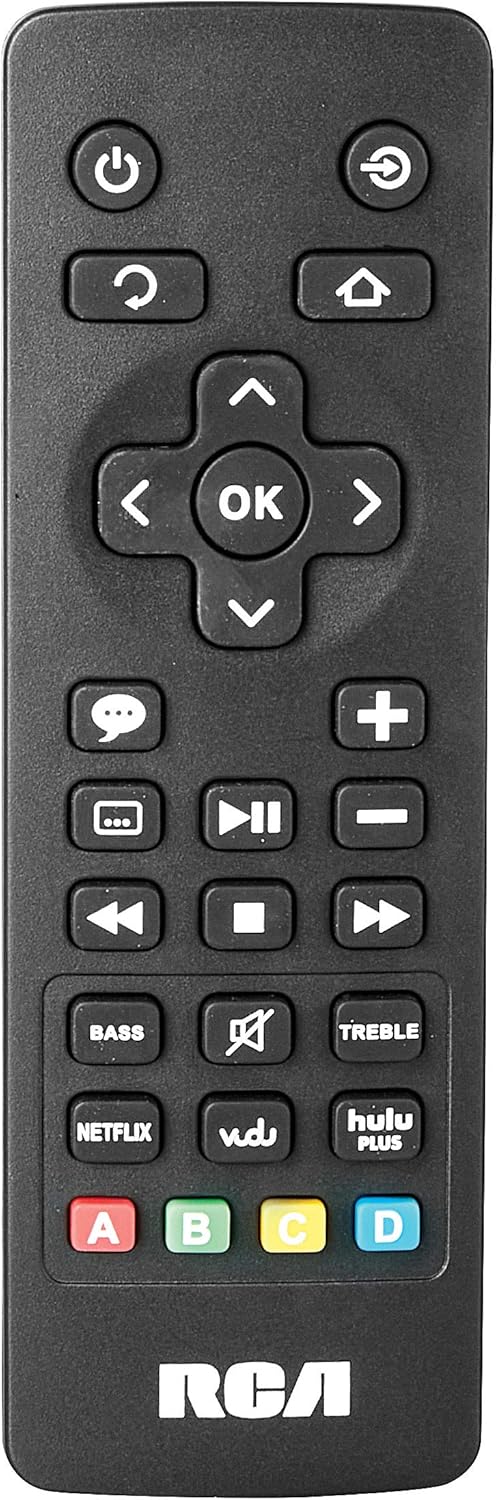
Image: The remote control for the RCA RTS736W soundbar, featuring dedicated buttons for power, volume, input selection, navigation, and direct access to streaming services like Netflix, Vudu, and Hulu Plus.
Dedicated buttons for services like Netflix, Vudu, and Hulu Plus may be available on the remote for direct access.
5. Audio Adjustments
Use the BASS and TREBLE buttons on the remote control to fine-tune the audio output to your preference.
Maintenance
- Cleaning: Disconnect the soundbar from the power outlet before cleaning. Use a soft, dry cloth to wipe the exterior surfaces. Do not use liquid cleaners or abrasive materials.
- Ventilation: Ensure that the ventilation openings on the soundbar are not blocked. Proper airflow prevents overheating.
- Storage: If storing the soundbar for an extended period, disconnect it from power and store it in a cool, dry place away from direct sunlight and extreme temperatures.
Troubleshooting
No Power
- Check if the power adapter is securely connected to the soundbar and a working wall outlet.
- Ensure the power outlet is active by testing it with another device.
No Sound
- Verify that the correct input source is selected on the soundbar.
- Check all audio cable connections between the soundbar and your audio source (TV, etc.).
- Ensure the volume on both the soundbar and the connected audio source is turned up and not muted.
- If using HDMI, confirm that your TV's audio output settings are configured to send audio to the soundbar.
Streaming Issues (Buffering, Freezing)
- Check your Wi-Fi network connection. Ensure the signal strength is adequate.
- Restart your home router and modem.
- Restart the soundbar by unplugging it from the power outlet for a few minutes, then plugging it back in.
- Ensure your internet service is active and performing correctly.
Remote Control Not Working
- Replace the batteries in the remote control.
- Ensure there are no obstructions between the remote control and the soundbar's sensor.
- Point the remote directly at the soundbar.
Specifications
| Model Number | RTS736W |
| Speaker Type | Soundbar |
| Channels | 3.0 (Left/Center/Right) |
| Connectivity | HDMI, RCA, Wi-Fi |
| Wireless Technology | Wi-Fi |
| HDMI Output | 1080p |
| Audio Inputs | 2x Analog Audio-in (RCA), 1x Side Line-in (3.5mm) |
| Speaker Size | 30 Inches |
| Maximum Output Power | 150 Watts |
| Impedance | 8 Ohms |
| Power Source | Corded Electric |
| Product Dimensions (L x W x H) | 33.5 x 6.5 x 5.5 inches |
| Item Weight | 5.55 pounds |
| Manufacturer | Alco Electronics Ltd. |
Warranty Information
Specific warranty details for the RCA RTS736W Soundbar are typically provided with the product packaging or can be found on the official RCA website. Please retain your proof of purchase for warranty claims.
For warranty service, contact RCA customer support with your model number and purchase date.
Customer Support
For further assistance, technical support, or service inquiries, please refer to the contact information provided in your product's original documentation or visit the official RCA support website.
Online Resources: Visit the RCA Store on Amazon
Related documentsRTS736W


Ask a question about this manual
Ask about setup, troubleshooting, compatibility, parts, safety, or missing instructions. Manuals+ will review the question and use this page’s manual context to help answer it.