
1. Important Safety Information
Read all instructions carefully before using the appliance. Failure to follow these safety guidelines may result in electric shock, fire, or injury.
- Grounding: This appliance must be grounded. Connect only to a properly grounded outlet.
- Supervision: Do not leave the microwave unattended during operation.
- No Empty Operation: Do not operate the oven when empty. This can damage the appliance.
- Metal Objects: Do not place metal containers, foil, or utensils inside the microwave. Arcing may occur.
- Flammable Materials: Do not store or use flammable materials near the oven.
- Liquids: Exercise caution when heating liquids. Superheated liquids can erupt suddenly. Stir liquids before and halfway through heating.
- Eggs: Do not heat whole eggs with shells, as they may explode.
- Child Safety: Keep children away from the appliance during operation. Use the electronic child-safety lock system to prevent unintended use.
- Damage: Do not operate the microwave if the door, door seals, or oven cavity is damaged. Contact qualified service personnel.
- Repairs: Only qualified service personnel should perform repairs or adjustments.
2. Product Overview
The Daewoo KOR-1N0A is a 1.1 cubic feet countertop microwave oven designed for efficient food preparation. It features a 1000W output for cooking, multiple power levels, and convenient one-touch cooking options.
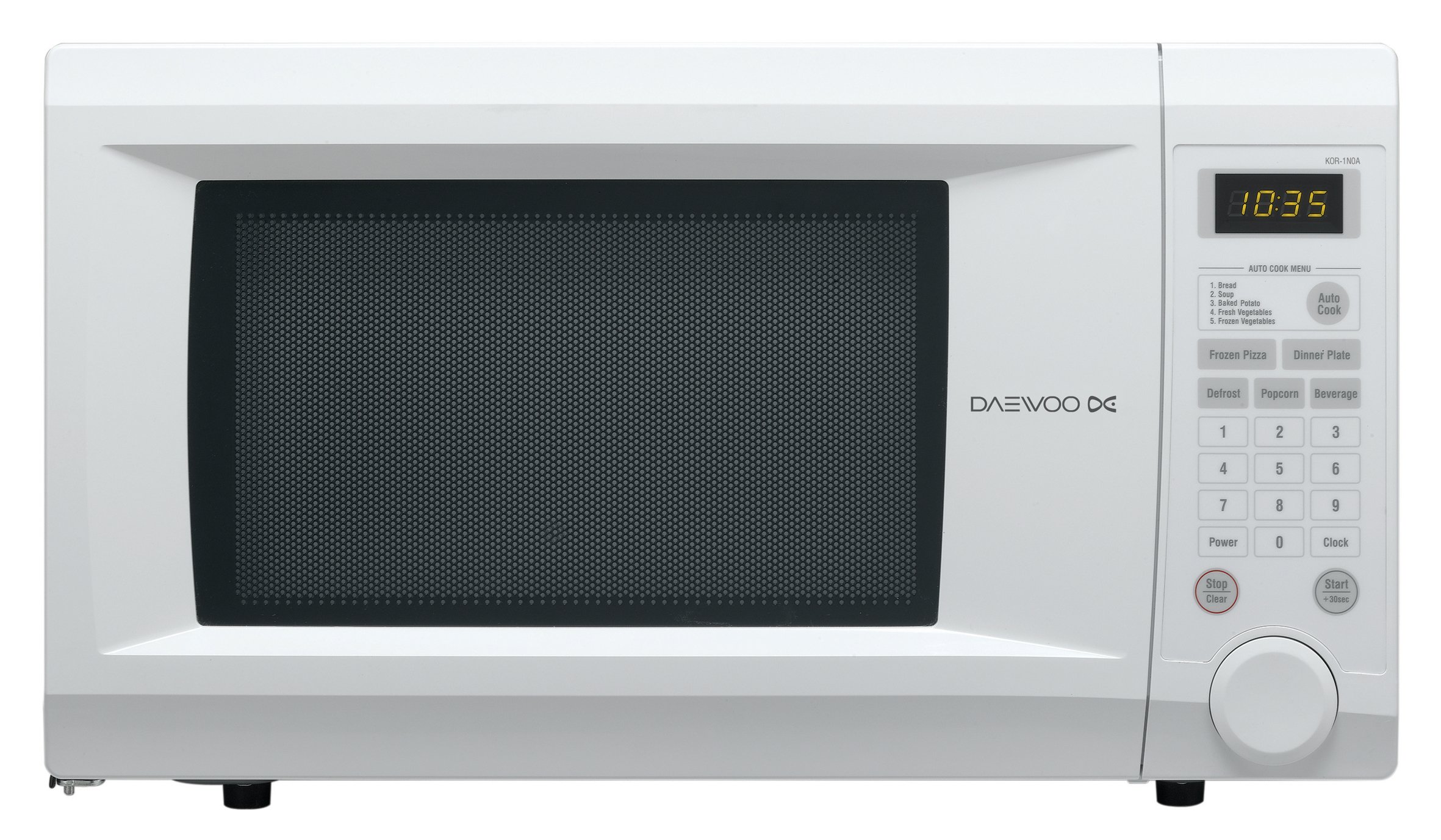
Figure 1: Front view of the Daewoo KOR-1N0A microwave oven, showing the control panel, door, and display.

Figure 2: Angled view of the Daewoo KOR-1N0A microwave oven, illustrating its countertop placement.
3. Setup and Installation
3.1 Unpacking
- Remove all packaging materials from inside and outside the oven cavity.
- Check the oven for any damage, such as dents or a misaligned door. Do not operate if damaged.
- Ensure all included components, such as the turntable, are present.
3.2 Placement
- Place the microwave on a flat, stable surface strong enough to support its weight (approximately 27.3 pounds).
- Ensure adequate ventilation. Leave at least 4 inches (10 cm) of space around the top, back, and sides of the oven for proper airflow. Do not block ventilation openings.
- Keep the oven away from heat sources, steam, or splashing water.
3.3 Electrical Connection
- Plug the microwave into a dedicated 120 Volt, 60 Hz, AC outlet with a minimum 15 Amp circuit.
- Ensure the outlet is properly grounded. Do not use extension cords or adapters.
3.4 Turntable Installation
- Place the turntable ring in the center of the oven cavity.
- Position the glass turntable plate securely on top of the ring, ensuring it sits correctly on the center hub.
4. Operating Instructions
This section details the basic functions and special features of your Daewoo KOR-1N0A microwave oven.
4.1 Setting the Clock
- Press the CLOCK button.
- Use the number pad to enter the current time (e.g., 1-2-3-0 for 12:30).
- Press the CLOCK button again to confirm.
4.2 Basic Microwave Cooking
- Place food in a microwave-safe container on the turntable. Close the door.
- Enter the desired cooking time using the number pad (e.g., 1-0-0 for 1 minute).
- Press the POWER button repeatedly to select the power level (10 levels available, 100% is default).
- Press the START/+30sec button to begin cooking.
4.3 One-Touch Cooking (Auto Cook Menu)
The oven features an Auto Cook Menu for common food items. Refer to the label on the control panel for specific item numbers.
- Press the AUTO COOK button.
- Select the desired food item by pressing the corresponding number on the number pad (e.g., 1 for Bread, 2 for Baked Potato, 3 for Frozen Vegetables, 4 for Dinner Plate, 5 for Frozen Pizza, 6 for Beverage).
- Press the START/+30sec button to begin. The oven will automatically set the cooking time and power level.
4.4 Dedicated One-Touch Buttons
For quick access, the microwave includes dedicated buttons for frequently used functions:
- DEFROST: Press to activate the auto defrost menu. Follow on-screen prompts or manual instructions for weight input.
- POPCORN: Press for automatic popcorn preparation.
- BEVERAGE: Press for heating beverages.
- FROZEN PIZZA: Press for heating frozen pizza.
- DINNER PLATE: Press for reheating a dinner plate.
- START/+30sec: Press to start cooking or to add 30 seconds to the current cooking time.
4.5 Electronic Child-Safety Lock System
To activate the child lock:
- Press and hold the STOP/CLEAR button for 3 seconds. A lock indicator will appear on the display.
To deactivate the child lock:
- Press and hold the STOP/CLEAR button for 3 seconds. The lock indicator will disappear.
4.6 Concave Reflex System (C.R.S.)
The Daewoo KOR-1N0A features an Exclusive Concave Reflex System (C.R.S.). This system is designed to distribute microwave energy more evenly throughout the oven cavity, resulting in more uniform heating and cooking of food.
5. Maintenance and Cleaning
Regular cleaning and maintenance will ensure the longevity and optimal performance of your microwave oven.
- Interior Cleaning: Wipe the inside of the oven with a damp cloth after each use. For stubborn food splatters, place a bowl of water with lemon slices inside and microwave for 2-3 minutes to loosen residue, then wipe clean.
- Exterior Cleaning: Clean the exterior surfaces with a soft, damp cloth and mild detergent. Avoid abrasive cleaners or solvents.
- Door and Seals: Regularly clean the door, door seals, and adjacent parts to remove any food spills. This helps ensure a proper seal.
- Turntable: The glass turntable and turntable ring can be removed and washed in warm, soapy water or in a dishwasher. Ensure they are completely dry before placing them back in the oven.
- Odor Removal: To remove odors, combine a cup of water with several tablespoons of lemon juice in a microwave-safe bowl. Microwave for 5-7 minutes, then let it sit in the oven for a few minutes before removing and wiping the interior.
- Power Off: Always unplug the microwave before cleaning or performing any maintenance.
6. Troubleshooting
If you encounter issues with your microwave, consult the following table for common problems and solutions.
| Problem | Possible Cause | Solution |
|---|---|---|
| Oven does not start | Power cord not plugged in; Door not closed properly; Child lock activated; Fuse blown or circuit breaker tripped. | Ensure power cord is securely plugged in; Close the door firmly; Deactivate child lock (see Section 4.5); Check household fuse or reset circuit breaker. |
| Food not heating | Incorrect cooking time or power level set; Door not closed properly; Metal objects inside. | Adjust cooking time and power level; Ensure door is fully closed; Remove any metal objects. |
| Turntable not rotating | Turntable not properly seated; Turntable ring dirty or damaged; Obstruction. | Ensure turntable and ring are correctly positioned; Clean turntable ring and rollers; Remove any obstructions. |
| Sparking or arcing inside oven | Metal objects inside; Food residue on oven walls; Damaged waveguide cover. | Remove all metal objects; Clean oven interior thoroughly; If sparking persists, contact service. |
| Oven light not working | Bulb burned out. | Contact qualified service personnel for bulb replacement. |
If the problem persists after attempting these solutions, please contact Daewoo customer support or a qualified service technician.
7. Specifications
| Feature | Specification |
|---|---|
| Brand | Daewoo |
| Model | KOR-1N0A |
| Capacity | 1.1 Cubic Feet |
| Power Output | 1000 Watts |
| Voltage | 120 Volts |
| Item Weight | 27.3 Pounds |
| Product Dimensions (L x W x H) | 20 x 16.8 x 14.9 inches |
| Installation Type | Countertop |
| Material Type | Stainless Steel/Painted Metal |
| Inner Material Type | Stainless Steel |
| Special Features | Auto Cook, Auto Defrost, Concave Reflex System (C.R.S.), Electronic Child-Safety Lock |
| Controller Type | Touch |
| Included Components | Turn Table |
8. Warranty and Support
For information regarding the product warranty, please refer to the warranty card included with your purchase or contact the retailer where the product was acquired. Warranty terms and conditions may vary.
For technical support, service, or to inquire about replacement parts, please contact Daewoo customer service directly. Contact information can typically be found on the manufacturer's official website or on the product packaging.


