
1. Important Safety Instructions
Please read these instructions carefully before operating the unit and retain them for future reference. Following these guidelines will ensure safe and proper use of your GPX R602B radio.
- Water and Moisture: Do not use this apparatus near water. Avoid exposure to rain or moisture.
- Heat Sources: Do not install near any heat sources such as radiators, heat registers, stoves, or other apparatus (including amplifiers) that produce heat.
- Ventilation: Ensure proper ventilation. Do not block any ventilation openings.
- Power Sources: Operate only from the type of power source indicated on the marking label.
- Cleaning: Clean only with a dry cloth.
- Attachments: Use only attachments/accessories specified by the manufacturer.
- Servicing: Refer all servicing to qualified service personnel. Servicing is required when the apparatus has been damaged in any way, such as power-supply cord or plug is damaged, liquid has been spilled or objects have fallen into the apparatus, the apparatus has been exposed to rain or moisture, does not operate normally, or has been dropped.
Battery Safety
- Do not mix old and new batteries.
- Do not mix alkaline, standard (carbon-zinc), or rechargeable (nickel-cadmium) batteries.
- Insert batteries correctly, observing the + and - polarities.
- Remove exhausted batteries promptly.
- Dispose of batteries properly. Do not incinerate.
2. Features
The GPX R602B Portable AM/FM Radio offers a range of features designed for convenience and versatility:
- Portable AM/FM radio with a built-in handle for easy transport.
- Integrated speakers with analog volume control and durable metal grills.
- Digital clock with user-friendly setting buttons.
- Operates using the built-in AC power cable.
- Can also be powered by 3 C batteries (sold separately) for portable use.
- 3.5mm audio line input jack for connecting external audio devices.
- Telescopic antenna for improved FM reception.
- Stereo headphone jack for private listening.

Figure 2.1: Key features and connection points of the GPX R602B radio.
3. Package Contents
Upon unpacking your GPX R602B radio, please ensure all the following items are present:
- GPX R602B Portable AM/FM Radio Unit
- Owner's Manual
- Built-in AC Power Adapter
4. Controls and Indicators
Familiarize yourself with the controls and indicators on your radio for optimal operation.
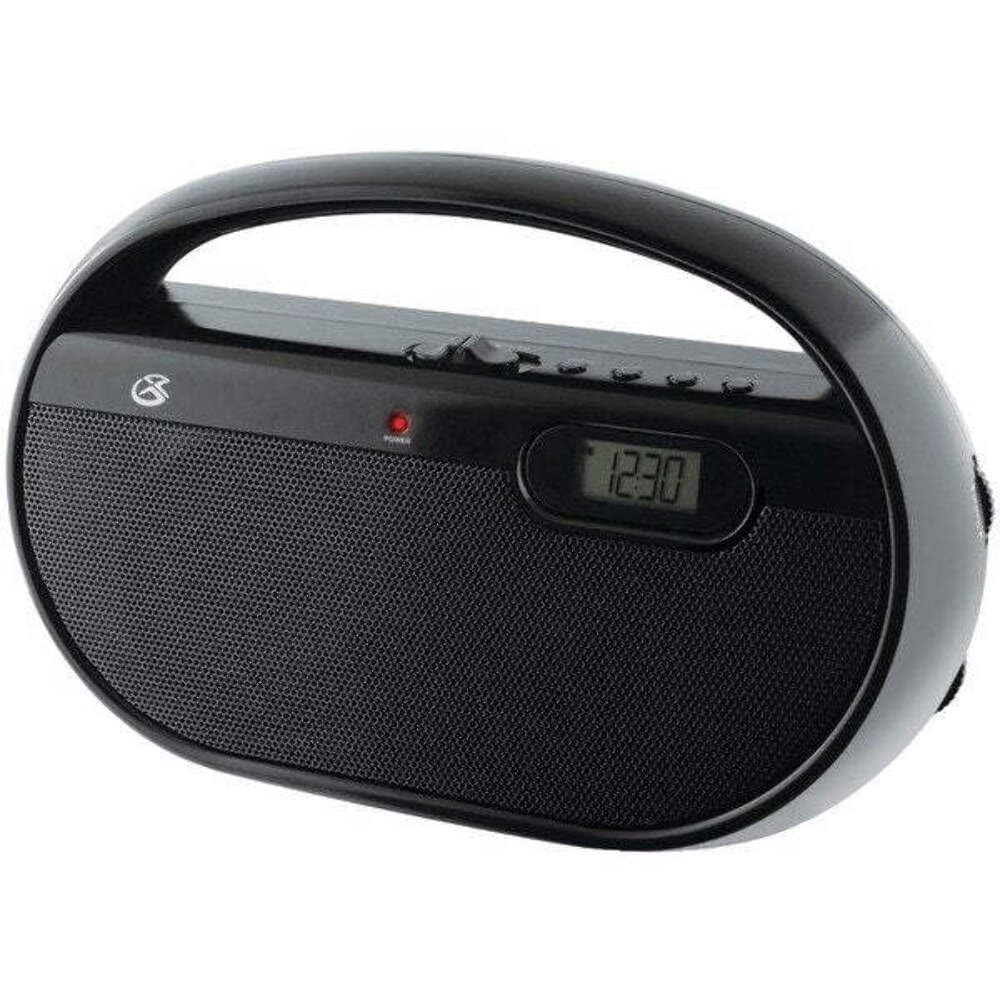
Figure 4.1: Front view of the GPX R602B radio.
Control Layout (Refer to Figure 4.1)
- Power/Volume Knob: Rotates to turn the unit ON/OFF and adjust the volume level.
- Tuning Knob: Rotates to select AM or FM radio stations.
- Band Selector Switch: Slides to select between AM and FM radio bands.
- Digital Display: Shows the current time or radio frequency.
- Set Time Button: Used in conjunction with H/M buttons to set the clock.
- H/M Buttons: Used to adjust hours and minutes when setting the clock.
- Display Time Button: Briefly shows the time when the radio is playing.
- Aux In Jack (3.5mm): Connect external audio devices.
- Headphone Jack (3.5mm): Connect headphones for private listening.
- Telescopic FM Antenna: Extend and adjust for optimal FM reception.
5. Powering the Unit
The GPX R602B radio can be powered by either AC power or batteries.
AC Power Operation
- Locate the built-in AC power cord. This cord is typically stored in the battery compartment when not in use.
- Plug the AC power cord into a standard wall outlet (120V AC, 60Hz).
- The unit is now ready for operation.
Battery Power Operation
For portable use, the radio requires 3 'C' size batteries (not included).
- Open the battery compartment cover located on the back of the unit.
- Insert 3 'C' size batteries, ensuring the correct polarity (+ and -) as indicated inside the compartment.
- Close the battery compartment cover securely.
- The unit is now ready for battery-powered operation.

Figure 5.1: Power options for the GPX R602B radio.
6. Setup and Basic Operation
Initial Setup
- Power Connection: Connect the radio to AC power or insert batteries as described in Section 5.
- Antenna Adjustment: For FM reception, extend the telescopic antenna fully. For AM reception, the unit has a built-in antenna, so no external adjustment is needed. Position the unit for best AM reception.
Operating the Radio
- Turn On: Rotate the Power/Volume knob clockwise until it clicks and the unit powers on.
- Select Band: Slide the Band Selector switch to either AM or FM.
- Tune Station: Rotate the Tuning knob to find your desired radio station. The frequency will be displayed on the digital screen.
- Adjust Volume: Rotate the Power/Volume knob to adjust the sound level.
- Turn Off: Rotate the Power/Volume knob counter-clockwise until it clicks and the unit powers off.
Using the Line Input (Aux In)
You can connect external audio devices, such as smartphones or MP3 players, to play audio through the radio's speakers.
- Connect a 3.5mm audio cable (not included) from the headphone jack or line-out jack of your external device to the Aux In jack on the radio.
- Turn on the radio and your external device.
- Adjust the volume on both the radio and your external device for optimal sound.

Figure 6.1: Devices compatible with the Aux In feature.
Using Headphones
For private listening, plug standard 3.5mm headphones (not included) into the Headphone Jack. The internal speakers will automatically mute.
Setting the Digital Clock
The digital clock can be set when the radio is turned off.
- Ensure the radio is turned OFF using the Power/Volume knob.
- Press and hold both the Set Time button and the H/M button simultaneously.
- While holding the Set Time button, repeatedly press the H/M button to adjust the hour and then the minutes.
- Release the Set Time button once the desired time is set.
- To view the time while the radio is playing, press the Display Time button. The time will appear briefly on the digital display.
7. Maintenance
Proper care and maintenance will ensure the longevity of your GPX R602B radio.
- Cleaning: Wipe the exterior of the unit with a soft, dry cloth. Do not use abrasive cleaners, waxes, or solvents.
- Battery Replacement: If using batteries, replace all three 'C' batteries when the unit's performance diminishes. Always replace with new batteries of the same type.
- Storage: If storing the unit for an extended period, remove the batteries to prevent leakage and corrosion.
8. Troubleshooting
If you encounter issues with your GPX R602B radio, refer to the following common problems and solutions:
| Problem | Possible Cause | Solution |
|---|---|---|
| No power | AC cord not plugged in; Batteries exhausted or incorrectly inserted. | Ensure AC cord is securely plugged into a live outlet. Replace batteries with new ones, checking polarity. |
| Poor radio reception | Antenna not extended (FM); Unit poorly positioned (AM); Weak signal. | Extend and adjust the telescopic FM antenna. For AM, rotate the unit for better reception. Try moving the radio to a different location. |
| No sound from speakers | Volume too low; Headphones connected. | Increase the volume using the Power/Volume knob. Disconnect headphones if not desired. |
| Clock not setting correctly | Incorrect button sequence. | Ensure the radio is OFF. Press and hold both 'Set Time' and 'H/M' buttons simultaneously, then repeatedly press 'H/M' to adjust. Release 'Set Time' when done. |
| Sound distorted or unclear | Volume too high; Poor reception; External device volume too high. | Lower the volume. Adjust antenna or unit position for better reception. If using Aux In, adjust volume on the external device. |
9. Specifications
Detailed technical specifications for the GPX R602B Portable AM/FM Radio:
- Model Number: R602B
- Product Dimensions (L x W x H): 9.62 x 3.74 x 6.3 inches (24.43 x 9.50 x 16.00 cm)
- Item Weight: 1.76 pounds (0.80 kg)
- Power Source: AC 120V, 60Hz or 3 x 'C' size batteries (not included)
- Tuner Technology: AM/FM
- Radio Bands Supported: 2-Band (AM/FM)
- Connectivity Technology: Radio, 3.5mm Aux In
- Special Features: Built-In AM Antenna, Built-In Clock, Portable, Telescopic FM Antenna, 3.5mm Headphone Jack
- Color: Black
- Manufacturer: Digital Products International, Inc.
- Date First Available: June 5, 2012
10. Warranty and Support
For warranty information and customer support regarding your GPX R602B radio, please refer to the warranty card included with your purchase or visit the official GPX website. Keep your purchase receipt as proof of purchase for any warranty claims.
If you require technical assistance or have questions not covered in this manual, please contact GPX customer service directly. Contact details are typically available on the manufacturer's website or in the product packaging.


